
QuickBend is a cutting-edge conduit bending calculator app designed for precision and ease of use. It stands out by offering the most accurate measurements, accounting for the radius of the shoe and bender, conduit type, and size diameter. The app employs a centerline radius algorithm to ensure rigorous and field-tested calculations, making it an indispensable tool for electricians and DIY enthusiasts alike.
Beyond its core functionality, QuickBend provides comprehensive information and documentation for individual bends. Its intuitive interface allows users to toggle between inches and centimeters, switch input styles, and visualize bends before finalizing them. With features like QuickCheck, users receive visual cues about bend feasibility, enhancing both efficiency and accuracy in the field.
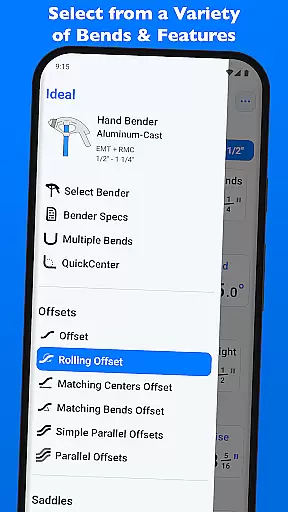
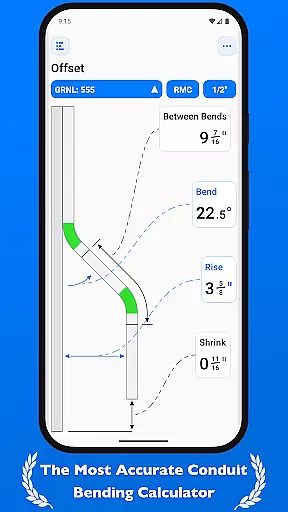
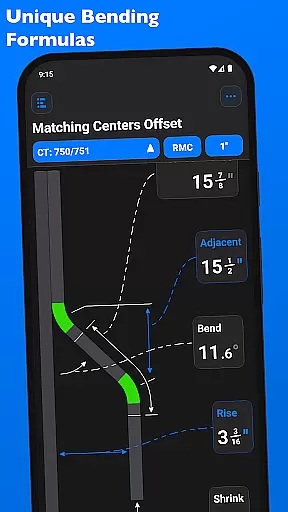
QuickBend offers a range of advanced features tailored to meet the needs of professionals working with conduits. One standout feature is its support for various bend types, including Offset, Rolling Offset, Three-Point Saddle, and more. Each bend type is meticulously calculated using the same engine that generates the displayed bends, ensuring consistency and reliability.
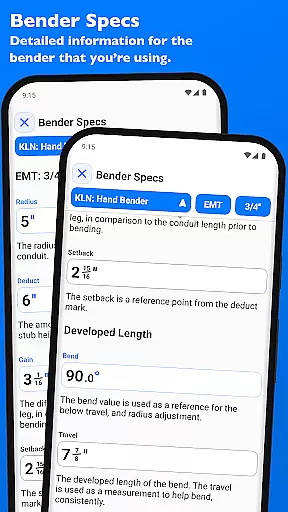
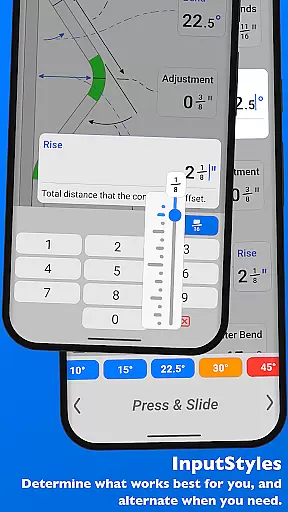
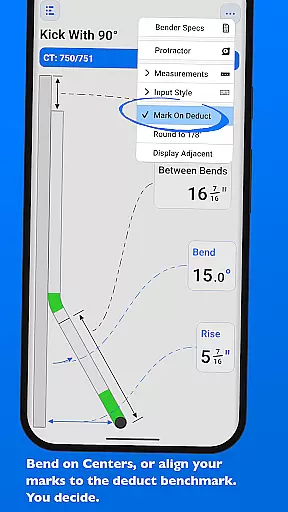
The app's interface is designed for maximum flexibility, allowing users to choose between different input methods such as a number pad or slider bar. This adaptability extends to measurement units, where users can easily switch between inches and centimeters. Additionally, QuickBend includes detailed 'Bender Specs' that provide insights into centerline radius, deduct, gain, setback, and travel adjustments, all visually represented and editable within the app.
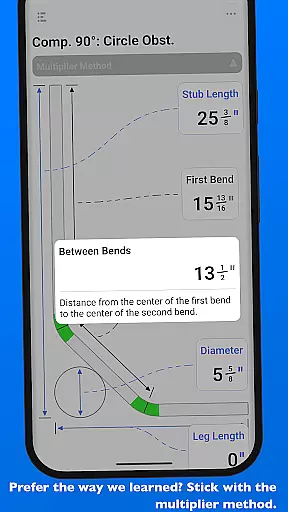
QuickBend revolutionizes the way electricians and conduit workers manage their bending tasks through its advanced calculation engine. The app's core functionality lies in its ability to handle complex measurements with precision, taking into account variables such as shoe radius, bender specifications, and conduit dimensions. This ensures that every bend measurement generated is not only accurate but also field-tested for reliability.
The application offers an intuitive interface that allows users to toggle between different input methods, including a number pad and slider bar. This flexibility caters to both quick inputs and detailed adjustments, making it suitable for professionals of all experience levels. Whether you're calculating simple offsets or working on intricate segmented 90u00b0 bends, QuickBend provides the tools necessary to complete the task efficiently.
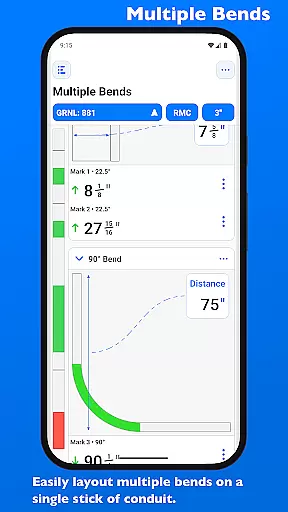
One of the standout features is the ability to layout multiple bends on a single conduit while receiving precise measurements for each mark. The app's sophisticated algorithm generates these calculations using the centerline radius method, ensuring consistency across all measurements. This feature saves valuable time and reduces material waste, ultimately leading to cost savings for professionals in the field.
While QuickBend focuses primarily on precision calculations, it also offers reliable cross-device functionality that enhances productivity for modern conduit workers. The app enables users to maintain consistent access to their bending data and preferences across multiple devices. This means that whether you're working on-site with a tablet or planning projects on your office computer, your information remains synchronized and up-to-date.
QuickBend's intelligent system allows users to pin frequently used benders for quick access, regardless of which device they're using. This feature streamlines workflow by eliminating the need to repeatedly search for preferred tools. Additionally, the app maintains detailed bender specifications, including centerline radius, deduct, gain, and setback information, ensuring that these crucial details are always available when needed.
The application's robust architecture ensures that all data, including complex bend configurations and user preferences, is accurately maintained across devices. This reliability is particularly valuable for teams working on large projects, as it guarantees that everyone has access to the same standardized measurements and settings. While primarily designed for individual use, this synchronization capability makes QuickBend a valuable tool for coordinated professional environments.
Highly accurate calculations
User-friendly interface
Comprehensive bend types
Intuitive input methods
Detailed bender specifications
Premium version required
Steep learning curve
Limited free features
Occasional bugs
Heavy on resources

Auto-shutoff Alarm with Sunrise, Sunset & Fixed Options.
 3.50
3.50
Ads Free App! Editor, Hide File, Copy, Move, Delete and Rename.. all facility av
1.70
Professional calendar app for Google Calendar, MS Outlook & Exchange
4.20
All in one sketching tool. Technical and General drawing. Online Maps support.
3.70
Customizable calendar widget for seamless event sync, planning & scheduling.
4.00
Calendar 2023 widget for Android. Appointment scheduler, planner, and reminder
4.60
Docker, Kubernetes management over Portainer Mobile
4.40
Great calculator for Android named one of USA TODAY's "25 Essential Apps".
4.90
Experience and share your SolidWorks designs on your Android® phone and tablet.
2.50
Use powerful, industry-leading AI tools to generate visual charts from any data
4.80
Mind Map and brainstorm, note taking and idea collection
4.80
Secure, fast, open-source, Remote Desktop Client for Windows and Linux with SSH
4.60
To do list widget with a notebook organizer, checklist, simple shopping list
4.60
Lightweight PDF, Word, Excel reader.
4.60
Experience Reading - Night Mode for Documents
4.40
When you Focus, so will your Bean in this cozy focus timer
4.30
Access, manage and transfer files on Android, PC, Mac, NAS and cloud storages.
4.30
Make your handwriting beautiful, even more than pen on paper.
3.60
A comprehensive suite of tools designed specifically for Lactation Consultants
4.2


User Reviews