

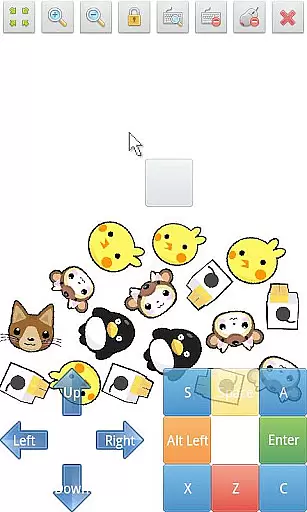
SWF Player Pro is a specialized video player designed for users who need to play SWF format files on their Android devices. The app supports playback through both Android AIR and Ruffle engines, ensuring compatibility with various SWF files. With features like zoom in/out, play/stop controls, and fullscreen support, it provides a comprehensive solution for viewing Flash content. The app also includes advanced settings that allow users to customize their playback experience, making it an essential tool for anyone working with legacy Flash media.
In addition to basic playback, SWF Player Pro offers practical tools such as multi-touch virtual keypads, virtual mouse functionality, and a built-in file browser. These features make it easier to interact with SWF files and manage content directly from your device. Whether you're a designer reviewing old Flash projects or an educator using legacy educational materials, this app ensures smooth and reliable SWF playback.
SWF Player Pro stands out with its robust feature set tailored specifically for SWF file playback. The app supports two powerful rendering engines - Android AIR and Ruffle - providing flexibility in handling different types of SWF content. Advanced playback controls include zoom functionality, play/stop options, and fullscreen mode, giving users complete control over their viewing experience. The inclusion of multi-touch virtual keypads and a virtual mouse makes interaction with SWF files intuitive and efficient.
One of the app's notable strengths is its comprehensive customization options. Users can adjust settings such as wmode, background color, wake-lock, rotation, quality, and scale to optimize playback according to their specific needs. The built-in file browser simplifies content management, while the app's support for various SWF engine options ensures broad compatibility. These features make SWF Player Pro a versatile solution for professionals and casual users alike who need reliable SWF playback on modern Android devices.
SWF Player Pro offers robust support for SWF format files, ensuring users can enjoy a wide range of multimedia content. The application leverages two powerful SWF engines - Android AIR and Ruffle - to maximize compatibility and performance.
With advanced settings like wmode, background color options, wake-lock, rotation controls, quality adjustments, and scaling features, the app provides an adaptable viewing experience tailored to individual preferences. These comprehensive format options make it simple to play various SWF files without compatibility issues.
Users benefit from reliable playback capabilities that maintain the integrity of original animations and interactive elements within SWF files. Whether for professional or personal use, this player ensures your video content is displayed accurately across different devices.
While primarily a video player, SWF Player Pro includes innovative tools that enhance user interaction with SWF content through AI-powered features. The multi-touch virtual keypad and virtual mouse provide intuitive control options that mimic desktop-like precision on mobile devices.
Advanced functionalities such as zoom in/out capabilities, play/stop controllers, and fullscreen support create an immersive viewing environment. These features are intelligently designed to optimize the user's interaction with SWF content, making navigation seamless and efficient.
The combination of traditional playback controls with modern interface enhancements demonstrates the application's commitment to providing both fundamental and cutting-edge tools for an enriched viewing experience.
User-friendly interface
Multi-engine support
Advanced customization
Intuitive controls
Comprehensive file management
Limited to SWF format
No iOS version available
Premium price point
Occasional compatibility issues
Requires technical knowledge

Full HD Video mp3 Player, MP4 player play 1080p, File manager, Video Downloader
 4.40
4.40
HD video maker with no watermark, no ads & vlog maker with music, PIP, text
4.50
Powerful HD video player with support for all formats & subtitles.
4.5
Stream Web Videos to Chromecast, Samsung, LG, Sony, Roku, Fire TV, DLNA + more
4.00
Download videos easily & play them all in one smart, powerful video manager.
3.40
Fast & easy HD video downloader for all formats, support 4K playback & download.
4.60
Download videos and play them offline
4.70
The essential companion to your Blue Iris PC software
2.50
Make videos you’re proud to share with Edits, a video editor for creators.
4.70
Pro video editor app for Instagram, edit video with song, AI, effect & slowmo.
4.80
Screen recorder with audio to take live videos & Screenshot in high quality!
4.70
VLC Remote lets you control your VLC Media Player on Mac, PC or Linux.
4.60
Fast & Private HD Video Downloader with Built-in Proxy Browser and Video Player.
4.50
Fast video downloader & private browser. Save HD clips to watch offline.
4.40
Fast & Private Video Downloader App. Save all videos easily from the Internet.
4.40
All format media Player, no need video converter any more!
4.00
Make your own Animations, Video and Photo Edits, Visual Effects, and more!
4.00
Save photos and videos from social apps in one tap.
3.60
Video player with powerful streaming playback and various convenient features.
2.10


User Reviews