


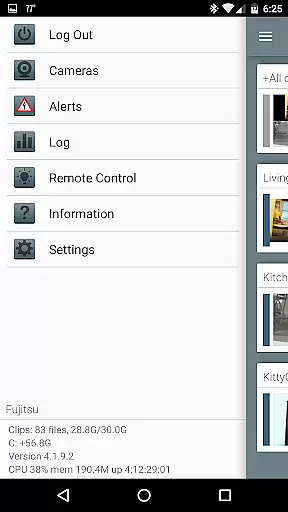
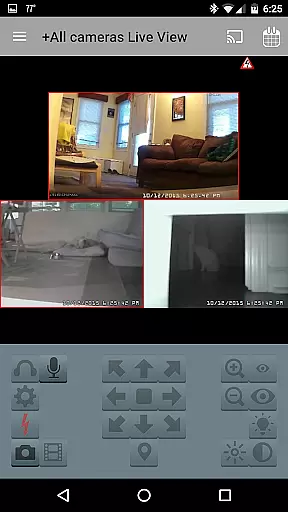

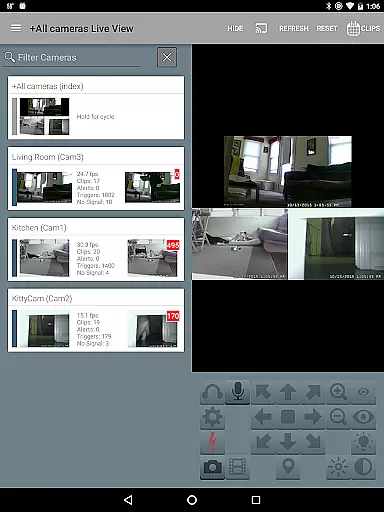
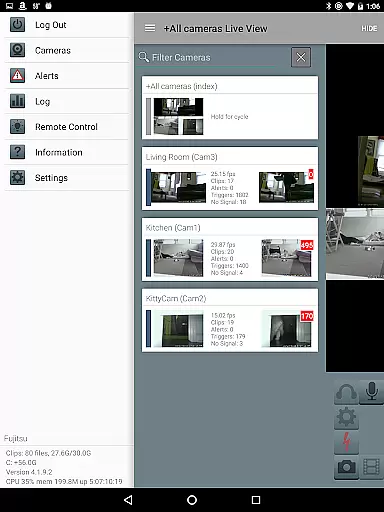
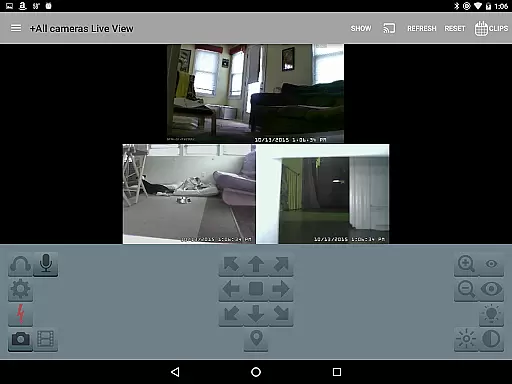
Blue Iris is a specialized client application designed to work seamlessly with the Blue Iris Windows PC software version 5.x. This app serves as a secure gateway to your home camera network, eliminating the need to expose individual cameras directly to the internet. By establishing a session-based protocol connection to your Blue Iris PC, it ensures that your surveillance system remains protected while providing remote access and control.
The app's core functionality revolves around comprehensive camera management. Users can control multiple Blue Iris installations, manage traffic signal icons, adjust schedules and profiles, and receive instant Android push notifications for triggered cameras or critical system alerts. The application supports advanced features such as H.264 streaming, PTZ (Pan-Tilt-Zoom) control, audio communication, and remote DIO signal management, making it an essential tool for sophisticated home security setups.
One of the key use cases for Blue Iris is remote monitoring and management of your security system. Whether you're checking live feeds, reviewing recorded footage at up to 64x speed, or controlling camera functions like IR and audio communication, this app provides complete control over your surveillance infrastructure from anywhere with internet access.
Blue Iris offers an impressive array of features that cater to both basic and advanced security needs. The app's most notable capability is its support for multiple Blue Iris installations, allowing users to manage complex security networks from a single interface. This feature is particularly valuable for users with extensive camera systems spread across different locations.
The application excels in its implementation of secure communication protocols. Unlike traditional methods that might expose your cameras directly to the internet, Blue Iris uses a session-based authentication system that never transmits passwords in plain text. This approach significantly enhances security while maintaining convenient remote access. Additionally, the app's push notification system ensures real-time alerts for camera triggers and system status changes.
What sets Blue Iris apart is its comprehensive camera control capabilities. Users can manipulate PTZ functions, control IR settings, and even engage in two-way audio communication with supported cameras. The app also enables efficient recording management, allowing users to review footage at accelerated speeds and selectively delete recordings directly from their mobile devices. These features demonstrate the app's commitment to providing professional-grade tools in a user-friendly mobile package.
Blue Iris stands out in video format compatibility, ensuring users can work with a wide range of video formats without any hitches. This app supports various camera inputs and provides fast H.264 streaming, which is essential for maintaining high-quality video while minimizing bandwidth usage.
The ability to review recordings stored on the Blue Iris PC at speeds up to 64x also showcases its versatile video handling capabilities. Whether you're managing multiple installations or just need efficient playback options, this feature ensures that your footage is easily accessible and navigable.
Moreover, the app allows for selective deletion of recordings directly from the Blue Iris PC. This functionality not only helps in managing storage space effectively but also maintains the integrity of important video data by allowing users to retain crucial clips while discarding unnecessary ones.
While Blue Iris primarily focuses on surveillance and camera management, it incorporates AI-powered features that enhance user interaction and control over their video feeds. The Android push alerts triggered when a camera detects motion or issues a critical status message are powered by intelligent algorithms that ensure timely notifications.
Additionally, the app's capacity to listen to and talk through supported cameras adds an innovative layer of interactivity. These AI-driven capabilities allow users to respond promptly to situations as they unfold, providing both security and convenience.
Furthermore, navigating cameras by simply tapping and swiping within the app interface demonstrates intuitive design principles augmented by AI technologies. Such seamless interactions make managing complex home camera networks straightforward and efficient, enhancing overall usability and accessibility.
User-friendly interface
Secure connection protocol
Real-time push notifications
Comprehensive camera controls
Multi-installation support
Requires Windows PC
No standalone functionality
Complex setup process
Limited OS compatibility
Dependent on main software

Auto video maker with music & exclusive filters. Video editing made simple.
 4.50
4.50
Cast Videos from Web Browser, IPTV to Roku, Chromecast, DLNA, Smart TV +more
4.60
Photo and Music Video Creator into Stunning Videos—Effortlessly
4.40
Search & download videos from net with all video downloader, auto-detect & safe.
4.60
KineMaster, Your Ultimate Video Editor!
4.40
Turn your phone into a wireless camera!
4.20
Make your own Animations, Video and Photo Edits, Visual Effects, and more!
4.00
Screen recorder with audio to take live videos & Screenshot in high quality!
4.70
Video player with 4K & 1080P support, popup play, background play and subtitle.
4.20
A Simple app to download Video & Music from the Internet.
4.70
Create photo video with music & template. AI video maker for stunning slideshow.
4.60
Cast to Chromecast, Xbox, Fire Stick, Roku, DLNA, Smart TV & No Feature Limited!
4.50
KMPlayer Plus (Divx Codec) officially support Divx codec.
4.30
Movie maker & video editing app with AI effects and green screen
4.30
This app was created to edit the metadata of music files.
4.20
Livestream, news, & gaming content. Watch, chat, and upload. Join Rumble today!
3.80
A full editing room to accompany your Insta360 cameras and handheld gimbals.
3.30
The smartest M3U IPTV Player your playlists have ever seen.
4.2
Stream high quality video from your camera over NDI protocol
4.0


User Reviews