
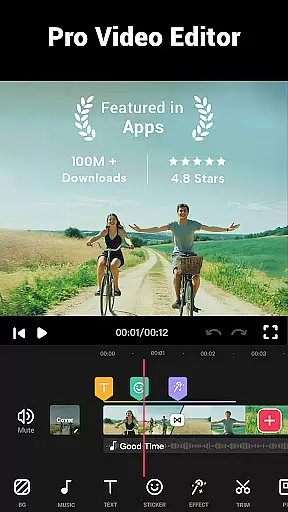


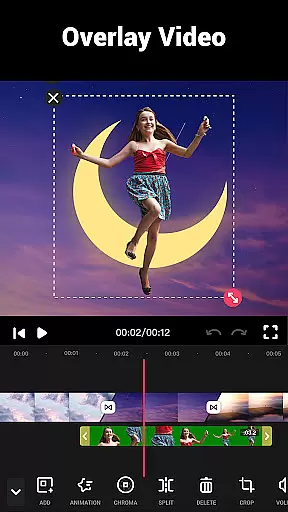
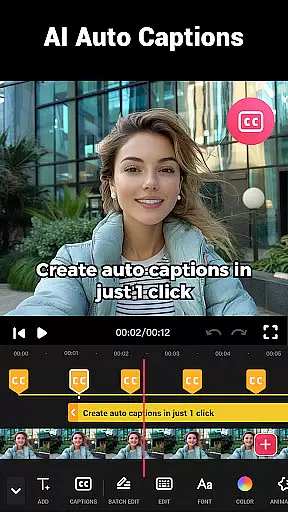
Video Maker is a versatile video editing application that allows users to create professional-quality videos directly from their Android devices. The app offers an extensive range of features including trimming, cutting, and adjusting video speed, as well as adding music, transitions, filters, and effects. With support for 4K video export and no watermark, it ensures high-quality output for both beginners and experienced editors.
This all-in-one video editor stands out with its user-friendly interface and powerful editing tools. Users can easily convert photos into videos with music, apply stunning movie-style filters, and merge clips with transition effects. The app also supports multi-layer editing, audio extraction, and video compression, making it suitable for creating content for platforms like YouTube, Instagram, and TikTok.
Whether you're producing vlogs, intros, or social media content, Video Maker provides the necessary tools to enhance your creativity. Its comprehensive feature set and easy sharing options make it an ideal choice for anyone looking to edit and share videos effortlessly while maintaining professional standards.
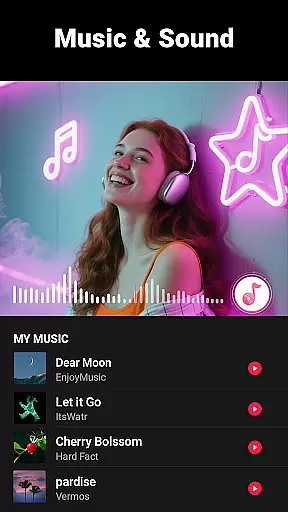
Video Maker distinguishes itself through its robust feature set tailored for comprehensive video editing. One of its key strengths is the multi-layer editing capability, which allows users to add music, voice-overs, sound effects, and stylish fonts. This feature enables creators to produce rich, dynamic content that stands out on social media platforms.
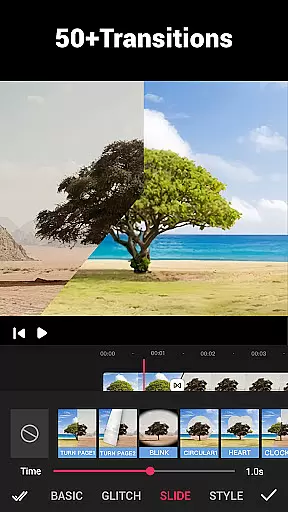
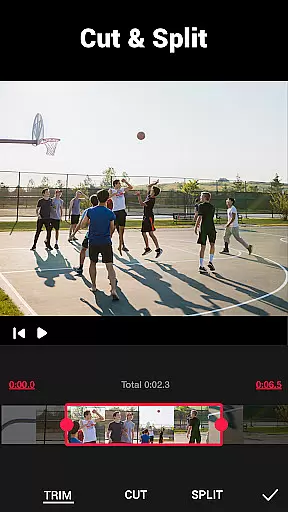
The app also excels in providing precise video trimming and cutting tools. Users can split videos into multiple clips and utilize over 50 transition effects to enhance their projects. Additionally, the ability to extract audio from videos and adjust music volume with fade-in/out options supports more sophisticated editing needs.
Another notable feature is the app's support for various aspect ratios and HD exports without quality loss. Whether you're editing for YouTube, Instagram, or other platforms, Video Maker ensures your videos maintain professional quality. With regular updates to effects, filters, and fonts, the app continues to offer fresh creative possibilities for video editors of all skill levels.
Video format compatibility is a crucial feature for any video editing application, ensuring that users can work with a wide range of video files without conversion hassles. Video Maker excels in this area by supporting various popular formats, allowing creators to import and export videos seamlessly.
The app's powerful processing engine ensures that whether you're working with MP4, AVI, or MOV files, the quality remains intact throughout the editing process. This versatility enables content creators to focus on their creative vision rather than technical limitations.
Furthermore, Video Maker's ability to export 4K videos without watermarks makes it stand out among its competitors. Users can share their high-quality creations directly to platforms like YouTube and Instagram without worrying about resolution constraints or unwanted branding.
This comprehensive format support extends to audio files as well, letting editors incorporate custom music tracks from their devices while maintaining perfect synchronization with video elements.
AI-powered editing features represent the cutting edge of video editing technology, and Video Maker incorporates these innovations to streamline the creative process. The app utilizes artificial intelligence to automate complex tasks, making professional-grade editing accessible to both beginners and experienced creators.
One notable AI feature is the automatic audio rhythm detection, which analyzes music tracks and suggests optimal cut points based on beats. This functionality helps users create perfectly synchronized music videos with minimal effort, enhancing the overall production value of their content.
The app also employs AI-driven enhancement tools that automatically optimize video quality, adjust color balance, and apply appropriate filters based on content analysis. These intelligent suggestions save time while maintaining creative control, allowing editors to quickly achieve polished results.
Additionally, Video Maker's AI capabilities extend to object recognition and smart cropping, enabling automatic adjustments for different social media platforms' aspect ratio requirements. This ensures that videos maintain their impact across various sharing channels without manual resizing.
User-friendly interface
Extensive editing tools
High-quality 4K export
No watermark on videos
Regular feature updates
Limited advanced features
Occasional performance issues
Fewer tutorials for beginners
Ads in free version
Some features require premium

Client application for NextPVR software
 3.00
3.00
Watch a large amount of high-definition short drama content
4.60
HD video maker with no watermark, no ads & vlog maker with music, PIP, text
4.50
High-Quality USB Camera Viewer & HDMI Display
4.70
Download videos easily & play them all in one smart, powerful video manager.
3.40
IPTV Player - Watch live TV from m3m & m3u8 playlist, stream IPTV on mobile
3.30
Powerful video player with advanced hardware acceleration and subtitle supports
4.20
Livestream, news, & gaming content. Watch, chat, and upload. Join Rumble today!
3.80
Screen recorder with audio to take live videos & Screenshot in high quality!
4.70
#1 Torrent App on Android ** No Ads Ever + Battery Saver **
4.80
GENRAL PRO - General Pro is the best video player that fully supports all formats.
4.70
Download website videos fast&privacy
4.40
Video player, file manager for all formats, 4K/HD media player supports subtitle
4.30
This app was created to edit the metadata of music files.
4.20
Turn your phone into a wireless camera!
4.20
Powerful, professional, versatile teleprompter. Developed by an active film crew
4.00
Capture images & record videos for USB Camera, Webcam, Microscopes, Endoscopes
3.80
Watch full episodes of your favorite Cartoon Network and Cartoonito shows!
3.50
Video player with powerful streaming playback and various convenient features.
2.10


User Reviews