
ID.me Authenticator is a productivity-focused application designed to enhance account security through Two Factor Authentication (2FA). This free solution generates 6-digit Time-Based One-Time Passwords (TOTP) and provides PUSH notification-based authentication. Users can secure their online accounts on supported websites by adding an extra layer of protection.
The app functions both as a TOTP code generator and a PUSH notification authenticator. When used as a TOTP generator, it allows users to produce verification codes without requiring network or cellular connectivity. For PUSH-based authentication, users approve login attempts via notifications sent directly to their devices. These features make ID.me Authenticator a reliable tool for safeguarding digital identities.
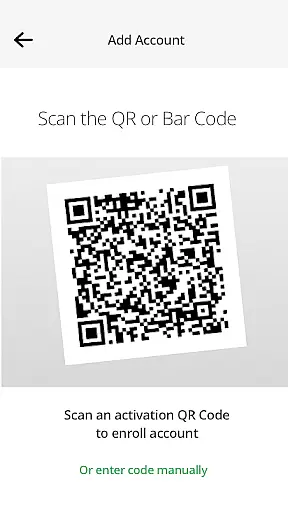
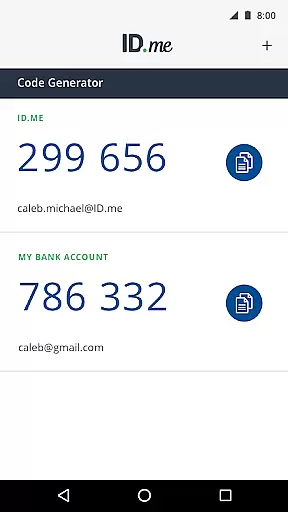
ID.me Authenticator offers several key features that set it apart in the productivity category. First, its TOTP Code Generator functionality enables users to generate 6-digit verification codes after setting up their accounts with a QR code scan. This ensures access to verification codes even without an internet connection, making it highly convenient for users who need security on the go.
In addition to TOTP, the app supports PUSH-based authentication. This feature simplifies the login process by allowing users to approve login requests via push notifications. The combination of these two methods provides flexibility and strengthens account security. By integrating both technologies, ID.me Authenticator delivers a comprehensive 2FA solution that caters to diverse user needs while maintaining ease of use.
ID.me Authenticator excels in core task management by providing a reliable Two Factor Authentication (2FA) solution. This app ensures that users can manage their authentication tasks efficiently through either Time-Based One-Time Passwords (TOTP) or PUSH notifications.
With TOTP, users generate a 6-digit code necessary for account access alongside their username and password. This process is seamless as it doesn't require network or cellular connection once set up, making it an accessible tool for secure account management anywhere.
The PUSH-based authentication simplifies the security process further by allowing users to approve sign-in attempts via push notifications sent directly to their smartphones. This method streamlines the user experience while maintaining high-security standards.
Cross-device synchronization is a critical feature of ID.me Authenticator, ensuring that users have a consistent and reliable authentication experience across all their devices. By supporting both TOTP and PUSH-based authentication methods, this app guarantees that your verification data is synchronized reliably no matter where you are.
For TOTP, once the initial QR code setup is complete, the same credentials can be used on multiple devices without needing additional configuration steps. This means you can access your accounts securely from different locations with ease.
PUSH notifications also contribute to this reliability by delivering real-time alerts to any enrolled device. Whether at home or work, these instant notifications allow for immediate approval of login attempts, reinforcing both convenience and security in managing online identities.
Enhanced Security
User-Friendly Interface
Offline Code Generation
Free to Use
Reliable PUSH Notifications
Limited to ID.me Accounts
QR Code Setup Required
No Biometric Login
Dependent on Device
Push Notification Delays

 4.20
4.20
The AI assistant that thinks with you - write, code, and solve complex tasks
4.60
Enjoy classic gameplay with customizable features and retro-style graphics.
4.30
A comprehensive suite of tools designed specifically for Lactation Consultants
4.5
A beautiful digital clock with autostart and many other functions
4.70
To do list widget with a notebook organizer, checklist, simple shopping list
4.60
A Pixel Art watchface inspired by other iconic 90s designs for Wear OS devices!
4.40
Scientific calculator for Android - looks and operates like the real thing!
4.90
QuickEdit is a fast, stable and full featured text and code editor.
4.20
Multilingual translator for text, voice, and image translation!
4.90
Absolutely the best CNC machinist speed and feed calculator around. fswizard.com
4.60
Client for Nextcloud Deck
4.60
Calendar 2023 widget for Android. Appointment scheduler, planner, and reminder
4.60
When you Focus, so will your Bean in this cozy focus timer
4.30
Easily read and manage all your PDF files
4.10
A Revolutionary All-in-One Artificial Intelligence Tools
3.80
All in one sketching tool. Technical and General drawing. Online Maps support.
3.70
Code on-the-go with VScode for Android. Edit,debug and collaborate from mobile!!
3.10
A simple, portable logger for POTA, SOTA, Field Day, and more
4.3


User Reviews