
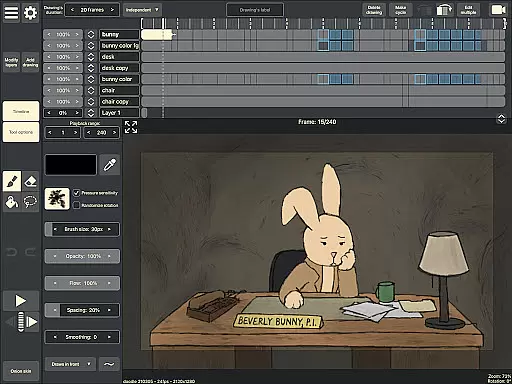
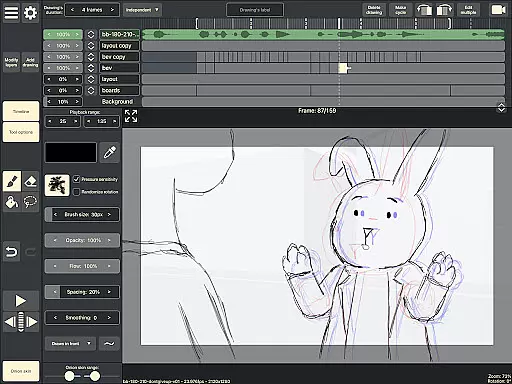
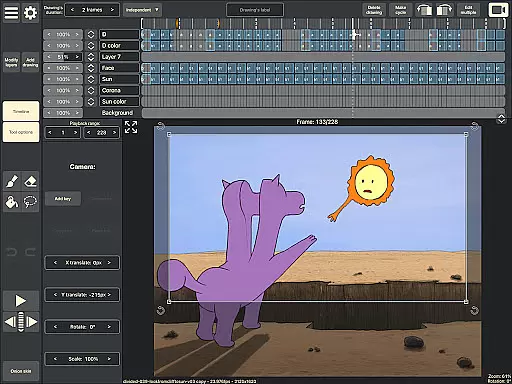
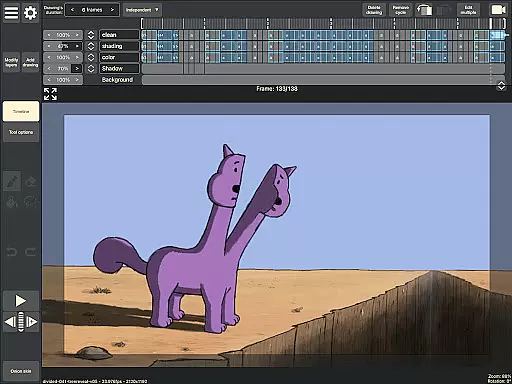
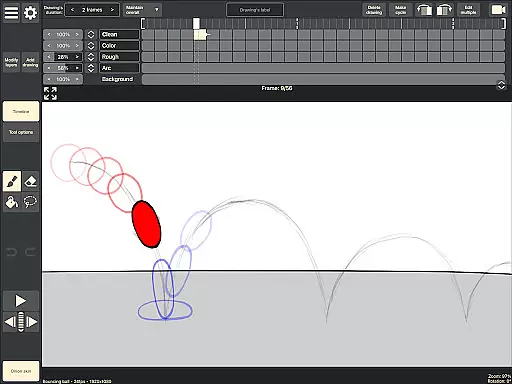
RoughAnimator is a professional-grade hand-drawn animation application designed specifically for Android users. This powerful tool caters to both seasoned animators and beginners, offering a complete suite of features needed for traditional frame-by-frame animation. With RoughAnimator, users can create high-quality animations anywhere, thanks to its intuitive interface and robust functionality.
The app includes advanced features such as onion skinning, timeline control with unlimited layers, and adjustable exposure lengths. It also supports importing audio for lip-syncing and video for rotoscoping, making it versatile for various animation styles. Additionally, RoughAnimator allows exporting animations in multiple formats including Quicktime video, GIFs, and image sequences, ensuring compatibility with industry-standard software like Adobe Flash/Animate, After Effects, and Toon Boom Harmony.
RoughAnimator stands out with its comprehensive set of animation tools tailored for artists. The app's timeline feature supports unlimited layers and provides easy adjustment of exposure lengths for individual drawings, catering to both pose-to-pose and straight-ahead animation techniques. Onion skinning enhances the drawing process by allowing animators to see previous and next frames, ensuring smooth transitions between frames.
Another notable feature is the ability to preview playback and scrub along the timeline, giving animators precise control over their work. The app also supports custom brushes and works seamlessly with Samsung S-Pen and other pressure-sensitive devices, enhancing the drawing experience. Furthermore, users can control the framerate and resolution, export animations in various formats, and even import projects into popular animation software, providing flexibility and integration within professional workflows.
Creative tools are the backbone of any art and design application, and RoughAnimator excels in this area. As a fully featured hand-drawn animation app for Android, it offers animators a comprehensive suite of tools that cater to both professionals and beginners. The app provides a timeline with unlimited layers, customizable brushes, onion skinning, and the ability to import audio and video, making it versatile for various animation techniques.
RoughAnimator stands out by supporting devices like the Samsung S-Pen, offering precision and control akin to traditional drawing instruments. This compatibility enhances the creative process, allowing artists to leverage the pressure sensitivity and control these devices provide. With features such as adjustable exposure length, preview playback, and scrubbing along the timeline, animators can fine-tune their work with professional-grade tools.
For users, this means the ability to create high-quality, frame-by-frame animations without needing expensive equipment or software. RoughAnimator democratizes the animation process, enabling creators to produce content that rivals industry standards right from their mobile device. Artists can seamlessly transition their projects to desktop applications like Adobe Flash/Animate, After Effects, and Toon Boom Harmony, ensuring that their workflow is not only complete but also flexible across different platforms.
Flexibility in canvas and format options is crucial for artists who need to adapt their work for different mediums and platforms. RoughAnimator addresses this need by providing animators with extensive control over their project's resolution and framerate, which are essential for producing high-quality animations. Users can tailor their animations to specific requirements, whether for web, film, or broadcast, ensuring their final output meets professional standards.
The app supports exporting animations into multiple formats, including Quicktime video, GIF, and image sequences. This versatility allows creators to choose the best format for their intended use, be it for social media, professional portfolios, or further editing in other software. Additionally, RoughAnimator's projects can be imported into popular desktop applications like Adobe Flash/Animate, After Effects, and Toon Boom Harmony, offering an uninterrupted creative workflow.
By providing such adaptable canvas and format options, RoughAnimator empowers artists to experiment with different styles and techniques without being constrained by technical limitations. Animators can focus on their creative vision, knowing that the app will support their needs from initial concept to final export, regardless of where their work will ultimately be showcased.
Powerful animation tools
User-friendly interface
Supports multiple formats
Compatible with industry software
Portable and versatile
Steep learning curve
Requires specific hardware
Limited free features
No cloud sync
Occasional bugs

Art of Combination Wear OS Watch faces
 4.0
4.0
Unleash your drawing and painting potential
4.50
Photo blender app to create overlay photos & double exposure.
4.40
Unleash Your Creativity with Draw Cartoon - AR Drawing App
4.10
Novices can also easily complete diamond painting masters
4.70
Experience next-gen icons with a modern liquid glass look.
3.60
Turning simple sketches into captivating tales filled with life and motion
3.90
Create amazing pictures and unleash your creative genius with AR Drawing Sketch
4.40
Unleash your inner artist! Sketchar: AR Drawing for Limitless Creativity
4.40
See Color, Paint Color
4.90
Create stunning art with AI.
4.80
2D animation studio for Android tablets - unlimited layers, infinite timeline
4.70
Photo editor for art, avatars, filters & fun transformations.
4.60
Discover Cartoon Dream : Unleash Your Creativity with CuttingEdge AI
4.50
The perfect place to start sketching! Use Sketchbook to draw and paint sketches.
4.50
Draw Trace image sketch by, AR art projector app, Easy to trace any image.
4.50
Draw, make movies & animate cartoons easily with our 2D animation maker app
4.40
Remove Background, Magic Eraser, Photo Enhancer, Story Templates, Collage Maker
4.30
OneUI 8.5 icons ✨ Smooth, modern & based on the latest Play Store design ??
4.10


User Reviews