
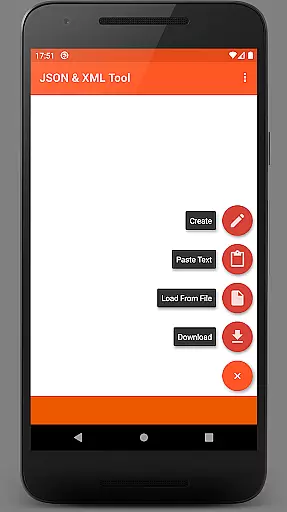
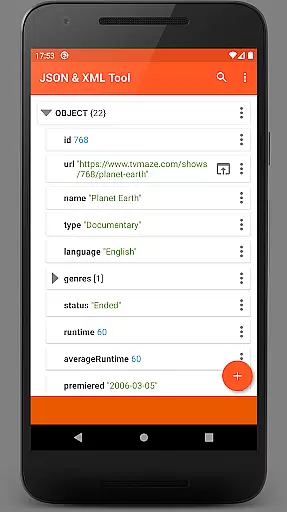


JSON & XML Tool Premium is a powerful productivity app designed for effortless creation, editing, and conversion of JSON and XML files. The app's standout feature is its simple hierarchical view that makes file navigation intuitive and efficient. Whether you're working on game addons or handling data transformation tasks, this tool provides the necessary functionality to streamline your workflow.
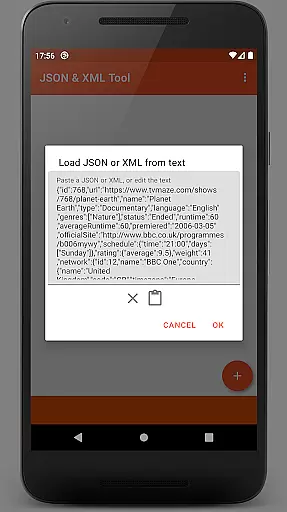
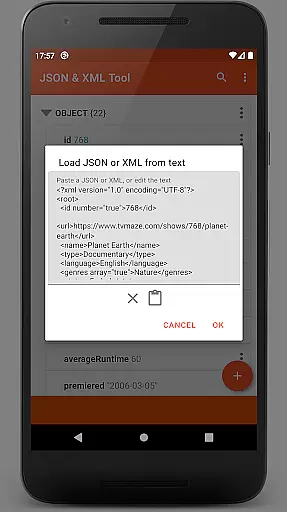
The app supports multiple file loading methods including internal SAF-based file picker, external file pickers, web downloads, and text pasting. It also offers robust editing capabilities like renaming nodes, modifying values, switching value types, and managing array elements. With additional features such as dark theme support, PDF export, and JMESPath query integration, it becomes an indispensable tool for developers and power users who frequently work with structured data formats.
One of the key strengths of JSON & XML Tool Premium is its comprehensive set of features tailored for efficient file management. The app allows users to perform complex operations like converting JSON to XML and vice versa, making it suitable for various development scenarios. Its storage browser, powered by the Storage Access Framework (SAF), ensures secure file handling without requiring traditional storage permissions in most cases.
Editing capabilities are particularly robust, allowing users to rename node elements, modify values, and switch between different data types seamlessly. The app also supports advanced functions like element duplication, movement within arrays, and saving files in multiple formats. Additional productivity-enhancing features include dark theme support, formatted text output, PDF export functionality, and JMESPath query language integration for element extraction and transformation.
These features collectively make JSON & XML Tool Premium an essential utility for developers, data analysts, and IT professionals who need reliable tools for working with structured data formats across different platforms and use cases.
At the heart of the JSON & XML Tool Premium app lies its robust core task management system, which is essential for efficiently handling JSON and XML files. This productivity tool offers a comprehensive suite of features that streamline the process of viewing, creating, and editing these file types.
The app's intuitive interface allows users to perform a multitude of tasks with ease. Whether it's renaming node elements, modifying values, or switching between different value types like Boolean, Number, and String, the app provides a seamless experience. Additionally, users can add, duplicate, remove node elements, and even reposition them within arrays, ensuring that data structuring is both flexible and precise.
For those working with complex datasets, the ability to extract and transform elements using the JMESPath query language adds another layer of sophistication. This feature enables power users to manipulate their data structures in a way that meets specific project requirements, thus enhancing workflow efficiency.
Cross-device synchronization is a pivotal aspect of modern productivity applications, and the JSON & XML Tool Premium app excels in this area by providing reliable and consistent access to files across different devices. The app leverages the Storage Access Framework (SAF) to ensure that your JSON and XML files are accessible whenever and wherever you need them.
By utilizing SAF, the app minimizes the need for traditional storage permissions, which not only enhances security but also simplifies the user experience. When storage permissions are required, they are requested judiciously, maintaining a balance between functionality and user control.
Moreover, the app supports various methods of file access, including loading files via internal or external file pickers, downloading from URLs, pasting text, or receiving files from other apps. Once edited, files can be saved anew or overwritten, with changes reliably reflected across all synchronized devices. This ensures that whether you're working on a desktop or mobile device, your work remains up-to-date and consistent.
User-friendly interface
Comprehensive editing tools
Multiple file loading options
Advanced data conversion
Secure file handling
Premium version only
No free trial available
Occasional permission requests
Steep learning curve
Limited customer support

Seamlessly integrate data and reports to build your presentation to impress
 4.80
4.80
Native client for Forgejo and Gitea
5.00
Unlock AutoNotification
4.00
Mega cloud explorer plugin for Solid Explorer
3.80
All in one sketching tool. Technical and General drawing. Online Maps support.
3.70
Smart PDF reader & editor to view, organize and manage PDF documents easily.
3.70
Secure, open-source, SPICE and SSH Remote Desktop for QEMU KVM virtual machines
4.00
Quickly and easily keep track of your work shifts
4.70
Use powerful, industry-leading AI tools to generate visual charts from any data
4.80
Scan paperwork into PDF/JPG, generate your own e-signature and send fax or email
4.70
Client for Nextcloud Deck
4.60 4.20
4.20
Device's storage information in a simple and clear graphical form (infographics)
4.10
Intelligent AI Assistant
4.10
Wake up & get tasks done! Add alarms & reminders on the Clock Launcher.
4.00
Create and edit presentations with Google Slides, part of Google Workspace.
4.00
Ultimate Virtual AI Character for immersive Roleplay Chat. Perfect Companion
3.90
Easiest event planning, volunteer signups & parent teacher conference scheduling
2.20
The upgraded version of Name Wheel with AI and the power to add your own wheels.
4.5


User Reviews