

Intervalometer for TimeLapse is a powerful photography tool designed to automate the process of capturing time-lapse sequences. This app allows photographers to configure specific time intervals for triggering the camera shutter, enabling greater creative control over exposure settings and image formats that are typically unavailable in standard smartphone time-lapse modes.
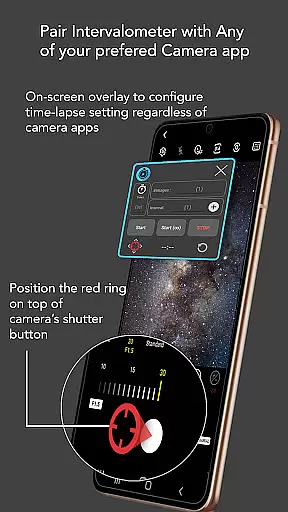
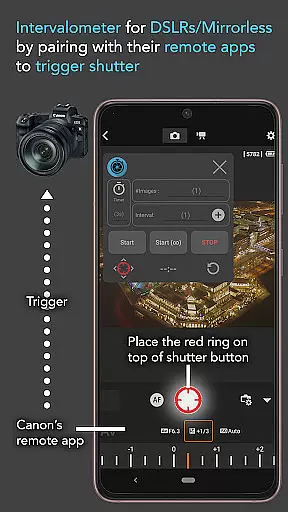
The application works seamlessly with any camera app on Android 7 and above, utilizing AccessibilityService API to trigger the shutter automatically. It supports various advanced camera modes including HDR, night mode, manual settings, and more, making it possible to create stunning low light, long exposure, and even Holy Grail time-lapses. Additionally, Intervalometer can also be used with dedicated camera remote apps from brands like Canon, Sony, and Nikon, effectively turning your smartphone into a versatile intervalometer device.
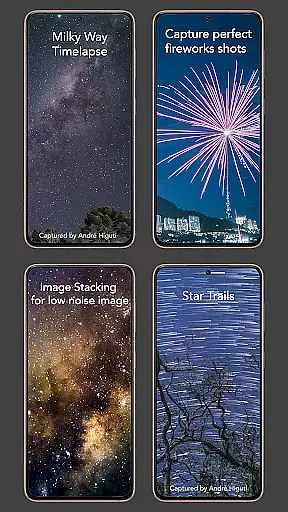
Whether you're capturing star trails, milky way shots, or ultra-wide angle scenes, this app provides the flexibility needed to produce professional-quality time-lapse videos. Its ability to work with image stacking techniques further enhances its value, allowing users to achieve higher quality images through post-processing.
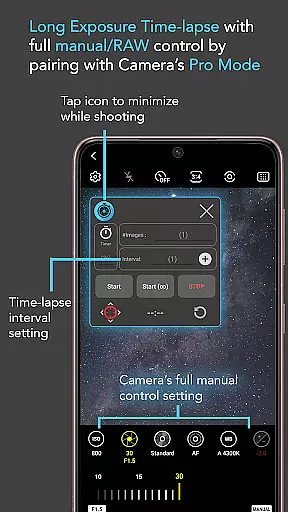
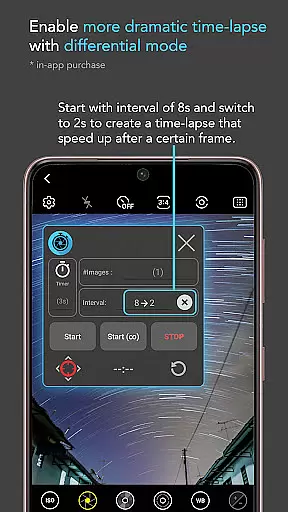
Intervalometer for TimeLapse offers an impressive array of features that cater to both amateur and professional photographers. The app provides full control over time-lapse configurations, allowing users to set delay timers, interval times, and the number of shots. This level of customization ensures that every time-lapse sequence can be precisely tailored to the photographer's vision.
One of the standout features is its compatibility with any camera app. Through the use of AccessibilityService API, Intervalometer can automate the photo-taking process across different camera applications, regardless of whether they support basic or advanced shooting modes. Users can easily reconfigure the shutter button position if needed, ensuring smooth operation with various camera interfaces.
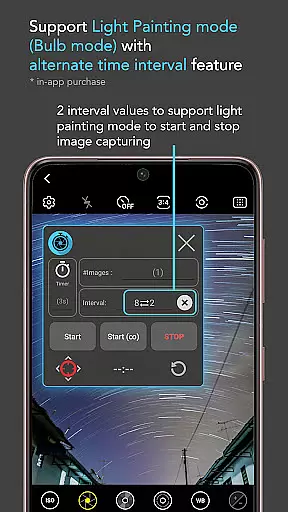
In addition to its core functionality, the app includes specialized modes such as Infinite Mode and Bulb Mode, which are particularly useful for long-exposure photography. These features, combined with its ability to work alongside dedicated camera remote apps, make Intervalometer an indispensable tool for anyone looking to explore the creative possibilities of time-lapse photography.
Real-time capture and preview functionality is essential for photographers who need precise control over their time-lapse sequences. Intervalometer for TimeLapse offers this by integrating seamlessly with any camera app, allowing users to configure and trigger the shutter at specific intervals.
This application uses AccessibilityService API to automate the camera shutter triggering process on Android devices running version 7 or higher. This ensures that each photo is taken at the exact moment specified by the user, providing accurate and consistent results every time.
Users benefit from the ability to work with various camera modes such as light-painting, HDR, night mode, and more. The app's flexibility means it can handle complex time-lapse projects like low light, long exposure, and even Holy Grail transitions from day to night.
By enabling bulb mode and infinite shooting options, Intervalometer empowers photographers to explore creative possibilities without being constrained by traditional camera limitations. This makes it an invaluable tool for both amateur enthusiasts and professional photographers looking to elevate their craft.
While Intervalometer for TimeLapse does not focus on AI beauty enhancements, its core features contribute significantly to producing natural and high-quality images. By automating the photo-taking process, it allows users to concentrate on composing the perfect shot rather than managing technical details.
The app supports advanced configurations including delay timers, interval times, and the number of shots, which are crucial for achieving smooth and natural time-lapse sequences. These settings ensure that each frame flows seamlessly into the next, creating a visually appealing final product.
For those interested in post-processing techniques like image stacking or star trail creation, Intervalometer provides the necessary framework to capture frames with precision. This leads to enhanced image quality when processed through other specialized software.
Although primarily designed for time-lapse photography, the appu2019s versatility extends to various applications such as capturing lightning strikes or creating detailed star trail images. Its robust feature set ensures that all captured content maintains a level of naturalness and authenticity that enhances the overall viewing experience.
User-friendly interface
Wide compatibility
Advanced customization
Supports multiple camera modes
Flexible configuration options
Requires Accessibility permissions
May not work on all devices
Limited to Android 7+
No built-in camera functionality
Potential battery drain

All-in-One Editor & AI Photo Enhancer, Beautify & Retouch, Collage, Cartoonify
 4.20
4.20
[3DSteroid Pro] is a stereoscopic application for Android.
4.30
Easily stitch panoramas from multiple photos or video.
4.40
Professional photography on your mobile phone
4.20
See your baby AI baby face generator AI baby maker Face generator babymaker fun!
4.70
Smart, light, and fast photo and video gallery
4.30
RAW video capture with advanced controls
4.40
A unique animation app. Powerful, easy to use, and lots of fun.
4.30
Photo & Video Gallery app to manage albums and save WA Status easily.
4.70
Find time and duration of different sunlight phases at any location
4.90
Create funny photos and videos with the popular Time Warp Scan filter.
4.90
AI Photo Editor with 100+ Filters, Effects! Remove BG, Retouch & Photo Enhancer.
4.80
Viewfinder, Light meter, Reciprocity failure time, DOF & Bellows Extension
4.60
Virtual makeup, hair filters & body tuner—edit from face to full body!
4.20
Luminar: Photo Editor - easy picture editing with AI
4.20
All-in-One Editor & AI Photo Enhancer, Collage, Cartoonify, Funny Stickers & BGS
4.10
USB Storage Access for Photos, Videos, Music and Documents
3.80
GCamera allows all GCam features on all phone models! Better photos with GCamera
3.30
Add a dreamy vibe to your selfies and videos with soft style filters
4.1


User Reviews