








MotionCam Pro revolutionizes mobile photography and videography by offering professional-grade tools directly on your smartphone. The app's standout feature is its ability to capture RAW videos, a first for smartphone cameras. This allows photographers and videographers to retain maximum detail and flexibility during post-processing.
In addition to RAW video capture, MotionCam Pro enhances photo quality through advanced computational photography algorithms. These algorithms replace standard camera software, enabling users to produce stunning images with improved dynamic range, color accuracy, and low-light performance. Whether you're an amateur enthusiast or a seasoned professional, MotionCam Pro provides the tools needed to elevate your mobile photography experience.
MotionCam Pro stands out with its innovative features tailored for photography and videography enthusiasts. The app's hallmark is its support for RAW video capture, allowing users to record footage with unparalleled detail and flexibility for editing. This feature alone sets a new standard in mobile videography.
Beyond video capabilities, MotionCam Pro incorporates cutting-edge computational photography techniques. These algorithms enhance image quality by optimizing various parameters such as exposure, white balance, and noise reduction. As a result, users can capture breathtaking photos with superior clarity and vibrant colors. With these powerful features, MotionCam Pro transforms any smartphone into a versatile tool for creative expression.
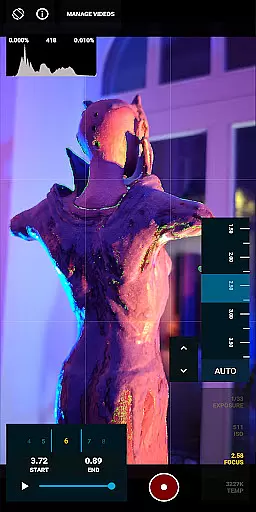
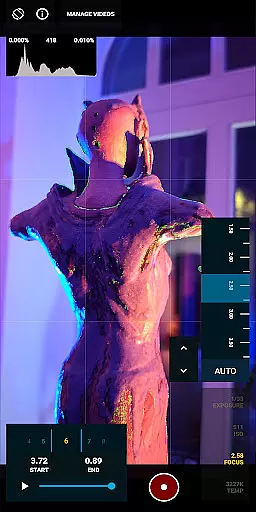
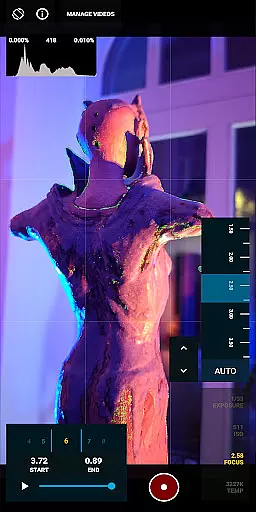
Real-time capture and preview functionality is essential for photographers who need to see the exact image they are capturing. MotionCam Pro excels in this area by providing users with a live view of their shot before taking it, ensuring precision and satisfaction with each photo.
The app's interface displays critical exposure information and allows adjustments on the fly, giving users control over their photography process. This real-time feedback loop empowers photographers to make necessary changes quickly, enhancing their workflow efficiency.
MotionCam Pro's advanced computational algorithms work behind the scenes to optimize the preview quality. By processing data instantly, the app delivers an accurate representation of the final image, which helps in making informed decisions about composition and settings.
AI beauty and enhancement features have become increasingly popular, but maintaining naturalness is key. MotionCam Pro uses sophisticated AI to enhance images without compromising authenticity, offering subtle improvements that respect the original photo's integrity.
The app intelligently identifies facial features and applies enhancements that look genuine, avoiding the over-processed appearance common in other applications. Users can expect skin smoothing, blemish reduction, and eye enhancement that retains the subject's natural look.
With customizable intensity levels, MotionCam Pro allows users to tailor the degree of enhancement to their preference. This flexibility ensures that whether you're aiming for a polished professional finish or a more candid snapshot, the results will appear effortlessly natural.
First app to offer RAW video capture
Advanced computational photography
Superior image quality
Active community support
Regular updates and improvements
Premium pricing model
Steep learning curve
Limited device compatibility
High storage requirements
Intensive battery usage

A collection of tools and reference tables for DPs, ACs, DITs and Operators.
 4.70
4.70
Natural Beauty, Selfie Retouch
4.30
Photo prints, cards, & gifts at Walgreens. Easy ordering & fast local pickup !
4.80
Create AI Photos, Improve and restore quality of blurry, old or damaged pics.
4.20
HD Camera Pro with HD Video shooting, Panorama, Photo editor , Beauty Camera.
4.50
A must-have app for landscape photographers
4.60
Fit multiple photos on one post. Create carousels & scroll layouts for Instagram
4.50
Turn photos into cartoons & avatars! - Photo Editor, Cartoon Face!
3.90
Your Family Calendar + Photos. Manage your Skylight Calendar and Skylight Frame.
4.40
Pro version: AR sun/moon tracker for any date. Tool for photographers & planners
4.90
Automatically backup your photos and videos to computer, NAS and Cloud services
4.60
AI photo editor with hair editor, retouch tools, hair color changer & filters!
4.50
Create AI photos & videos with Enhancer; restore, fix, beautify, enhance photos
4.50
Easily stitch panoramas from multiple photos or video.
4.40
Luminar: Photo Editor - easy picture editing with AI
4.20
AI-powered video creator by MiniMax - Where ideas meet cinema
4.20
Remote control of the phone camera from your Wear OS smartwatch
3.70
Create amazing frames with up to five photos. Rounded corners, effects and more!
3.60
Remote control the phone camera shutter from your smartwatch and take a picture
1.60


User Reviews