



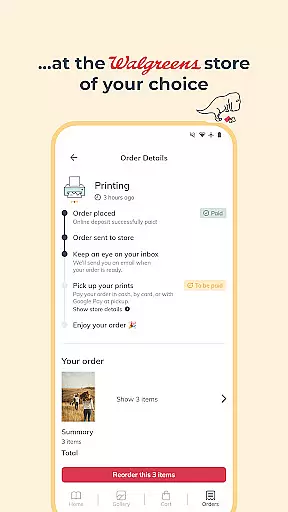
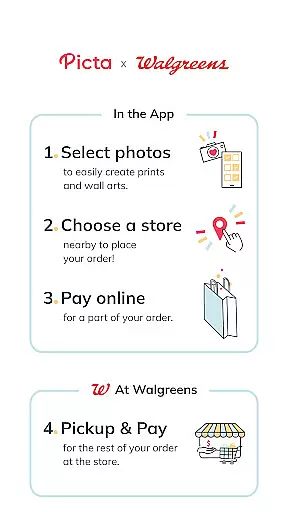
Picta is a photo printing app that allows users to print photos at Walgreens with ease. The app offers professional-quality photo printing services, printed on Kodak paper in multiple sizes including 4x6, 5x7, and square prints. Users can select their photos, choose the size and quantity, and pick up their prints in-store within an hour.
With Picta, users can also create personalized photo gifts such as magnets, posters, canvas, photobooks, greeting cards, and invitations. The app provides a fast and safe photo transfer process and organizes mobile photos by date taken. Picta is available for download on Android devices and is manufactured exclusively in the United States.
Picta offers a range of features to enhance the photo printing experience. Users can easily crop and zoom each picture within the app, ensuring their prints are exactly how they want them. The app also provides real-time order status updates, allowing users to track their prints and pick them up conveniently at their selected Walgreens store.
In addition to standard photo prints, Picta allows users to create photo collages in different layouts, showcasing their favorite moments. The app also offers exclusive deals and coupons for users, providing additional savings. With its user-friendly interface and seamless integration with Walgreens stores, Picta aims to revolutionize the way people print their photos.
Real-time capture and preview functionality is essential for ensuring that users can accurately select and edit their photos before printing. The Picta app excels in this area by providing a seamless experience where users can instantly see the results of their photo selections and edits.
The app allows users to choose photos directly from their Android device, then select print sizes and quantities with immediate visual feedback. This real-time preview ensures that customers are satisfied with their choices before they proceed to checkout, reducing the likelihood of dissatisfaction with the final printed product.
Additionally, Picta offers easy cropping and zooming features within the app, further enhancing the real-time editing process. Users can fine-tune their images to fit specific print dimensions or artistic preferences, all while seeing the changes take effect instantly on their screen.
This feature not only streamlines the photo printing process but also empowers users to create professional-quality prints with confidence. By offering such precise control over the final output, Picta enhances user satisfaction and encourages repeat usage for all their photo printing needs.
While the Picta app does not explicitly advertise AI beauty and enhancement features, it focuses on delivering high-quality photo prints through professional-grade services. However, users can still benefit from natural-looking enhancements by leveraging the app's advanced editing tools that ensure their photos look their best without appearing overly processed.
The app uses Kodak paper for its prints, which is renowned for its ability to produce vibrant colors and sharp details. This choice of material inherently enhances the quality of printed photos, making them look more appealing and true-to-life. Users can trust that their mobile photos will be transformed into stunning prints that preserve the original beauty of their moments.
Moreover, Picta provides various customization options such as creating photo collages and personalized gifts. These features allow users to add creative touches to their photos, enhancing their overall aesthetic appeal while maintaining a natural look. Whether it's a collage or a customized gift, the end result is a beautifully crafted product that reflects the user's personal style.
By focusing on professional-quality printing and customizable options, Picta ensures that every print order meets high standards of beauty and naturalness. This commitment to quality helps users turn their cherished memories into tangible keepsakes that they can proudly display and share.
User-friendly interface
Fast in-store pickup
Wide range of print sizes
Exclusive deals and coupons
Professional-quality prints
Limited to Walgreens stores
No direct payment option
Requires physical store visit
Occasional delays in printing
Compatibility issues reported

AI portrait generator and polaroid AI selfie, fun AI generated AI photo creator!
 4.30
4.30
Perfect photos with body shaping, BG changer and object remover.
3.70
What celebrity do you look like? Celebs will find your celebrity match!
4.10
Turn your phone into a professional camera - full DSLR manual photography
4.30
A must-have app for landscape photographers
4.60
Add a dreamy vibe to your selfies and videos with soft style filters
4.0
The original Rarevision VHS look seen everywhere!
4.70
Unlock the full potential of your DJI drone with Litchi
4.50
Your Family Calendar + Photos. Manage your Skylight Calendar and Skylight Frame.
4.40
Pro version: AR sun/moon tracker for any date. Tool for photographers & planners
4.90
Create funny photos and videos with the popular Time Warp Scan filter.
4.90
Your personal guide to the sun and moon. Plan ahead, visualize and predict!
4.70
Light-weight Media Gallery app for Android made with Jetpack Compose
4.60
Create AI photos & videos with Enhancer; restore, fix, beautify, enhance photos
4.50
Edit like a pro with Hypic. Apply filters, AI effects, & magic touch.
4.40
How old age camera Gender Swap App Face Shape Hairstyle App Hair Styler App fun!
4.00
Turn photos into cartoons & avatars! - Photo Editor, Cartoon Face!
3.90
Application for remote controlling DSLR
3.00
HD Photo gallery and photo manager to edit, hide private photos, videos & albums
4.0


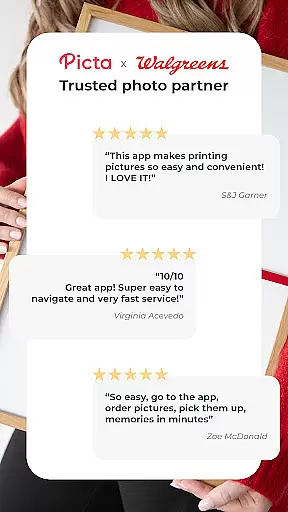
User Reviews