


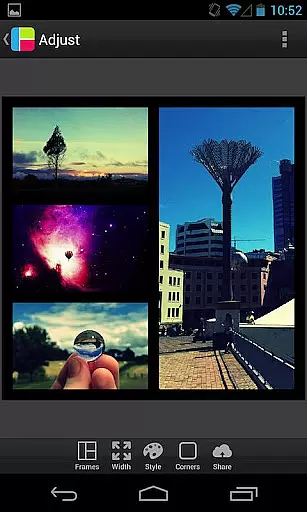
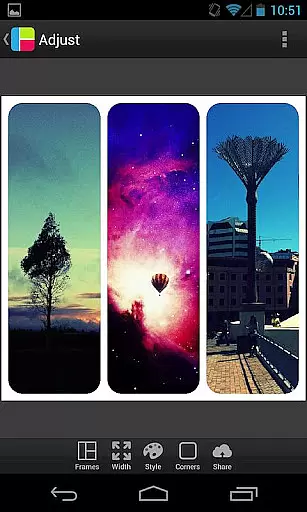

PicFrame is a versatile photography app that allows users to create stunning photo collages by combining multiple images into customizable frames. With 36 adjustable frame layouts, users can include up to five photos in a single frame, offering endless creative possibilities. The app provides advanced editing tools such as rounded corners, shape customization, and precise control over borders, colors, and patterns. Whether you're looking to enhance your social media posts or create personalized gifts, PicFrame ensures your creations stand out with its intuitive design features.
Designed for both casual users and photography enthusiasts, PicFrame supports various aspect ratios including square format, making it ideal for platforms like Instagram. Its easy-to-use interface lets you adjust brightness, contrast, and saturation for each photo, while pinch-to-zoom functionality offers precise placement. Once completed, you can save your masterpiece to your gallery or share it directly on popular social media platforms like Facebook and Twitter. PicFrame's combination of powerful editing tools and seamless sharing options makes it an essential app for anyone who loves visual storytelling.
PicFrame stands out with its extensive range of customization options, ensuring every collage is unique. The app includes 36 fully adjustable frames, allowing users to modify inner borders for endless layout possibilities. You can also change the shape of your photos to creative forms like hearts, circles, and hexagons, adding a personal touch to your designs. Advanced color controls let you pick border colors effortlessly, while 52 background patterns provide additional aesthetic choices.
Beyond its framing capabilities, PicFrame offers robust photo editing features. Users can adjust brightness, contrast, and saturation for individual photos within the frame, ensuring optimal image quality. The app supports rotation and zooming through intuitive gestures, giving you complete control over photo placement. With multiple output resolutions available, your final creations will look sharp on any platform. Whether you're posting to Instagram or printing your collage, PicFrame delivers professional-quality results every time.
Real-time capture and preview functionality is essential for photography apps as it allows users to see exactly what the camera sees before taking a shot. PicFrame offers this feature, ensuring that users can frame their photos accurately with live adjustments.
The app provides multiple output resolutions and supports various aspect ratios including square format, which enhances the real-time preview experience. Users can pinch to zoom and drag to move photos within frames, offering precise control over the composition.
With adjustable photo effects such as brightness, contrast, and saturation, PicFrame empowers users to fine-tune their images on-the-fly. This immediate feedback loop ensures that the final image matches the user's creative vision without any surprises after capture.
AI beauty and enhancement features are increasingly popular in photography apps, aiming to improve image quality while maintaining natural aesthetics. PicFrame includes tools like rounded corners, shape transformations, and pattern backgrounds that subtly enhance photos without compromising authenticity.
Users have access to 36 fully adjustable frames and 52 background patterns, allowing for endless customization possibilities. The ability to change the shape of photos into hearts or hexagons adds an artistic touch that enhances visual appeal naturally.
An easy-to-use border color picker and adjustable border width ensure that enhancements complement the photo rather than overpower it. These thoughtful design elements help maintain a balance between enhancement and natural presentation, making each framed photo unique yet authentic.
User-friendly interface
Extensive customization
Versatile sharing options
High-quality output
Creative photo shapes
Limited free features
In-app purchases required
Ads may appear
Advanced tools complex
Learning curve present

[3DSteroid Pro] is a stereoscopic application for Android.
 4.30
4.30
Trendy TikTok time warp scan funny filter app brings you unique photos & videos.
4.40
Android Native system HD camera app. Never been so simple and faster.
4.70
Take videos and pictures with the popular TikTok TIME WARP SCAN filter.
4.60
Create Business Headshots, Polaroid Filter, Retake Photos,Profile Pics,AI Photos
4.50
The #1 app for B&W film developing featuring an advanced darkroom timer.
4.10
Easily view, share, delete photos with Gallery.
4.70
A light meter for true photographers.
4.20
PhotoSync Bundle Add-On License. Enables all features and services in PhotoSync.
4.60
Photo editor: AI filters, photo enhancer, pic collage maker, AI art generator.
4.80
See your baby AI baby face generator AI baby maker Face generator babymaker fun!
4.70
Light-weight Media Gallery app for Android made with Jetpack Compose
4.60
Photo Exif Editor allows to view, add and modify EXIF data of multiple photos
4.50
Future baby face generator: AI kids generator, kid face! What my baby look like?
4.40
Create AI Photos, Improve and restore quality of blurry, old or damaged pics.
4.20
Hair color changer, AI haircut app, fun hair editor and buzz cut filter for all!
3.80
Professional video recording application with manual controls for filmmakers!
2.80
HD Photo gallery and photo manager to edit, hide private photos, videos & albums
4.1
Snap photos remotely using your Garmin watch as the camera trigger
4.2


User Reviews