
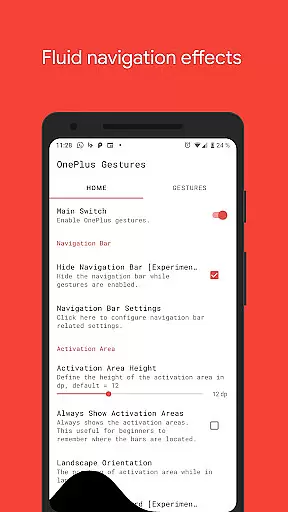
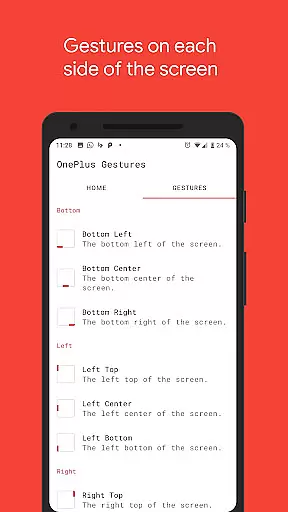
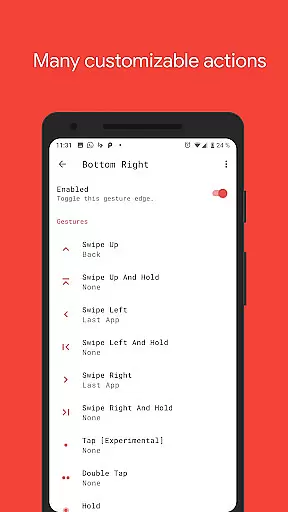
Vivid Navigation Gestures is a powerful tool that revolutionizes the way you interact with your Android device. This app allows users to control their devices through intuitive gestures instead of traditional button presses, offering a more modern and fluid user experience.
One of the standout features of Vivid Navigation Gestures is its beautiful visual effects during gesture interactions, enhancing both functionality and aesthetics. The app supports multiple gesture triggers across different areas of the screen, giving users flexibility in how they navigate their devices. Whether it's launching the Google Assistant, going back, returning to the home screen, or accessing recent apps, this app has got you covered.
This application is particularly useful for those who prefer minimalistic designs on their devices, as it can hide the stock navigation bar when gestures are enabled. Although some features require ADB or root access, the overall convenience and customization options make Vivid Navigation Gestures an excellent choice for power users looking to streamline their device interactions.
Vivid Navigation Gestures offers a comprehensive set of features designed to enhance user interaction with Android devices. The app includes fluid visual effects during gesture operations, making navigation not only functional but also visually appealing. With multiple gesture triggers available, such as Bottom Left, Bottom Center, Bottom Right, and various others, users have numerous options to customize their navigation experience.
The range of available gestures is extensive, including swipe up, swipe left, double tap, and many more. Each gesture can be mapped to specific actions like launching apps, toggling settings, taking screenshots, controlling media playback, and even opening notifications or quick settings. This level of customization ensures that users can tailor the app to fit their unique needs and preferences.
For advanced users, the app provides additional functionalities through accessibility services, allowing for programmatically executed actions such as back, home, or quick settings without collecting any personal data. Moreover, the ability to hide the stock navigation bar using ADB or root access adds another layer of personalization, catering to tech-savvy individuals who value clean interfaces and efficient workflows.
Vivid Navigation Gestures excels in providing accurate and effective gesture controls that replace traditional button presses. The app ensures precision in recognizing various gestures, such as swipes and taps, across different trigger zones on your device's screen.
With its robust design, the app supports a wide array of actions from launching Google Assistant to taking screenshots. Each gesture is mapped to perform specific tasks, enhancing both speed and ease of use without compromising on reliability.
Users benefit from seamless interaction as the app executes commands swiftly without delay or error. This responsiveness elevates user experience by making navigation intuitive and fluid, setting a high standard for functional accuracy in gesture-based controls.
The interface of Vivid Navigation Gestures is crafted to offer simplicity and an intuitive user experience. By minimizing complexity, the app allows users to easily configure and activate gesture controls without a steep learning curve.
Despite the sophisticated functionality, the setup process remains straightforward. Users can quickly assign preferred actions to specific gestures through a clean and organized menu system that prioritizes ease of access.
This focus on intuitive design ensures that even those new to gesture navigation can adapt quickly. As a result, users enjoy not only simplified interactions but also enhanced productivity as they navigate their devices with natural, easy-to-remember movements.
Intuitive gesture controls
Beautiful visual effects
Extensive customization options
Comprehensive action mapping
Enhanced user experience
Requires ADB or root for full functionality
Complex setup process
Limited to Android devices
Potential learning curve
Not suitable for all users

Just swipe the edge to do something!
 4.40
4.40
1-Click close all background apps on Android TV
3.90
Unlock your Essential Key. Create custom shortcuts to your favorite apps!
4.2
Quickly & easily calculate the spacing of handrail balusters
4.20
Best leveling tool for your Android device. Hang paintings like a pro.
4.90
Making emulation easy for everyone!
4.30
Bedrock Together: Join any bedrock server on Xbox/PS
4.80
Button mapper, mouse toggle, sleep timer and a lot of another features
4.50
Your personal health butler
3.60
Support Fossify apps with a warm thank you!
5.00
Enjoy smooth gameplay with Game Booster
4.90
Unit and currency converter with easy and simple UI.
4.80
Monitor car performance in real time and troubleshoot malfunctions.
4.80
Screen Mirroring for Roku Sticks, Roku TCL TV and Roku Hisense TV
4.50
Use your phone as a webcam on your computer over WiFi or USB.
4.40
PC precision for mobile gaming: dominate with keyboard and mouse!
4.30
Effortlessly run ADB commands directly on your device without a PC.
4.20
Clean the junk files on your device
3.40
Transfer Files, APK from Phone to Watch & Install.
4.5


User Reviews