
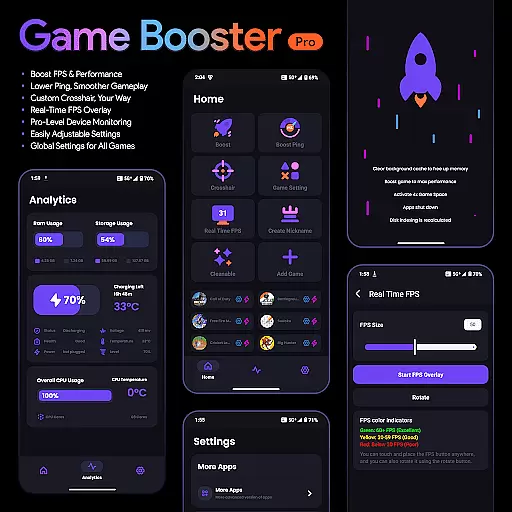
Game Booster Pro is a powerful tool designed to enhance your mobile gaming experience. This app focuses on optimizing game performance by boosting FPS, reducing lag, and offering real-time device monitoring. With its advanced features, gamers can enjoy smoother gameplay while customizing their gaming environment to suit their preferences.
The app's standout feature is its ability to create a local-only VPN connection that prioritizes network traffic for selected games, ensuring minimal latency during online matches. Additionally, the customizable crosshair feature caters specifically to FPS and shooting game enthusiasts, allowing them to fine-tune their aiming tools. Whether you're a casual or competitive gamer, Game Booster Pro provides the essential utilities to elevate your gaming sessions.
With an intuitive interface and seamless integration into various games, this tool ensures that users can easily adjust settings without disrupting their gameplay. The app also emphasizes user privacy by maintaining a secure, data-free environment, making it a reliable choice for gamers who value both performance and security.
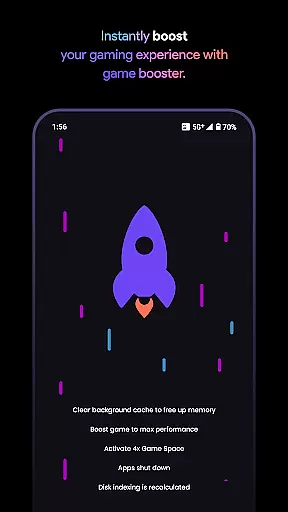
Game Booster Pro offers a comprehensive suite of features tailored to improve gaming performance. One of its primary functions is the ability to boost FPS and enhance overall game performance, providing users with a smoother and more responsive gaming experience. By optimizing device settings, the app reduces lag and improves frame rates, which is crucial for fast-paced games where every millisecond counts.
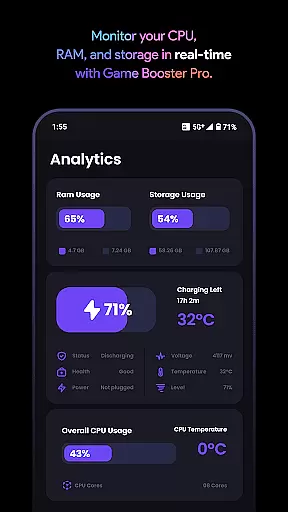
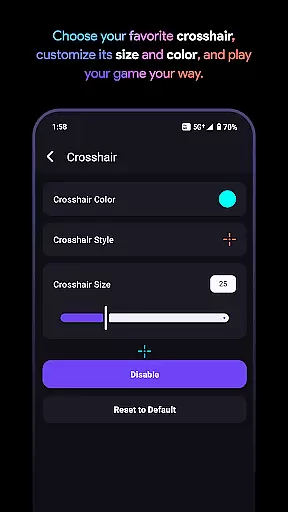
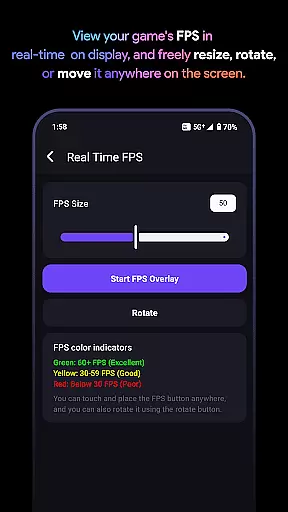
In addition to performance enhancements, the app includes a customizable crosshair feature, enabling players to design their ideal aiming point for any game. This is complemented by a real-time FPS overlay, allowing gamers to monitor their device's performance metrics without leaving the game. The app also offers pro-level device monitoring, giving users insights into CPU, GPU, and memory usage, ensuring their device runs at optimal efficiency.
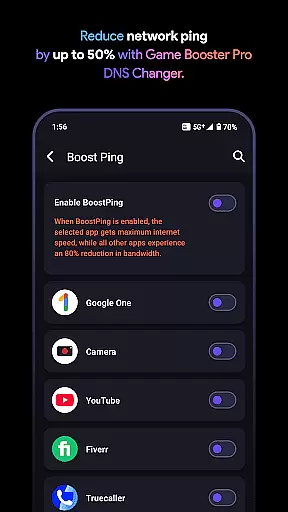
Another notable feature is the use of VpnService to optimize network traffic specifically for gaming. This creates a local-only VPN connection that prioritizes bandwidth for selected games, effectively reducing ping and network interruptions. With easily adjustable global settings, users can apply their preferences across all games, streamlining the customization process and enhancing the overall gaming experience.
Game Booster Pro focuses on delivering accurate and effective core functions that cater to gamers who demand high performance. The app optimizes gaming settings to boost FPS, lower lag, and enhance the overall gaming experience. By prioritizing network traffic for selected games using VpnService, it ensures a seamless online experience without compromising privacy.
The effectiveness of Game Booster Pro is evident in its ability to reduce ping and lag, which are crucial for online gaming. It achieves this by creating a Local-Only VPN connection that prioritizes gaming traffic while reducing bandwidth usage for background apps. This targeted optimization allows gamers to enjoy smoother gameplay with minimal interruptions or delays.
Users benefit from real-time monitoring features that display FPS and device stats directly on their screen. This overlay provides critical insights into device performance, enabling users to make informed adjustments. With easily adjustable settings and global preferences, gamers can customize their experience across all games, ensuring consistent performance enhancement tailored to individual needs.
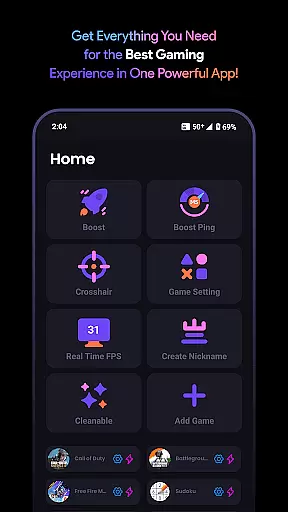
A simple and intuitive interface is essential for any tool-based application, and Game Booster Pro excels in this area. The user-friendly design allows gamers to navigate through various settings effortlessly. Whether adjusting crosshairs, monitoring FPS, or tweaking device performance, each feature is accessible within just a few taps.
The app's layout emphasizes ease of use without sacrificing functionality. Key features such as Boost FPS & Performance, Lower Lag, Custom Crosshair, and Real-Time FPS Overlay are prominently displayed, making them easy to locate and activate. This straightforward presentation ensures that even novice users can quickly grasp how to utilize these powerful tools effectively.
By focusing on an intuitive interface, Game Booster Pro reduces the learning curve typically associated with performance-enhancing applications. Gamers can spend less time configuring settings and more time enjoying their games. The combination of simplicity and powerful functionality makes this app an invaluable asset for both casual and professional gamers seeking enhanced performance without complexity.
Boosts FPS effectively
Reduces lag significantly
User-friendly interface
Customizable crosshair
Real-time performance monitoring
Premium features require payment
Limited to compatible games
VPN feature may concern some users
Occasional bugs reported
Refund policy has restrictions

A powerful, easy-to-use flight computer on your phone or tablet!
 3.80
3.80
Connect instantly to a fast, encrypted VPN with one tap
4.60
Just one-tap to easy translate in any language after calls within seconds.
4.20
Unlock your Essential Key. Create custom shortcuts to your favorite apps!
4.2
HD Video player and downloader for all formats, fast & smooth 4K video playback.
4.60
Planner and Tracker for Stardew Valley
4.60
Screen Mirroring for Roku Sticks, Roku TCL TV and Roku Hisense TV
4.50
Play your X-Box games remotely in 1080p with any controller and zero latency
4.60
Clean up your phone, find files, play media, and share files offline
4.50
Change your GPS location instantly. Simulate routes anywhere in the world.
4.90
Remote Play with FSR upscaling, low latency & full controller support
4.80
FV File Manager Pro, Fast and powerful file manager for Android
4.60
Canon PRINT is a companion app for your Canon printer.
4.60 4.50
4.50
Family Locator, Share location, StayConnect with your family in real time
3.90
A non-root local ADB shell client. READ BELOW!
3.40
PDF Reader - Document Viewer: Read, Manage & Organize Your Documents
3.10
card-reader app
2.20
Transfer Files, APK from Phone to Watch & Install.
4.4


User Reviews