
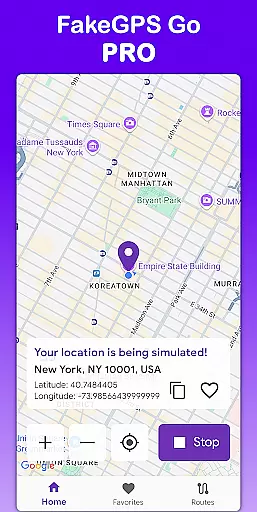
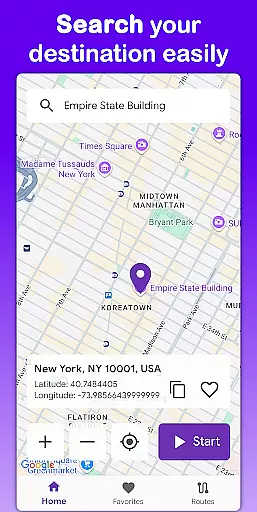
Fake GPS Go Pro is a powerful tool designed to help users instantly change their GPS location and simulate routes anywhere in the world. This app is ideal for developers testing location-based apps, individuals exploring virtual locations, or anyone needing to spoof their GPS position. With no root access required, it offers a seamless experience across devices while maintaining high precision in location simulation.
The app stands out with its user-friendly interface, allowing users to set locations with just a few taps, create custom routes on the map, and even save favorite spots for quick access. Supporting eight languages and offering a premium experience free of ads, Fake GPS Go Pro ensures both accessibility and reliability for various use cases.
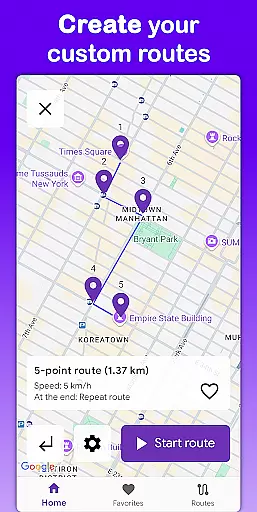
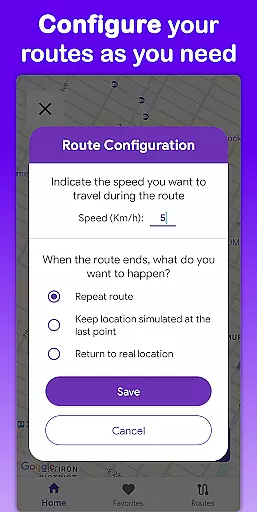
Fake GPS Go Pro boasts an array of features that cater to different needs related to GPS location manipulation. One of its core functionalities is the ability to instantly change your GPS location to anywhere globally, providing flexibility for app testing or virtual exploration. The app also allows users to simulate movement by creating custom routes on the map, specifying speeds, and choosing actions upon route completion.
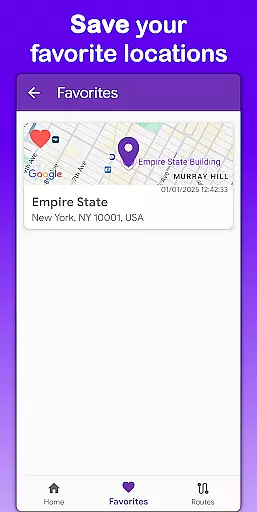
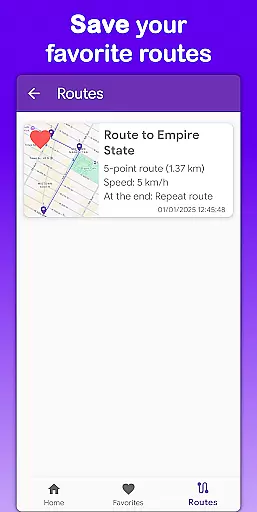
In addition to these capabilities, the app supports saving frequently used locations and routes, ensuring efficiency for regular tasks. Its multilingual support spans eight languages, making it accessible worldwide. Furthermore, the app operates without requiring root access, enhancing its compatibility with various devices while delivering a lightweight, battery-efficient performance.
For any location spoofing app, the precision and reliability of its core functions are paramount. Fake GPS Go Pro excels in this area by offering users the ability to instantly change their GPS location with just a few taps. This feature is crucial for developers testing geolocation-based applications or individuals exploring virtual locations.
The app's route simulation functionality further enhances its effectiveness. Users can create custom routes by placing markers on the map and selecting the speed at which the simulated movement occurs. This level of control ensures that the spoofed location behaves realistically, mimicking actual travel patterns which is essential for thorough app testing and development.
Additionally, Fake GPS Go Pro supports saving favorite locations and routes, allowing users to quickly access frequently used spots without reconfiguration. This not only streamlines the workflow but also significantly improves efficiency, making it an indispensable tool for anyone needing to manipulate GPS data.
A user-friendly interface is vital for ensuring that users can easily navigate and utilize an app's features. Fake GPS Go Pro boasts an intuitive design that allows users to spoof their location anywhere in the world effortlessly. The straightforward layout ensures that even those new to location spoofing can quickly get up to speed.
Moreover, the app provides multilingual support, being available in eight languages including English, Spanish, French, Portuguese, German, Italian, Hindi, and Indonesian. This broad language coverage makes the app accessible to a global audience, enhancing its usability across different regions and cultures.
Fake GPS Go Pro also eliminates the need for root access, making it compatible with any device right out of the box. This ease of use, combined with its powerful features, ensures that users can enjoy a seamless experience without technical barriers, focusing instead on leveraging the appu2019s capabilities for their specific needs.
User-friendly interface
High-precision GPS simulation
No root access needed
Multilingual support
Premium experience without ads
Limited to development purposes
Potential ethical concerns
Not suitable for real-world navigation
May conflict with system apps
Requires careful usage

 4.50
4.50
Quickly switch to an encrypted DNS server on Android TV
4.50
Unlock your Essential Key. Create custom shortcuts to your favorite apps!
4.2
Save any video in HD - paste the link, download fast and watch offline.
4.4
Forza Tuning Calculator App for Forza Horizon 5, Motorsport and Earlier Titles
4.40
VESC Tool can monitor and configure VESC-compatible devices over BLE and Wifi
4.20
Create your own live wallpaper or check out thousands already made presets
3.90
Play your X-Box games remotely in 1080p with any controller and zero latency
4.60
Remote Play with FSR upscaling, low latency & full controller support
4.80
Navigate with Ease and Style
4.90
Excellent scientific calculator with symbolic algebra, integrals, derivatives
4.80
WiFi Signal Strength Meter help you detect WiFi Signal Strength in real time.
4.80
Planner and Tracker for Stardew Valley
4.60
With videos, electrical calculators, and built-in ebook, Ugly’s has your answer.
4.50
Game Booster, GFX Tool is now compatible with newer game update
4.50
Universal TV remote control all TVs, Roku, LG, Samsung, Fire, Vizio, Sony, TCL.
4.40
Remote for Roku, Fire TV, Samsung TV, LG TV, Android TV, Chromecast and VIZIO TV
4.20
View detailed information about your Nissan Leaf the dealer never shows you.
4.10
Fun lie-detection pranks for friends and parties.
3.80


User Reviews