

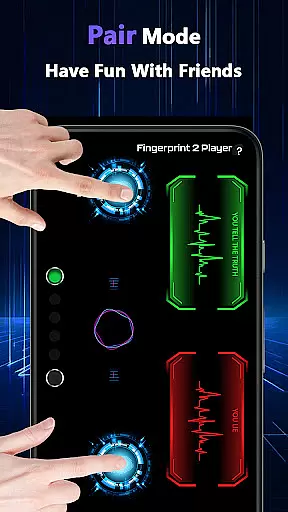
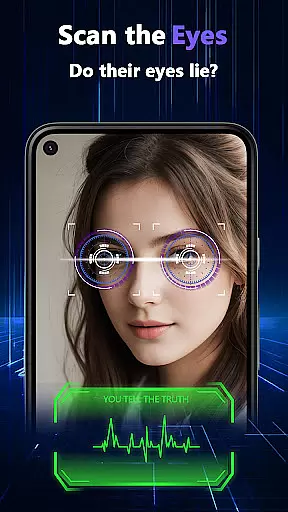
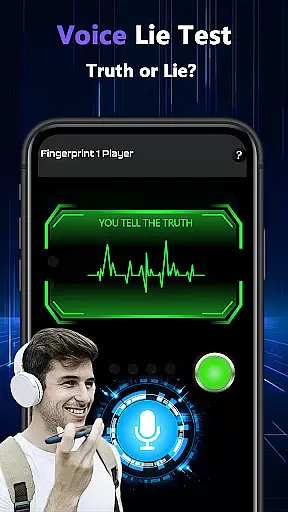

Lie Catcher Pro is a playful tool designed to add excitement and laughter to your social gatherings. This app offers various entertaining features such as fingerprint tests, eye scans, voice lie checks, and a pair mode for interactive fun with friends. While the results are purely for amusement and hold no scientific accuracy, Lie Catcher Pro creates whimsical moments perfect for parties and friendly banter. Dive into this lighthearted app and explore its engaging tools that guarantee a memorable time with friends and family.
Whether you're hosting a party or simply hanging out with mates, Lie Catcher Pro transforms ordinary moments into extraordinary experiences. Its intuitive interface allows users to quickly jump into different modes, sparking conversations and laughter in any setting. The app's design emphasizes user engagement and entertainment, making it an ideal choice for those looking to inject some fun into their social interactions.
Lie Catcher Pro boasts a variety of unique features that set it apart from typical entertainment apps. One standout feature is the pair mode, which allows two users to interact simultaneously, creating a dynamic and engaging experience. Additionally, the app includes simulated lie-detection methods like fingerprint analysis, eye scans, and voice checks, each adding a layer of intrigue and fun to your gatherings.
Each feature within Lie Catcher Pro is crafted to enhance user interaction and enjoyment. For instance, the fingerprint test mimics real lie detector procedures, providing a convincing and immersive experience. Similarly, the eye scan and voice analysis tools offer playful ways to challenge your friends' honesty. Although these features are designed purely for entertainment purposes, they succeed in delivering light-hearted fun that can turn any mundane meeting into a lively event.
Lie Catcher Pro provides a variety of playful features designed to enhance social interactions during gatherings. The app includes fingerprint tests, eye scans, and voice lie checks, all intended to create light-hearted moments among friends.
While the results are not scientifically accurate, the app excels in delivering fun experiences. Its core functions are crafted to spark friendly banter and amusement, making it ideal for parties or casual meet-ups where entertainment is the priority.
Users can engage with pair mode, allowing them to test who might be 'lying' in a group setting. This feature adds an interactive layer, encouraging participants to guess outcomes playfully. The whimsical nature of these interactions ensures memorable and enjoyable sessions.
The interface of Lie Catcher Pro is designed to be straightforward and easy to navigate, ensuring users can quickly access its features without confusion. With clear options for fingerprint tests, eye scans, and voice lie checks, the app maintains a user-friendly layout that supports its playful purpose.
Each feature is presented in a simple format, minimizing the learning curve for new users. Whether selecting pair mode or initiating a single-player test, the intuitive design allows seamless transitions between activities, enhancing the overall experience.
By focusing on simplicity, the app ensures that users spend less time figuring out controls and more time enjoying the fun, interactive elements. This balance of ease and engagement makes Lie Catcher Pro a delightful addition to any social gathering.
User-friendly interface
Engaging pair mode
Variety of fun features
Perfect for parties
Encourages social interaction
No scientific accuracy
Limited practical use
Requires willing participants
Short-term entertainment
Ads may disrupt experience

 4.50
4.50
A recovery soft,it features photo recovery, video recovery, file recovery.
3.40
Use your phone as a webcam on your computer over WiFi or USB.
4.40
card-reader app
2.20
Forza Tuning Calculator App for Forza Horizon 5, Motorsport and Earlier Titles
4.40
Quickly check the frequency of the Earth
4.30
Connect wirelessly to your computer to watch movies, browse the web, play games
5.00
Clean up your phone, find files, play media, and share files offline
4.50
Enjoy a smooth mobile reading experience!
3.60
Enjoy smooth gameplay with Game Booster
4.90
Fast Video Downloader, Movie Downloader, Torrent Downloader & Adblock Browser
4.70
Connect instantly to a fast, encrypted VPN with one tap
4.60
Quickly switch to an encrypted DNS server on Android TV
4.50
Complete kernel toolbox with features to manage and tweak your rooted device
4.30
Introducing Smart Printer, your ultimate destination for printing solutions!
4.00
Create your own custom widget with endless possibilities
3.90
Clean the junk files on your device
3.40
A non-root local ADB shell client. READ BELOW!
3.40
Unlock your Essential Key. Create custom shortcuts to your favorite apps!
4.0


User Reviews