
The Everything Key is a powerful utility app designed to unlock the full potential of your device's hardware button. With this tool, you can remap your phone's special button to perform various actions, turning it into an instant productivity booster. The app offers a clean and intuitive interface inspired by the Nothing aesthetic, making it easy to personalize your device.
Whether you want to launch your camera, favorite messaging app, or most-used utility with a simple double or triple press, The Everything Key has got you covered. It works seamlessly on supported devices without requiring root access, using standard Android features for enhanced functionality. Your privacy is prioritized, as the app solely listens for specific hardware key presses without accessing any personal information.
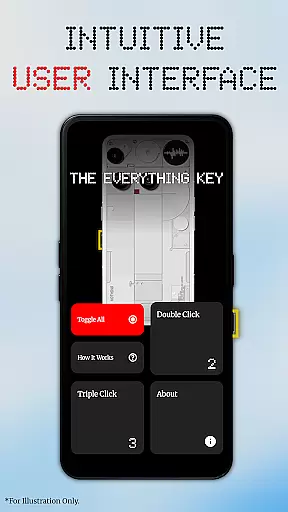
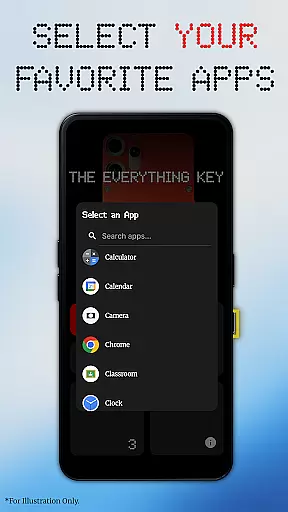
The Everything Key stands out with its powerful remapping capabilities. You can assign different apps to both double-press and triple-press actions, providing quick access to your most-used applications. The app's intuitive UI ensures a beautiful, minimalist experience that feels right at home on your device.
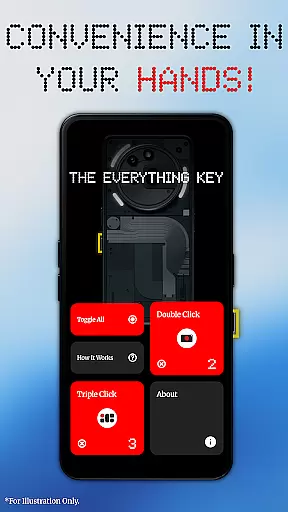
Advanced control options allow you to tap a mapped card to enable or disable its action quickly. Additionally, the 'Toggle All' feature lets you activate or deactivate all mappings at once. On first launch, the app helps you select your specific device model and color to display a stunning, integrated background, offering a personalized experience tailored to your device.
The Everything Key excels in providing precise and effective core functionality by enabling users to remap their device's special hardware button. This app leverages Android's Accessibility Service to accurately detect specific hardware key presses, ensuring that your custom double or triple press actions are executed without fail.
With a focus on speed and personalization, the app allows you to launch frequently used applications such as your camera or favorite messaging app instantly. The intuitive interface ensures that even those new to customization can easily navigate and set up their preferred mappings, making it an accessible tool for enhancing productivity.
Advanced control features further enhance its effectiveness; tap a mapped card to toggle its action on or off, use the 'X' icon to un-map an app permanently, or utilize the 'Toggle All' feature to manage all mappings simultaneously. These options provide users with complete command over their device's functionality, streamlining their interaction with the device.
The Everything Key offers a beautifully minimalist and intuitive user interface inspired by the Nothing aesthetic, ensuring that it feels like a natural extension of your device. Upon first launch, the app assists you in selecting your specific device model and color, displaying a stunning integrated background that aligns perfectly with your deviceu2019s design.
Its clean layout makes it easy to see which apps are mapped to your hardware button and whether they are active, simplifying the management of your custom actions. The straightforward design eliminates any unnecessary complexity, allowing users to focus on personalizing their experience without distraction.
By not requiring root access and working out of the box with standard Android features, The Everything Key removes barriers to entry for users seeking enhanced functionality. Its commitment to privacy is evident through its sole purpose of listening for specific hardware key presses without accessing personal information, reinforcing trust and ease of use.
Intuitive user interface
No root required
Advanced control options
Privacy-focused design
Personalized device integration
Limited to specific devices
Requires Accessibility Service
No official affiliation with device manufacturers
Functionality depends on hardware support
May not work on all Android versions

Just swipe the edge to do something!
 4.40
4.40
Save any video in HD - paste the link, download fast and watch offline.
4.5
HD Video player and downloader for all formats, fast & smooth 4K video playback.
4.60
Best leveling tool for your Android device. Hang paintings like a pro.
4.90
A non-root local ADB shell client. READ BELOW!
3.40
Bedrock Together: Join any bedrock server on Xbox/PS
4.80
Screen Mirroring for Roku Sticks, Roku TCL TV and Roku Hisense TV
4.50
Fast VPN USA for any country. Super secure VPN for calls, streaming, games, TV.
4.40
Your personal health butler
3.60
Easily install aab(Android App Bundle) files on your Android device with our app
4.80
Monitor car performance in real time and troubleshoot malfunctions.
4.80
Learn the vast amount of system information about device and monitor it's state
4.70
Small and simple app to Verify Root Access and BusyBox Install!
4.70
Fast Video Downloader, Movie Downloader, Torrent Downloader & Adblock Browser
4.70
Connect instantly to a fast, encrypted VPN with one tap
4.60
Mirror your screen to Chromecast and Android TV - Super fast and simple
4.60
Quickly check the frequency of the Earth
4.30
Create your own custom widget with endless possibilities
3.90
Smart and comfortable browsing experience.
3.80


User Reviews