
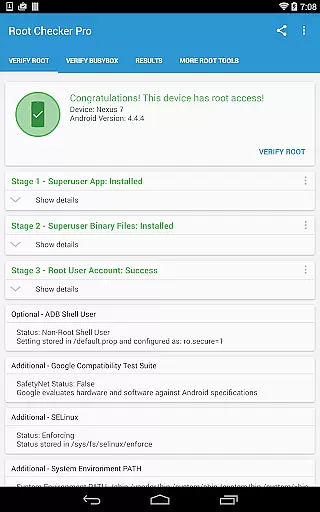
Root Checker Pro is a powerful diagnostic tool designed to verify root access on Android devices. The application provides a comprehensive check of the su binary, BusyBox installation, and related permissions without requiring root itself. It offers both basic and advanced users detailed system information needed to troubleshoot root-related issues.
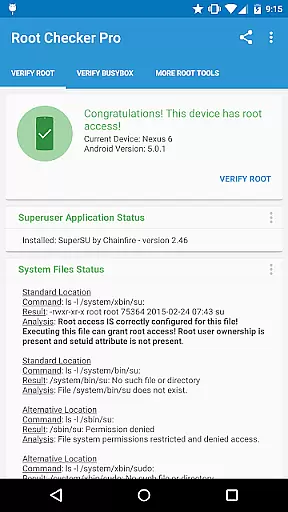
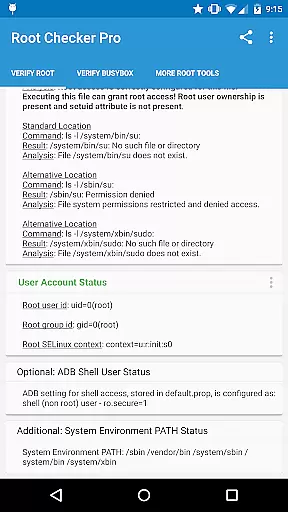
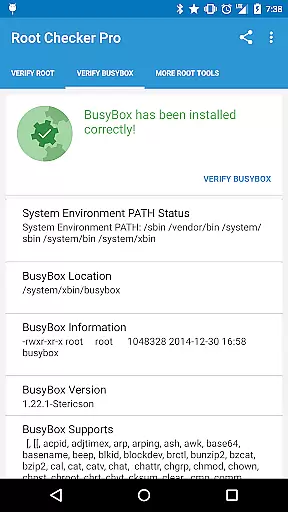
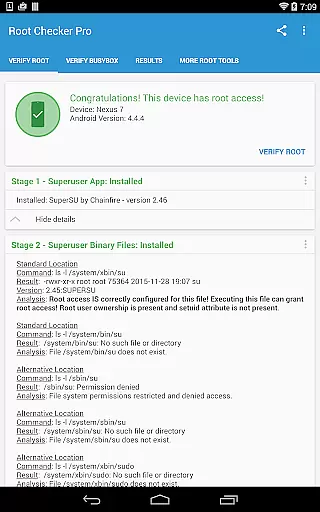
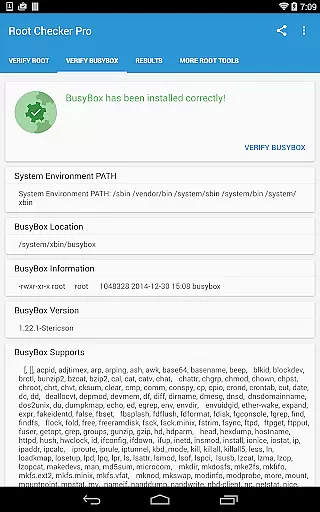
The app's intuitive interface displays critical data points such as su binary locations, file permissions, SELinux status, and Superuser app versions. For technically inclined users, it presents in-depth details about root configurations and BusyBox installations. Additionally, its widget feature enables real-time monitoring of root status, making it an essential utility for rooted devices.
This application is particularly useful for users who have recently rooted their devices or are experiencing issues with root access. By providing quick export options via email or social media, it facilitates easy collaboration with technical support teams or online communities.
Root Checker Pro stands out with its robust feature set tailored for root verification and diagnostics. The application checks all standard su binary locations and validates file permissions, ensuring accurate detection of root access. It also examines SELinux contexts and default adb shell user modes, providing complete visibility into the device's security configuration.
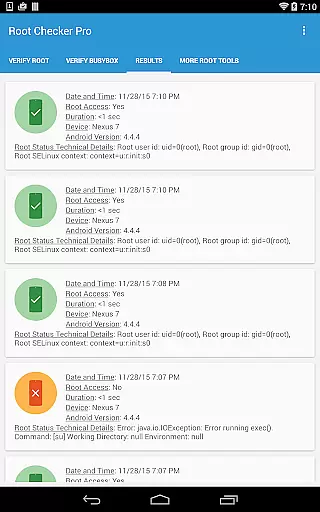
One of the key features is its detailed reporting capability. Users can generate comprehensive reports containing root status, BusyBox version, and other relevant system information. These reports can be easily shared via email or any installed social media app, enabling efficient troubleshooting and support.
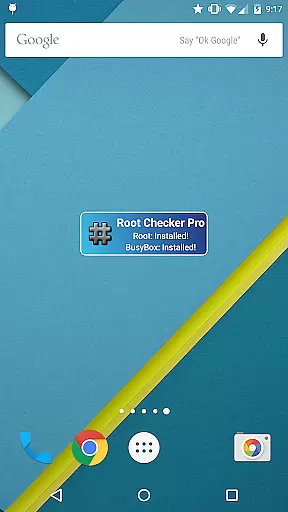
The included widget adds another layer of convenience by allowing users to monitor root status continuously. With customizable check intervals, it ensures users stay informed about their device's root condition. This combination of detailed diagnostics, easy sharing options, and real-time monitoring makes Root Checker Pro an indispensable tool for managing rooted Android devices.
Root Checker Pro delivers exceptional accuracy in verifying root access on Android devices. The application meticulously examines the presence and status of the su binary, which is critical for granting root permissions. By checking standard su binary locations and file permissions, it ensures that users receive precise information about their device's root access.
The app goes beyond basic checks by providing detailed outputs of root uid/gid, SELinux context results, and Superuser application installations. This comprehensive approach guarantees that even the most complex root configurations are correctly identified and validated. Such thoroughness makes the application reliable for both novice and advanced users who need to confirm their device's root status.
For troubleshooting purposes, Root Checker Pro offers advanced details around the root and BusyBox installation. These insights help users quickly identify and resolve any issues related to improper installations or misconfigurations. With its ability to export detailed outputs via email or social media, the app facilitates easy collaboration and efficient problem-solving.
Root Checker Pro boasts an intuitive interface that simplifies the process of checking for root access. Upon launching the app, users are greeted with a straightforward dashboard that clearly presents the most crucial information regarding their device's root status. This ease of access ensures that even those new to Android can confidently verify their root access without confusion.
The design emphasizes usability with a single button that allows users to share Root and BusyBox details effortlessly. Whether exporting information via email or through social media applications installed on the device, this feature streamlines collaboration and troubleshooting efforts. Such simplicity enhances user experience by removing unnecessary complexity often found in technical tools.
Additionally, the inclusion of a widget further exemplifies the app's commitment to simplicity. Users can set up timer intervals to monitor root and BusyBox installation statuses continuously. With on-screen notifications provided by the widget, staying informed about any changes in real-time becomes hassle-free, ensuring users remain up-to-date with their deviceu2019s operational status without needing to open the app constantly.
Comprehensive root checking
User-friendly interface
Detailed system reports
Easy sharing options
Real-time monitoring widget
No rooting capability
Advanced details may overwhelm beginners
Limited functionality on non-rooted devices
Requires basic technical knowledge
Occasional compatibility issues

 4.10
4.10
pdf merge, word to pdf, jpg to pdf, edit pdf, convert to pdf and much more!
4.20
Learn the vast amount of system information about device and monitor it's state
4.70
Remote for Roku, Fire TV, Samsung TV, LG TV, Android TV, Chromecast and VIZIO TV
4.20
Amateur Radio app for APRS: Track friends, exchange messages, get tactical info.
3.90
Forza Tuning Calculator App for Forza Horizon 5, Motorsport and Earlier Titles
4.40
Your personal health butler
3.60
fast and easy mp3 music downloader
4.80
Enhance your Beats
3.70
Fast Video Downloader, Movie Downloader, Torrent Downloader & Adblock Browser
4.70
ADB support Android 4.X-Android 13(Support wireless pair mode).No root required!
4.70
Protect your device with antivirus, storage cleanup, and system monitoring
4.70 4.50
4.50
Button mapper, mouse toggle, sleep timer and a lot of another features
4.50
Quickly & easily calculate the spacing of handrail balusters
4.20
Automate everything from settings to photos, SMS to speech. ADC2 prize winner.
4.10
A non-root local ADB shell client. READ BELOW!
3.40
PDF Reader - Document Viewer: Read, Manage & Organize Your Documents
3.10
card-reader app
2.20


User Reviews