
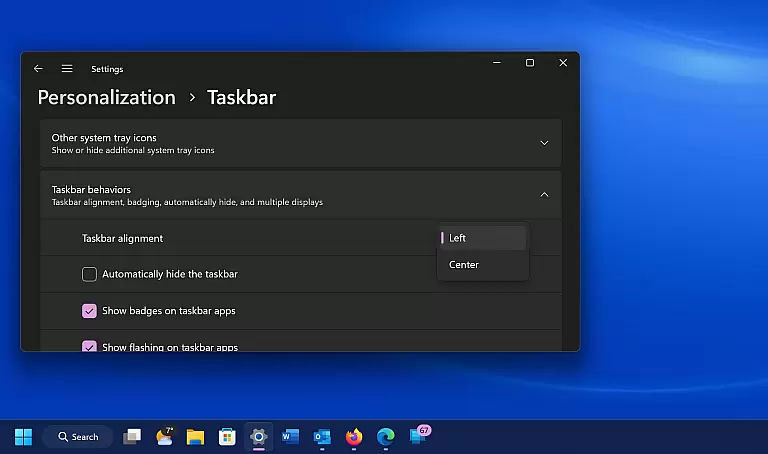
Windows 11 represents a significant evolution in personal computing, offering a streamlined interface and enhanced productivity tools. The operating system introduces a centered Start menu, redesigned for ease of access and navigation. With Snap Layouts and virtual desktops, users can organize their workspace efficiently, making multitasking seamless.
This OS also brings notable improvements in collaboration and connectivity features. Integrated Microsoft Teams allows direct communication from the taskbar, while DirectStorage technology ensures faster load times for supported games and applications. Windows 11 is optimized for both traditional PCs and modern touch-enabled devices, providing a versatile computing experience across various hardware configurations.
Windows 11 boasts several innovative features that set it apart from its predecessors. The new Start menu and taskbar design provide a clean, organized layout that emphasizes frequently used apps and recent files. Enhanced touchscreen gestures and voice typing offer intuitive control options, adapting to diverse user preferences.
Gaming on Windows 11 has been elevated with Auto HDR and DirectStorage technologies. These features ensure that compatible games display richer colors and load significantly faster than before. Additionally, the integration of Android apps expands the software ecosystem, allowing users to enjoy mobile applications directly on their PCs through the Amazon Appstore.
When evaluating a tool-based application like Windows 11, the precision and effectiveness of its core functions are paramount. This encompasses how reliably and efficiently the app performs its primary tasks.
Windows 11 ensures high performance standards by offering a stable operating environment with advanced multitasking features, such as Snap Layouts and Virtual Desktops. These tools allow users to organize their workspace effortlessly, thus improving productivity.
For users, this means experiencing seamless daily operations, from launching applications to managing multiple tasks simultaneously without any lag or system crashes. The operating system's robust architecture supports demanding software needs, making it suitable for both personal and professional use.
The true value lies in the operating system's ability to adapt to various user needs while maintaining top-notch performance. Whether you're a student, professional, or casual user, Windows 11 delivers an effective solution tailored to enhance your computing experience.
A simple and intuitive interface is crucial for ensuring that users can navigate and utilize an application effectively. In the case of Windows 11, the emphasis on user-friendly design significantly enhances the overall user experience.
Windows 11 introduces a redesigned Start menu, centered taskbar icons, and touch-friendly controls. These changes make navigation more straightforward and accessible, even for those who may not be tech-savvy. The new layout focuses on minimizing clutter and maximizing efficiency.
Users benefit from this streamlined approach as it reduces the learning curve associated with adopting a new system. Everyday tasks such as file management, app launching, and system settings adjustments are now more intuitive and less time-consuming.
Ultimately, the simplified interface fosters a more engaging and productive interaction with the device. By prioritizing clarity and ease of use, Windows 11 sets a new standard for what users should expect from modern operating systems.
Modernized UI
Improved multitasking
Better security
Enhanced gaming
Android app support
Higher system requirements
Limited upgrade path
Fewer legacy apps
Learning curve
Compatibility issues

 4.50
4.50
Transfer Files, APK from Phone to Watch & Install.
4.0
Safely recover deleted photos, videos, and files with a single easy tap.
3.70
Support Fossify apps with a warm thank you!
5.00
Play your X-Box games remotely in 1080p with any controller and zero latency
4.60
Automate everything from settings to photos, SMS to speech. ADC2 prize winner.
4.10
Clean up large files and similar photos, fast and easy to use
4.40
Your personal health butler
3.60
The ideal app to be the digital eye of your family
3.40
Best leveling tool for your Android device. Hang paintings like a pro.
4.90
Remote Play with FSR upscaling, low latency & full controller support
4.80
App to pay for FUTO Keyboard
4.60 4.50
4.50
An easy-to-use calculator designed to save time calculating and bending conduit
4.30
Effortlessly run ADB commands directly on your device without a PC.
4.20
A simple app to back up and restore SMS & MMS messages and call logs.
4.10
1-Click close all background apps on Android TV
3.90
Family Locator, Share location, StayConnect with your family in real time
3.90
A recovery soft,it features photo recovery, video recovery, file recovery.
3.40


User Reviews