
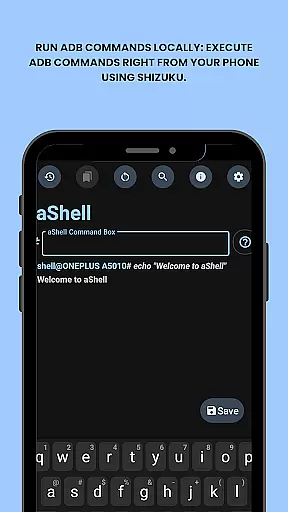
aShell is a specialized ADB shell tool designed for Android devices operating within a Shizuku environment. This application allows users to execute ADB commands directly from their mobile device, removing the necessity for a computer. It's particularly beneficial for developers and advanced users who require full control over their device internals.
The app features a lightweight design with open-source accessibility, providing preloaded command examples and live command output support. Users can search within the command output, save results to text files, and switch between dark and light modes. With bookmarking functionality for frequently used commands, aShell streamlines the process of managing device operations on-the-go.
For those familiar with ADB or Linux command-line operations, aShell offers an enhanced experience through its intuitive interface and comprehensive feature set. The app also supports continuous commands like logcat or top, making it an indispensable tool for real-time debugging and monitoring.
aShell stands out with its unique capability to run ADB commands locally on Android devices using Shizuku. This eliminates the traditional requirement of a connected PC for executing such commands, offering unparalleled convenience for power users. The inclusion of preloaded command examples ensures that even those with basic ADB knowledge can quickly get started.
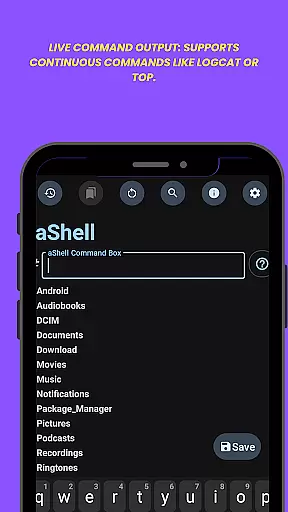
One of the key highlights is the live command output feature, which supports continuous commands such as logcat or top. This enables real-time monitoring and debugging directly from the mobile interface. Additionally, users can search within the command output and save these results to files for future reference or sharing.
The app provides both dark and light mode support, adapting seamlessly to user preferences and system settings. Its bookmarking system allows quick access to frequently used commands, enhancing workflow efficiency. These features collectively make aShell an essential tool for anyone seeking to manage their Android device with precision and ease.
aShell is designed to bring the power of ADB commands directly to Android devices, ensuring precision and reliability in its core functionality. By leveraging Shizuku's environment, it allows users to execute complex operations with confidence.
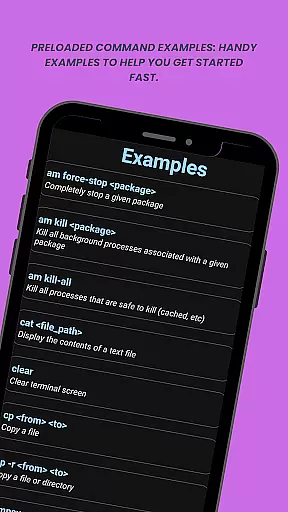
The app provides preloaded command examples that cater to both beginners and advanced users. These examples not only demonstrate proper syntax but also ensure that each command performs as expected, minimizing errors during execution.
With features like live command output for continuous monitoring and search functionality within results, aShell enhances operational effectiveness. Users can track real-time processes such as logcat or top without interruptions.
Ultimately, aShell empowers developers and power users by delivering accurate command-line capabilities on mobile devices. This makes device management more efficient while maintaining high standards of functional integrity.
aShell focuses on providing an intuitive user interface that simplifies interaction with ADB commands. Despite dealing with complex operations, the design ensures ease of use for all experience levels.
Key aspects include clear presentation of command outputs and straightforward navigation through various features. Users can easily access saved bookmarks or switch between dark/light modes based on their preferences.
The inclusion of helpful examples further streamlines the process, allowing users to quickly adapt to the tool's functionalities without a steep learning curve. This thoughtful arrangement reduces complexity typically associated with command-line tools.
By prioritizing simplicity and clarity, aShell creates an accessible environment where executing powerful ADB commands feels natural even on smaller screens. This approach significantly improves overall usability.
User-friendly interface
Live command output
Dark mode support
Bookmark functionality
Open-source availability
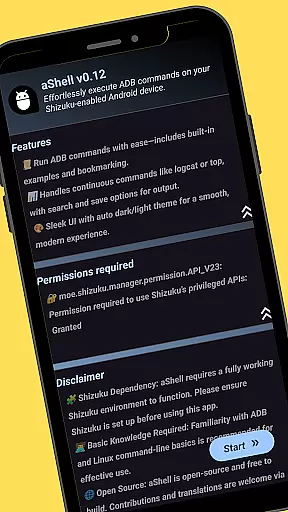
Requires Shizuku
Limited to ADB-savvy users
No iOS compatibility
Basic ADB knowledge needed
Feature-dependent on Shizuku

 4.10
4.10
Quickly switch to an encrypted DNS server on Android TV
4.50
Complete kernel toolbox with features to manage and tweak your rooted device
4.30
Family Locator, Share location, StayConnect with your family in real time
3.90
Universal TV remote control all TVs, Roku, LG, Samsung, Fire, Vizio, Sony, TCL.
4.40
Keep track of your Palia friendships, tasks, and inventory with Palia Notebook
4.60
Introducing Smart Printer, your ultimate destination for printing solutions!
4.00
Fast VPN USA for any country. Super secure VPN for calls, streaming, games, TV.
4.40
Enjoy a smooth mobile reading experience!
3.60
Unit and currency converter with easy and simple UI.
4.80
Monitor car performance in real time and troubleshoot malfunctions.
4.80
HD Video player and downloader for all formats, fast & smooth 4K video playback.
4.60
Canon PRINT is a companion app for your Canon printer.
4.60
Play your X-Box games remotely in 1080p with any controller and zero latency
4.60 4.50
4.50 4.50
4.50
Making emulation easy for everyone!
4.30
Remote for Roku, Fire TV, Samsung TV, LG TV, Android TV, Chromecast and VIZIO TV
4.20
A convenient photo, video, and file recovery tool.
4.00


User Reviews