
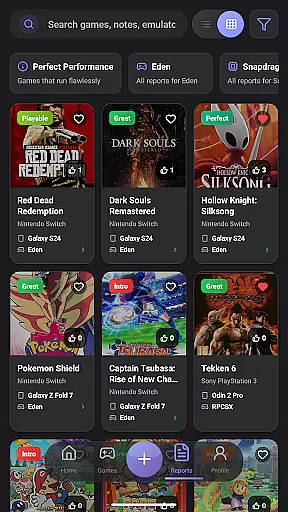
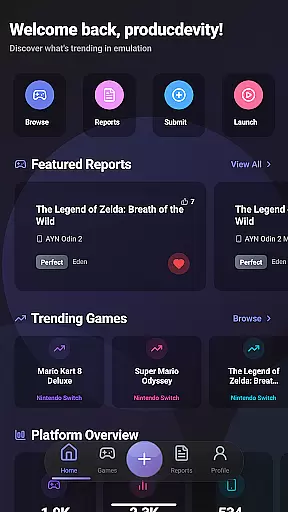
EmuReady Beta is a specialized tool designed for retro gaming enthusiasts who want to optimize their emulation experience. The app serves as a compatibility companion, helping users discover which games work best on their specific devices. With its comprehensive game compatibility database, EmuReady allows users to browse thousands of games and instantly see how they perform across different devices and emulators.
The app's community-driven platform provides detailed compatibility reports from real users, including performance ratings and custom settings. Whether you're using a flagship phone or a budget tablet, EmuReady delivers device-specific information to ensure optimal gaming performance. The app supports multiple emulator comparisons for systems like Nintendo Switch and 3DS, making it easier to find the best emulator for each game.
EmuReady is especially valuable for gamers who want to avoid wasting time with trial and error configurations. By offering smart filtering options, performance tracking, and a voting system, the app helps users make informed decisions about their emulation setup. Its dark mode feature ensures comfortable viewing at any time of day, enhancing the overall user experience.
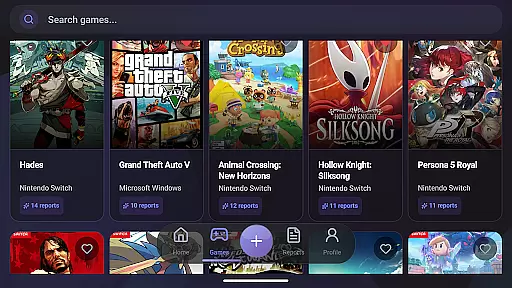
EmuReady Beta offers an array of features that cater to both novice and experienced emulation users. One of its standout capabilities is the extensive game compatibility database, which lets users search by game title, system, or browse through an extensive catalog. This feature saves users significant time by providing instant insights into game performance on various devices and emulators.
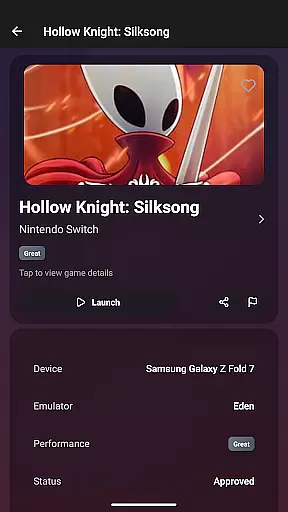
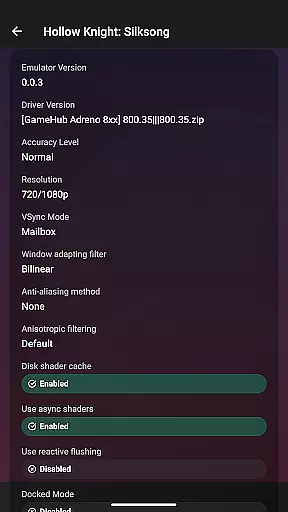
The app also includes community reports where real users share their experiences with detailed compatibility notes. These reports include performance ratings, custom settings, and helpful tips from the community. Additionally, EmuReady supports multiple emulators, allowing users to compare performance metrics such as FPS, graphical fidelity, and playability ratings ranging from Perfect to Unplayable.
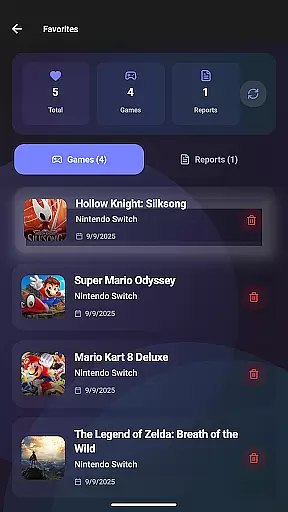
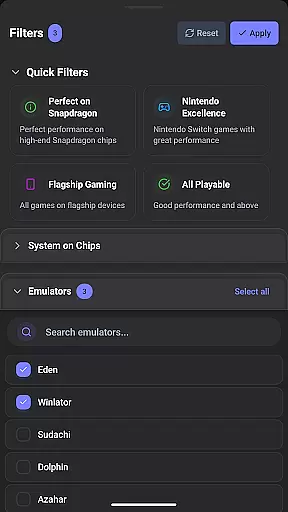
Other notable features include smart filtering options to refine searches by device, emulator, and performance rating, a vote and comment system to upvote helpful reports, and a favorites-saving function to track games of interest. The inclusion of dark mode ensures a comfortable viewing experience, making EmuReady Beta an essential tool for anyone serious about retro gaming.
EmuReady Beta focuses on providing accurate and effective core functions that are essential for retro gaming enthusiasts. The app's Game Compatibility Database allows users to browse thousands of games and instantly see how they perform on different devices and emulators. This feature ensures that gamers can make informed decisions about which games will run smoothly on their specific hardware.
The community-driven platform enhances the app's effectiveness by offering Community Reports where real users share their experiences with detailed compatibility reports. These reports include performance ratings, custom settings, and helpful notes from the community, ensuring that users have access to reliable information before they start playing.
Device-Specific Information is another key aspect of EmuReady Beta's functionality. By tailoring reports to exact device models, whether a flagship phone or a budget tablet, the app provides personalized recommendations. This targeted advice helps users optimize their gaming experience based on their unique device capabilities.
Furthermore, EmuReady Beta supports multiple emulators, allowing users to compare performance across different systems such as Nintendo Switch and 3DS. With smart filtering options, users can quickly find reports by device, emulator, performance rating, and more. This comprehensive approach ensures that users can efficiently identify the best emulator for each game, enhancing both the accuracy and effectiveness of their emulation setup.
EmuReady Beta excels in delivering an interface that is both simple and intuitive, catering to users of all experience levels. The app's design ensures that even those new to emulation can easily navigate through its features without feeling overwhelmed. Key functionalities like the Game Compatibility Database and Community Reports are straightforward to access and understand.
One-touch operations allow users to launch games, apply all necessary settings, and start playing with minimal hassle. This streamlined process significantly reduces the time spent on configurations, making it easier for users to dive into their gaming sessions. The app's Vote & Comment System further simplifies user interaction by enabling them to upvote helpful reports and contribute their own experiences effortlessly.
Additionally, EmuReady Beta offers a comfortable viewing experience with its Dark Mode feature, which includes automatic theme switching for day or night use. This attention to user comfort underscores the app's commitment to providing an intuitive interface that adapts to individual preferences.
Performance Tracking is presented in a clear and concise manner, displaying detailed metrics such as FPS, graphical fidelity, and playability ratings from Perfect to Unplayable. By presenting complex data in an easily digestible format, EmuReady Beta ensures that users can quickly grasp the performance aspects of their games, thus maintaining a balance between simplicity and depth in its interface design.
User-friendly interface
Comprehensive game database
Community-driven reports
Device-specific optimization
Multiple emulator support
Beta version limitations
Occasional bugs
Limited emulator coverage
Dependent on user reports
No built-in emulator

1-Click close all background apps on Android TV
 3.90
3.90
Unlock your Essential Key. Create custom shortcuts to your favorite apps!
4.4
Enjoy smooth gameplay with Game Booster
4.90
App that Recover your pictures, videos or files after you delete them.
4.20
Carry a FTP server in your pocket and avoid USB cables for file transfer
4.20
Effortlessly run ADB commands directly on your device without a PC.
4.20
Quickly check the frequency of the Earth
4.30
Mirror your screen to Fire TV - Super fast and simple
4.40
A simple app to back up and restore SMS & MMS messages and call logs.
4.10
Powerful collection of electronics tools and reference.A must for any enthusiast
4.90
The one-and-only remote control for PC, Mac, and Linux
4.70
NFC Tools can read and write NFC tags.
4.70
Canon PRINT is a companion app for your Canon printer.
4.60
App to pay for FUTO Keyboard
4.60 4.50
4.50 4.50
4.50
Pro Emulator is an easy to use game console emulator for a range of consoles.
4.40
Transfer Files, APK from Phone to Watch & Install.
4.1
Download any file easily and quickly with Downloader
4.0


User Reviews