
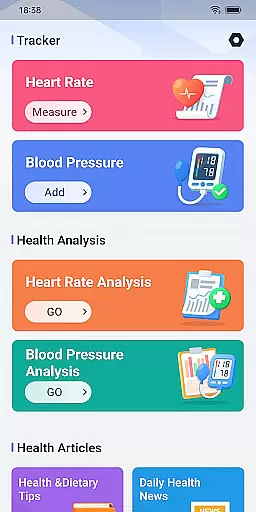
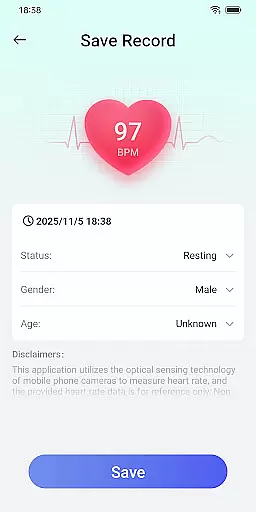
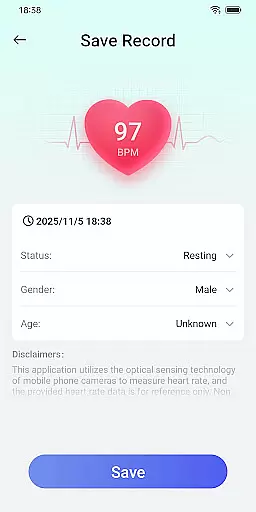
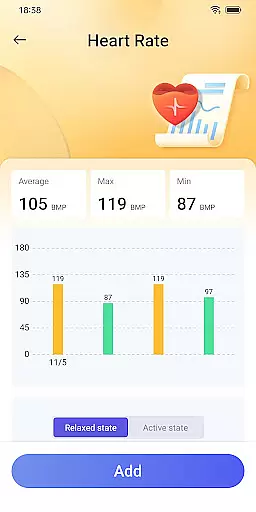
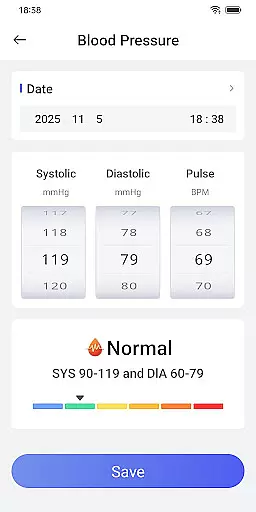
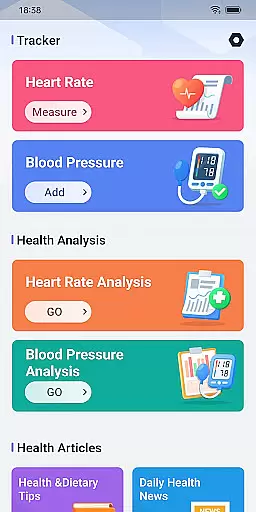
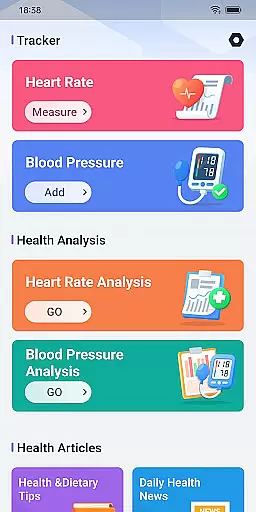
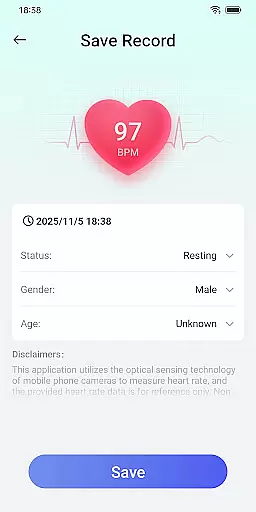
Daily HealthTracker is a comprehensive health monitoring tool that transforms your smartphone into a personal health assistant. The app utilizes the phone's camera to measure real-time heart rate by analyzing changes in fingertip blood flow, providing users with instant insights into their cardiovascular health.
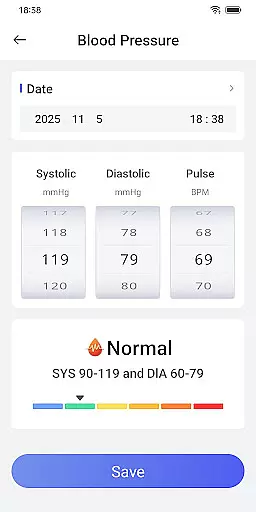
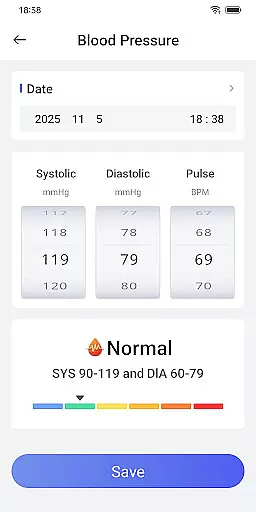
In addition to heart rate monitoring, the app allows users to manually input and track blood pressure readings, helping them maintain a complete record of their vital signs over time. With customizable reminders for measurements, it ensures users never miss an important health check. Whether you're a fitness enthusiast, an office worker concerned about sedentary lifestyle risks, or a senior looking after your well-being, Daily HealthTracker offers practical tools tailored to various health management needs.
While the heart rate data provided is for reference only and may vary based on environmental factors, the app serves as a convenient daily health companion. For medical-grade accuracy, users are advised to consult healthcare professionals. By adhering to strict privacy policies, Daily HealthTracker guarantees secure handling of user data, making it a reliable choice for health-conscious individuals.
Daily HealthTracker stands out with its innovative use of smartphone technology to deliver accessible health monitoring solutions. One of its key features is the ability to measure heart rate through the phone's camera, which intelligently captures subtle changes in blood flow. This functionality provides users with immediate feedback on their heart rate, enabling them to make informed decisions about their physical activities.
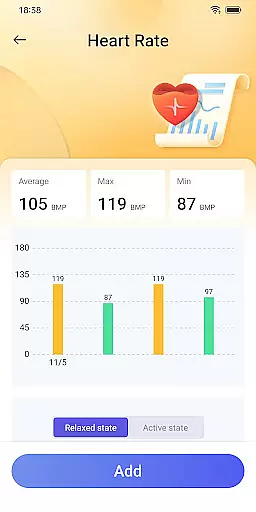
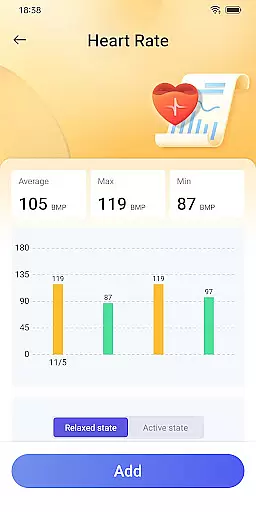
Beyond heart rate monitoring, the app includes robust tools for tracking blood pressure. Users can easily log their readings, view trends over time, and identify potential health risks early on. Customizable alarms remind users to take measurements regularly, ensuring consistent monitoring without disruptions. These features collectively empower users to manage their health proactively.
The app also caters to diverse user groups, from athletes monitoring training intensity to seniors managing age-related health concerns. Its intuitive interface and quick-access functionalities enhance usability, while adherence to Google Play's stringent privacy standards ensures user data remains protected. Although not intended for clinical use, Daily HealthTracker bridges the gap between convenience and professional healthcare support.
Accuracy and effectiveness are crucial for any health monitoring tool. Daily HealthTracker excels in this area by utilizing the smartphone's camera to intelligently capture changes in fingertip blood flow, providing real-time heart rate measurements. This innovative approach ensures that users receive immediate feedback on their cardiovascular status without the need for additional devices.
The application supports the input and recording of blood pressure data, allowing for comprehensive health tracking. By maintaining a detailed log of these metrics, users can monitor trends and fluctuations over time, aiding in the prevention of hypertension. The app's ability to deliver precise readings consistently adds to its reliability as a personal health companion.
For users ranging from sports enthusiasts monitoring training intensity to office workers looking to prevent cardiovascular diseases, Daily HealthTracker offers an accessible solution. Its features cater to various needs, ensuring that each user can maintain their health effectively. With clear disclaimers about the limitations of mobile phone-based measurements, the app promotes informed usage while encouraging professional medical consultation when necessary.
A simple and intuitive interface is essential for ensuring that users can easily navigate and utilize an application's features. Daily HealthTracker provides a seamless experience with its straightforward design, enabling users to quickly transform their mobile phones into health monitors. The minimalistic layout focuses on functionality, presenting key health metrics without overwhelming the user.
Setting up reminder alarms for heart rate measurements and blood pressure recordings is effortless, thanks to the app's logical structure. Users can configure notifications to avoid missing important health monitoring moments. These reminders contribute to forming consistent health-checking habits, which are vital for long-term wellness management.
Daily HealthTracker also respects user permissions, supporting quick access features once default home screen permissions are granted. While it may adjust the interface layout for optimization, all applications remain intact. Such considerate handling of user settings underscores the app's commitment to delivering an intuitive and hassle-free experience.
User-friendly interface
Real-time heart rate monitoring
Blood pressure tracking
Customizable reminders
Data privacy compliance
Heart rate accuracy varies
No medical certification
Limited device compatibility
Manual blood pressure input
Premium features require subscription

Extremely fast, secure, and protects your privacy
 4.80
4.80
FV File Manager Pro, Fast and powerful file manager for Android
4.60
Unit and currency converter with easy and simple UI.
4.80
HD Video player and downloader for all formats, fast & smooth 4K video playback.
4.60
Enjoy smooth gameplay with Game Booster
4.90
Unleash gamepad precision for ultimate mobile gaming dominance.
3.90
The Ultimate Bluetooth Keyboard & Mouse. Securely control your PC, Mac, and more
4.50
Planner and Tracker for Stardew Valley
4.60
Fast VPN USA for any country. Super secure VPN for calls, streaming, games, TV.
4.40 4.50
4.50
Screen Mirroring for Roku Sticks, Roku TCL TV and Roku Hisense TV
4.50
Complete kernel toolbox with features to manage and tweak your rooted device
4.30 4.10
4.10
MS-DOS in your pocket. Play old DOS games anywhere you are ;)
4.10
1-Click close all background apps on Android TV
3.90
Family Locator, Share location, StayConnect with your family in real time
3.90
Amateur Radio app for APRS: Track friends, exchange messages, get tactical info.
3.90
A non-root local ADB shell client. READ BELOW!
3.40
Transfer Files, APK from Phone to Watch & Install.
4.3


User Reviews