
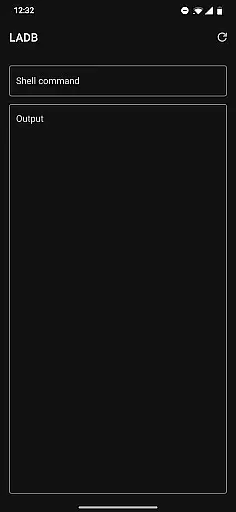
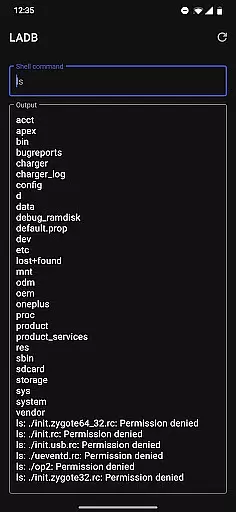
LADB is a powerful Android tool that allows users to establish a local ADB shell connection without requiring a USB cable. By bundling an ADB server within the app, it leverages Android's Wireless ADB Debugging feature to facilitate communication between the client and server directly on the device. This makes it ideal for developers and power users who need to execute ADB commands conveniently while on the go.
One of its standout features is the ability to pair devices using a pairing code and port, which can be managed through the app itself. While there are some compatibility issues with other tools like Shizuku, LADB remains a reliable solution for wireless debugging. With proper setup, it ensures seamless interaction with your Android device, making it a must-have utility for advanced device management.
LADB offers several notable features that enhance its functionality as a developer tool. First, it eliminates the need for a physical USB connection by utilizing Android's Wireless ADB Debugging capabilities. Users can easily set up a wireless debugging connection by copying the pairing code and port into the app, streamlining the process significantly.
Another key feature is its support for split-screen or pop-out window mode, allowing users to manage settings and LADB simultaneously. This ensures that the pairing information remains valid during the initial setup. Additionally, the app provides troubleshooting guidance for common issues, such as clearing app data and rebooting the device. Although it currently has compatibility limitations with Shizuku, LADB continues to deliver a robust and reliable wireless ADB experience.
For a tool like LADB, core function accuracy and effectiveness are paramount to ensure seamless local ADB operations without the need for USB connections. This app bundles an ADB server within its libraries, which traditionally requires an active USB connection to communicate with the Android device.
LADB leverages Android's Wireless ADB Debugging feature, allowing both the ADB server and client to interact locally. The initial setup is straightforward, involving simultaneous use of split-screen mode or a pop-out window with LADB and device Settings to input the pairing code and port without dismissing the dialog, ensuring continuous communication.
Users benefit from this precise interaction as it eliminates the dependency on physical USB connections, providing flexibility and convenience in managing their devices. Despite some compatibility issues with other apps like Shizuku, LADB offers a reliable solution for local ADB tasks.
A simple and intuitive interface is crucial for tools such as LADB, where users may range from beginners to advanced developers. The app provides clear instructions for setting up Wireless ADB Debugging, streamlining the process through guided steps that involve copying pairing codes and ports directly into the app.
The design supports multitasking features like split-screen mode, enhancing user experience by allowing simultaneous access to device settings and LADB. This approach minimizes errors during the pairing process and ensures that users can efficiently manage their ADB connections without unnecessary complexity.
By focusing on an uncluttered and functional UI, LADB reduces the learning curve associated with ADB operations, making it accessible even to those new to Android debugging. Troubleshooting tips further enhance usability, ensuring users can resolve common issues quickly and effectively.
Wireless convenience
Easy setup process
Powerful ADB functions
Reliable connectivity
Comprehensive troubleshooting
Incompatible with Shizuku
Setup can be complex
Occasional pairing issues
No offline user guides
Limited to supported devices

FV File Manager Pro, Fast and powerful file manager for Android
 4.60
4.60
Unit and currency converter with easy and simple UI.
4.80
Quickly & easily calculate the spacing of handrail balusters
4.20
Optimize your WiFi network, turn your phone into Wifi Analyzer
4.70
Keep track of your Palia friendships, tasks, and inventory with Palia Notebook
4.60
Monitor car performance in real time and troubleshoot malfunctions.
4.80
Powerful collection of electronics tools and reference.A must for any enthusiast
4.90
Mobile Security with Scam Protection | Malware & Virus Cleaner | Safe Browser
4.70
Your personal health butler
3.60
WiFi Signal Strength Meter help you detect WiFi Signal Strength in real time.
4.80
Small and simple app to Verify Root Access and BusyBox Install!
4.70
The Ultimate Flex Drivers Utility App - Convenient Tapping & Block Filters
4.70
NFC Tools can read and write NFC tags.
4.70
Pro Emulator is an easy to use game console emulator for a range of consoles.
4.40
Clean up large files and similar photos, fast and easy to use
4.40
Making emulation easy for everyone!
4.30
pdf merge, word to pdf, jpg to pdf, edit pdf, convert to pdf and much more!
4.20
Create your own custom widget with endless possibilities
3.90
Safely recover deleted photos, videos, and files with a single easy tap.
3.70


User Reviews