
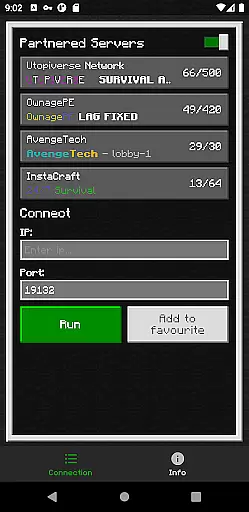
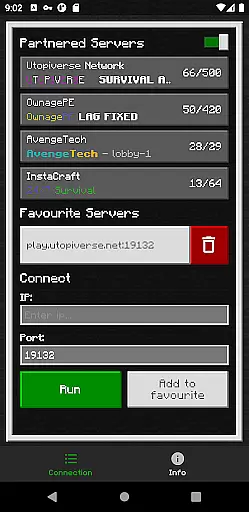
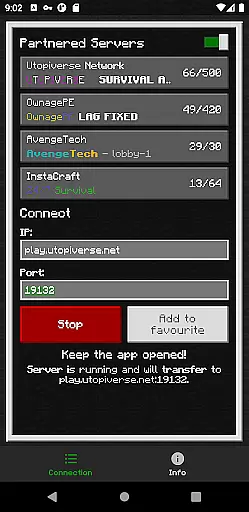
BedrockTogether (Pro) is an innovative networking tool designed to simplify server connections for Minecraft Bedrock Edition players. This ad-free version allows any Bedrock Edition server to appear as a LAN server on Xbox or PlayStation clients, enabling seamless connections without DNS rerouting. While Realms and Nintendo Switch compatibility are not supported, the app provides reliable performance for other platforms.
The application's core functionality lies in its ability to establish direct server connections through a simple four-step process. Users can input their desired server IP and port, launch the connection through the app, and access the server via the game's Friends tab. The tool automatically handles network configurations, making it particularly useful for gaming groups who frequently play together on local networks.
This tool delivers significant value to Minecraft enthusiasts by eliminating complex network setups. Its intuitive interface and straightforward operation make it accessible even to less technically inclined players, while its reliability ensures consistent performance during gaming sessions.
BedrockTogether (Pro) distinguishes itself through several notable features that enhance the multiplayer experience. The application's primary capability is its unique server bridging technology, which creates virtual LAN connections between devices on the same network. This feature works seamlessly with both Xbox and PlayStation consoles running Minecraft Bedrock Edition.
A key implementation detail is the app's four-step connection process, which simplifies traditional server joining procedures. The application handles all necessary network configurations automatically, while providing users with basic controls for starting and stopping the connection service. Additionally, the pro version removes all advertisements, ensuring uninterrupted usage during gaming sessions.
The tool's real value emerges in its ability to maintain stable connections while remaining completely transparent to the user. Unlike conventional methods requiring complex DNS settings or port forwarding, BedrockTogether operates entirely in the background. This approach not only reduces technical barriers but also minimizes potential security risks associated with manual network modifications.
Seamless LAN integration
Ad-free experience
Simple connection process
Reliable performance
Wide platform support
No Nintendo support
Local network required
Third-party app
Basic UI design
Paid version only

Easily install aab(Android App Bundle) files on your Android device with our app
 4.80
4.80
1-Click close all background apps on Android TV
3.90
Use your phone as a webcam on your computer over WiFi or USB.
4.40
Detect hidden spy camera with advanced scanning {{ Premium version }}
4.00
Unleash gamepad precision for ultimate mobile gaming dominance.
3.90
Screen Mirroring for Roku Sticks, Roku TCL TV and Roku Hisense TV
4.50
Download any file easily and quickly with Downloader
4.4
A simple app to back up and restore SMS & MMS messages and call logs.
4.10
Pro Emulator is an easy to use game console emulator for a range of consoles.
4.40
Navigate with Ease and Style
4.90
Excellent scientific calculator with symbolic algebra, integrals, derivatives
4.80
Small and simple app to Verify Root Access and BusyBox Install!
4.70
Mirror your screen to Chromecast and Android TV - Super fast and simple
4.60
Head tracking for PC sim games such as MSFS 2024 or Elite:Dangerous. No headset!
4.50
Just one-tap to easy translate in any language after calls within seconds.
4.20
Introducing Smart Printer, your ultimate destination for printing solutions!
4.00
Create your own custom widget with endless possibilities
3.90
Fun lie-detection pranks for friends and parties.
3.80
A recovery soft,it features photo recovery, video recovery, file recovery.
3.40


User Reviews