
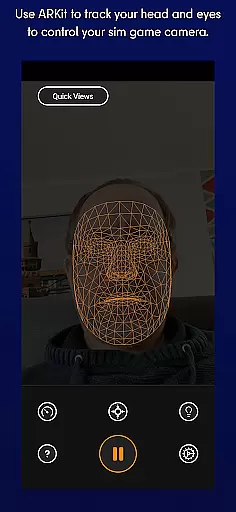
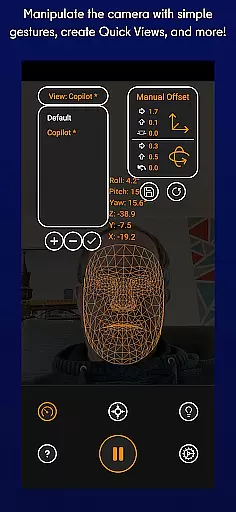
SmoothTrack is an innovative tool that leverages AR capabilities to provide 3D head tracking for sim game camera control. It supports any device compatible with Google AR services and works seamlessly with games supporting TrackIR. The app enables intuitive perspective adjustments through slight head movements, enhancing immersion in flight and driving simulators.
Key features include magnified in-game movements for precise control, a setup that requires no additional equipment, and compatibility with various popular simulation games. Whether you're flying planes in Microsoft Flight Simulator or driving trucks in Euro Truck Simulator 2, SmoothTrack offers a near-magical experience by translating your natural head motions into dynamic in-game camera views.
The app's practical applications extend to professional training simulations and immersive gaming experiences. Its ability to transform simple gestures into complex camera controls makes it an invaluable tool for both casual gamers and serious simulation enthusiasts.
SmoothTrack stands out with its unique use of AR technology for head tracking. The app employs advanced algorithms to interpret facial movements captured by your device's camera, converting them into precise in-game camera controls. This implementation requires no extra hardware, making it highly accessible.
Among its notable features are two display modes - dark mode for battery and OLED screen preservation, and bright mode for optimal visibility in low-light environments. The app also supports multiple protocols including FreeTrack and TrackIR, ensuring compatibility with a wide range of simulation software.
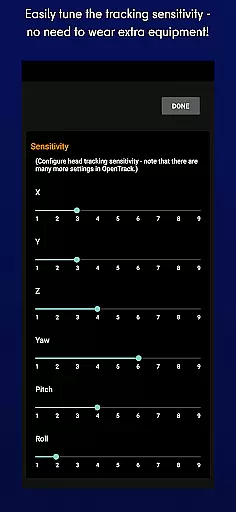
What sets SmoothTrack apart is its sophisticated motion exaggeration system. This feature allows users to achieve extreme viewing angles with minimal physical movement, creating a more comfortable and natural user experience. The app's versatility extends from basic cockpit views to complex space station approaches, demonstrating its adaptability across various simulation scenarios.
SmoothTrack's core functionality lies in its ability to provide precise 3D head tracking for controlling simulation game cameras. This is achieved through the AR capabilities of your device, ensuring that even the slightest head movements are accurately captured and translated into in-game camera perspectives.
The app supports any game compatible with TrackIR, making it versatile across various simulators like Microsoft Flight Simulator, Elite: Dangerous, and Euro Truck Simulator 2. The slight exaggeration of head movements allows users to achieve a wide range of motion without needing to make large physical movements, enhancing both comfort and control.
By utilizing simple camera gestures, SmoothTrack eliminates the need for additional equipment such as headsets. This accessibility ensures that users can seamlessly integrate the app into their gaming setup, providing an intuitive and immersive experience.
Gamers benefit from enhanced realism and engagement, as they can naturally lean forward to inspect cockpits or glance sideways to check surroundings. This level of precision and responsiveness significantly elevates the overall simulation experience.
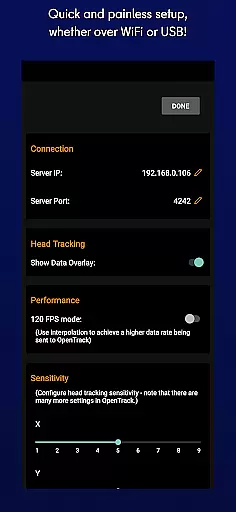
SmoothTrack excels in offering an interface that prioritizes simplicity and intuitiveness. Upon launching the app, users are greeted with straightforward setup instructions that guide them in positioning their device to capture facial movements effectively.
The app features two distinct modes: dark mode for battery savings and OLED screen protection, and bright mode for optimal visibility in dim environments. These options cater to different user preferences and lighting conditions, ensuring a comfortable experience regardless of the setting.
With no need for extra peripherals, the learning curve is minimal. Users can quickly adapt to controlling their games through natural head motions, thanks to the app's responsive design and real-time feedback system.
This intuitive approach extends to customer support, where assistance is readily available via Discord and Email. Whether troubleshooting issues or suggesting new features, SmoothTrack ensures that help is always within reach, reinforcing its commitment to user satisfaction.
Intuitive controls
No extra hardware
Wide game support
Energy-efficient modes
Precise tracking
Device compatibility
AR service required
Lighting dependent
Learning curve
Subscription model

pdf merge, word to pdf, jpg to pdf, edit pdf, convert to pdf and much more!
 4.20
4.20
Remote for Roku, Fire TV, Samsung TV, LG TV, Android TV, Chromecast and VIZIO TV
4.20
Unlock your Essential Key. Create custom shortcuts to your favorite apps!
4.1
An open-source APK explorer for Android!
4.10
VESC Tool can monitor and configure VESC-compatible devices over BLE and Wifi
4.20
Detect hidden spy camera with advanced scanning {{ Premium version }}
4.00
Unleash gamepad precision for ultimate mobile gaming dominance.
3.90
Download any file easily and quickly with Downloader
4.0
Pro Emulator is an easy to use game console emulator for a range of consoles.
4.40
Enjoy smooth gameplay with Game Booster
4.90
Excellent scientific calculator with symbolic algebra, integrals, derivatives
4.80
WiFi Signal Strength Meter help you detect WiFi Signal Strength in real time.
4.80
Fast Video Downloader, Movie Downloader, Torrent Downloader & Adblock Browser
4.70
Canon PRINT is a companion app for your Canon printer.
4.60
Mirror your screen to Fire TV - Super fast and simple
4.40
Quickly check the frequency of the Earth
4.30
App that Recover your pictures, videos or files after you delete them.
4.20
Carry a FTP server in your pocket and avoid USB cables for file transfer
4.20
Create your own custom widget with endless possibilities
3.90


User Reviews