
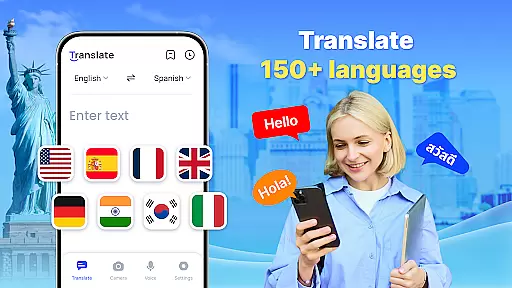







Translate is a versatile productivity app designed to break language barriers through its comprehensive translation capabilities. The app supports over 150 languages and offers multiple translation methods including text, voice, and photo translation. Whether you're traveling internationally, conversing with foreign colleagues, or studying new languages, this app provides instant and accurate translations.
One of the standout features is its offline functionality, allowing users to translate without an internet connection. This makes it particularly useful in areas with limited connectivity or when trying to avoid roaming charges. Additionally, the app includes practical tools like a floating ball for quick full-screen translations and auto-detection of input languages, making cross-cultural communication seamless and efficient.
The app's value extends beyond casual use, proving beneficial in professional settings as well. Business travelers can utilize real-time voice translation during negotiations, while students can employ photo translation to decipher foreign texts. By combining speed, accuracy, and accessibility, Translate empowers users to communicate effectively across different languages and cultures.
Translate offers an impressive array of features that cater to various translation needs. Its core functionality includes instant text translation across 150+ languages, which is perfect for travelers, business professionals, and language learners alike. The app utilizes advanced AI technology to ensure translations are not only fast but also highly accurate, maintaining the context and meaning of the original text.
Voice translation is another key feature, employing intelligent speech recognition to facilitate real-time conversations. Users can speak their native language and receive immediate translations, enabling smooth communication with foreign speakers. The photo translation function adds another layer of convenience, allowing users to capture images of foreign language materials such as menus, signs, or documents and receive instant translations.
Additional features enhance the overall user experience. The app's offline mode ensures uninterrupted service regardless of internet availability, while the floating ball provides quick access to full-screen translations. Users can also create translation collections for frequently used phrases, reverse translations for verification, and easily share results through various platforms. These comprehensive features make Translate an indispensable tool for global communication.
Core task management in a productivity app like Translate refers to the ability to handle multiple translation tasks efficiently and seamlessly. This feature is crucial for users who need quick and accurate translations across different formats such as text, voice, and images.
The Translate app excels in this area by offering instant text translation for over 150 languages, real-time voice translation using advanced speech recognition technology, and AI-powered photo translation. These features ensure that users can manage various translation tasks without hassle, whether they are traveling, conducting business, or learning new languages.
For the user, this means saving valuable time and effort. The app's ability to auto-detect input language and provide reverse translations adds another layer of convenience, making it an indispensable tool for both casual and professional use.
Ultimately, the robust task management capabilities of Translate empower users to communicate effectively across language barriers, enhancing both personal interactions and professional engagements.
Cross-device synchronization reliability ensures that users can access their translation history, saved phrases, and preferences across multiple devices without any loss of data or functionality. This feature is particularly important for those who use the Translate app on various devices throughout their day.
Translate offers reliable synchronization through cloud-based storage, allowing users to save important translations and create collections that are accessible from any device. Whether switching from a smartphone to a tablet or sharing translations via social media, the app maintains consistent performance and data integrity.
Users benefit significantly from this feature as it provides flexibility and continuity. They can start a translation task on one device and continue on another without missing a beat. Additionally, the ability to share results easily enhances collaboration and communication.
In summary, the cross-device synchronization reliability of Translate not only boosts productivity but also ensures a seamless user experience, making it a versatile tool for global communication.
User-friendly interface
Wide language support
Offline functionality
Real-time voice translation
Photo translation capability
Limited advanced grammar handling
Occasional translation inaccuracies
Ads in free version
Requires storage space
Some features need premium upgrade

The upgraded version of Name Wheel with AI and the power to add your own wheels.
 4.3
4.3
aCalendar+ makes your day, week and month
4.70
CalenGoo is a very flexible and feature-rich calendar app
4.40
Cloud storage, automatic phone backup, and more.
4.10
Functional QR scanner and barcode reader that requires little storage space.
4.60
The AI assistant that thinks with you - write, code, and solve complex tasks
4.60
Code on-the-go with VScode for Android. Edit,debug and collaborate from mobile!!
3.10
To do list widget with a notebook organizer, checklist, simple shopping list
4.60
QuickEdit is a fast, stable and full featured text and code editor.
4.20
Seamlessly integrate data and reports to build your presentation to impress
4.80
Absolutely the best CNC machinist speed and feed calculator around. fswizard.com
4.60
PDF scanner & converter for files, photos, lottery, QR codes. One swipe away!
4.50
Professional calendar app for Google Calendar, MS Outlook & Exchange
4.20
Pwnagotchi companion app
4.20
Easily read and manage all your PDF files
4.10
Create and edit presentations with Google Slides, part of Google Workspace.
4.00
Secure, open-source, SPICE and SSH Remote Desktop for QEMU KVM virtual machines
4.00
Find and delete junk files & block unwanted notifications & manage files
3.70
A simple, portable logger for POTA, SOTA, Field Day, and more
4.3


User Reviews