
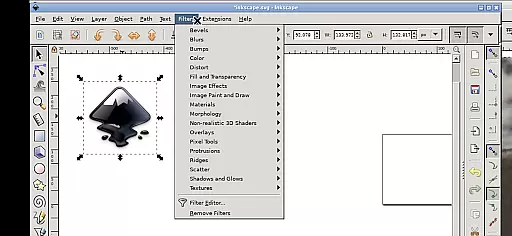
Inky is a feature-rich vector graphics editor that brings the full power of Inkscape to your Android device. This professional-grade application allows users to create and edit vector images in Scalable Vector Graphics (SVG) format, with support for importing and exporting other file types. The app supports primitive vector shapes, text editing, color gradients, and raster image tracing.
What sets Inky apart is its ability to deliver desktop-level functionality on mobile devices. Users can manipulate objects with transformations like moving, rotating, scaling, and skewing. The app also offers intuitive touch controls optimized for Android, making it usable on both tablets and smartphones. Whether you're a professional designer or an amateur artist, Inky provides a versatile platform for creating high-quality vector graphics on the go.
Inky stands out with its comprehensive set of design tools tailored for vector graphics creation. The app supports a wide range of vector shapes including rectangles, ellipses, polygons, arcs, spirals, stars, and 3D boxes. These elements can be customized with solid colors, patterns, radial or linear gradients, and adjustable transparency settings.
One of the key features is its seamless integration with Android's touch interface. Users can tap to click, pinch to zoom, and slide to scroll or pan across their designs. The app also provides access to Android's file system through useful links in the home directory, eliminating the need for manual file imports or exports. Additionally, Inky maintains compatibility with the Linux version of Inkscape, ensuring professional-grade performance on mobile devices.
Inky offers a comprehensive suite of creative tools that cater to both professional designers and hobbyists. The app provides full-featured vector graphics editing capabilities, enabling users to create intricate designs with shapes such as rectangles, ellipses, polygons, arcs, spirals, stars, and even 3D boxes.
Users can fill these shapes with solid colors, patterns, or gradients and adjust the transparency for unique visual effects. Inky also supports text manipulation, allowing for creative typography work within designs.
The ability to import and export various file formats extends the creative possibilities, while the option to trace raster images opens up avenues for converting photographs into scalable vector art. These robust features ensure that all your design needs are met within a single application.
With its powerful transformation tools, including moving, rotating, scaling, and skewing, Inky empowers users to refine their artwork with precision, making it an indispensable tool for anyone involved in graphic design.
Inky stands out with its canvas and format flexibility, accommodating a wide array of design requirements. The app's support for Scalable Vector Graphics (SVG) ensures that your creations remain crisp and clear at any scale, providing an ideal solution for projects ranging from web graphics to large-scale prints.
Beyond SVG, Inky allows designers to work with multiple file formats, importing assets from different sources and exporting their work in formats that best suit their project's needs. This versatility is crucial for collaboration and integration with other design tools and platforms.
Additionally, Inky's interface on Android devices is optimized for touch, supporting gestures like pinch-to-zoom and panning, which makes navigating complex artworks effortless. Whether you're using a stylus on a tablet or your finger on a phone, the app adapts to your workflow.
For those who require access to files across their device, Inky provides convenient links to directories such as Documents and Pictures, streamlining the process of managing design assets without the need for cumbersome imports or exports.
User-friendly interface
Professional-grade tools
Wide format support
Touch-optimized controls
Open-source flexibility
Steep learning curve
Performance on older devices
Limited mobile-specific features
Complex interface
Requires technical knowledge

Pose and morph realistic male and female models! 3D poser app
 3.00
3.00
Art of Combination Wear OS Watch faces (for Wear OS 5+ devices)
3.00
Image/ Text to Video Generator
4.40
Unleash your drawing and painting potential
4.50
Create color palette from Image, RGB & RYB Color wheel harmonies, Color Scheme
4.50
Convert image to JPG PNG HEIC PDF, support almost all kinds of image formats
4.70
Photo editor for art, avatars, filters & fun transformations.
4.60
Get an overview over all your embroidery threads, projects and more.
4.60
Explore future self face age filter & remove background image for a unique look.
3.50
Your AI soulmate — meaningful chats, and unique emotional moments
4.70
Learn how to draw with step-by-step tutorials, fun lessons & multiplayer drawing
4.70
Digital illustration drawing & painting pad app to paint Anime and Manga art
4.50
Nano Banana AI Image Generator, Anime Filter, AI Portrait, AI Photo Generator
4.30
Text to Image, Image to Video & AI Chat
4.20
Create Logos, Tattoos, AI Art & more with our AI Photo Generator & Design Editor
4.20
Paint with oils and sketch with natural tools on a realistic virtual canvas.
3.80
Transform photos into amazing monochrome dither art with professional algorithms
4.5
Android 14 style widgets and wallpapers app.
4.5
A luxurious gold watch face for an elegant and refined look.
4.3


User Reviews