
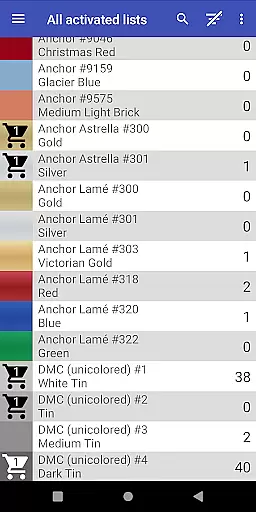
Cross Stitch Thread Organizer is a comprehensive tool designed for cross-stitch enthusiasts, providing an efficient way to manage thread collections on the go. With support for approximately 160 thread vendors, users can easily navigate through extensive lists of threads, fabrics, and patterns.
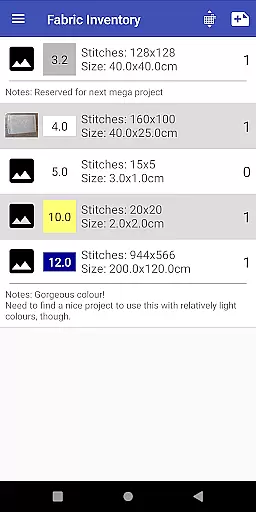
The app allows users to track inventory, search for specific colors, and calculate project sizes. Its intuitive interface ensures smooth performance without any ads or unnecessary features, making it an essential companion for both amateur and professional stitchers.
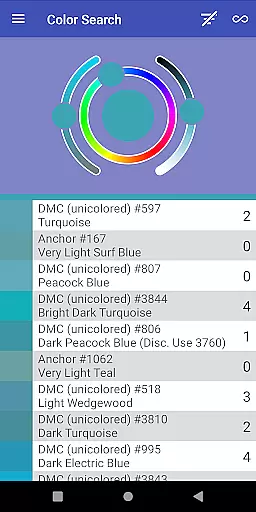
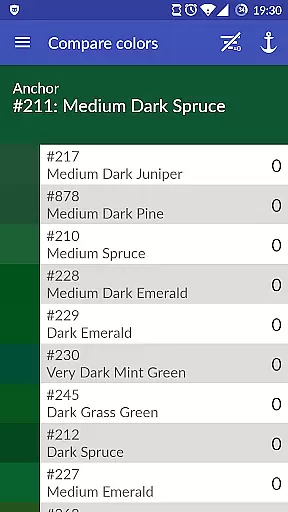
This Art & Design app stands out with its robust set of features tailored for cross-stitch management. Users can save thread amounts, add items to a shopping cart, and search for color matches or substitutes.
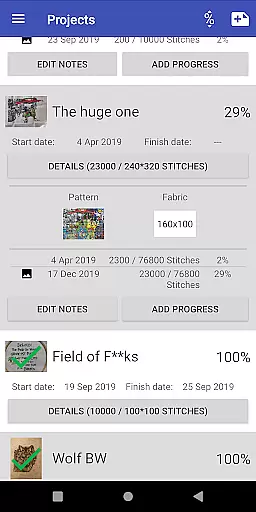
Advanced functionalities include tracking project progress, assigning required threads, and selecting standard frame sizes. The inclusion of custom lists empowers users to add missing vendors, while full-color displays enhance the selection process across various thread types.
Cross Stitch Thread Organizer offers a comprehensive suite of creative tools tailored for embroidery enthusiasts. The app supports an extensive list of thread vendors, providing users with access to approximately 160 individual thread lists. This includes popular brands such as DMC, Anchor, and The Caron Collection, ensuring that crafters can find the exact thread they need for their projects.
Each vendor list is optimized for full-color display and encompasses various thread types, including cotton, silk, variegated colors, and metallics. This diversity allows users to accurately match thread colors and types to their cross-stitch patterns, enhancing the precision and quality of their work. Additionally, the custom lists feature empowers users to add missing vendors, making the tool adaptable to individual preferences and emerging brands.
The inclusion of features like inventory management, shopping cart functionality, and project tracking further enriches the creative process. Users can efficiently manage their fabric and patterns, track daily progress, and calculate final piece sizes. These capabilities ensure that Cross Stitch Thread Organizer not only meets but exceeds the expectations of both amateur and professional embroiderers.
Flexibility in canvas and format options is crucial for accommodating diverse artistic needs, and Cross Stitch Thread Organizer excels in this area. The app provides users with the ability to manage all aspects of their embroidery projects, from fabric selection to pattern organization. This ensures that each project can be customized to fit specific dimensions and design requirements.
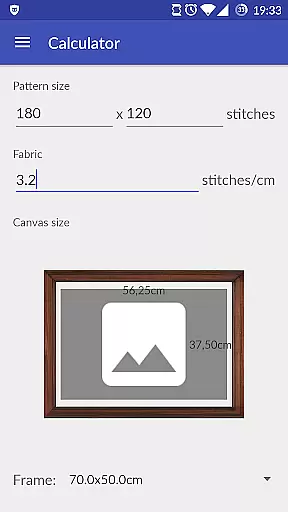
One standout feature is the app's capacity to calculate the final size of a cross-stitch piece and suggest matching frame sizes from a list of standard options. This functionality helps users plan their projects more effectively, ensuring that completed pieces will fit perfectly into desired frames without additional adjustments.
Moreover, the app supports different thread types and variations, allowing users to experiment with textures and effects within their designs. Whether working on traditional cotton-based projects or exploring innovative metallic threads, crafters have the freedom to express their creativity without limitations. This adaptability makes Cross Stitch Thread Organizer an invaluable tool for artists seeking both precision and versatility in their work.
User-friendly navigation
Comprehensive vendor support
Customizable thread lists
Efficient inventory management
No ads or bloatware
Limited to cross-stitch craft
Occasional bugs reported
Some features may feel complex
Vendor list not exhaustive
Requires manual updates

Discover Cartoon Dream : Unleash Your Creativity with CuttingEdge AI
 4.50
4.50
Learn how to draw with step-by-step tutorials, fun lessons & multiplayer drawing
4.70
Art of Combination Wear OS Watch faces
4.0
AI Face Swap, Video Effects Editor, Realtime Morph, Funny Video FX,AI Filters
3.70
Art of Combination Wear OS Watch faces
4.1
See Color, Paint Color
4.90
Your AI soulmate — meaningful chats, and unique emotional moments
4.70
Art of Combination Wear OS Watch Faces
3.30
All-in-One art, logo & collage maker. Design photos and edit video backgrounds
4.80
Just trace a projected picture on paper and color! Draw & Paint with AR drawing
4.40
Remove Background, Magic Eraser, Photo Enhancer, Story Templates, Collage Maker
4.30
Bring One UI 8.5 Icons to life -elegant dark icons with a modern, premium touch.
4.30
Beauty Camera - Selfie Camera is the ultimate beauty camera and selfie app
4.30
Create stylish invitation cards using templates for weddings, birthdays & RSVP.
4.20
Digital Drawing: Draw & Paint
4.10
Sketch, trace and master AR drawing with awesome anime art!
3.30
Create trending AI photos & videos with powerful effects and 3D styles.
3.20
Create stunning video, photo & magic from text with FlixAI GPT video generator.
3.10
Premium version of Shimeji-ee app with no ads & no limit active shimeji
4.1


User Reviews