
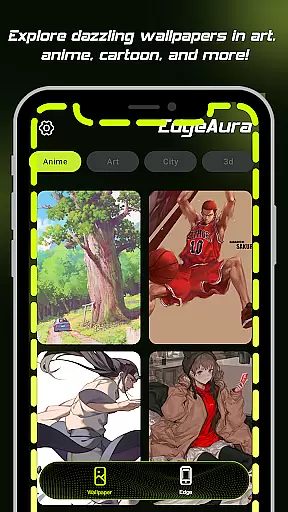
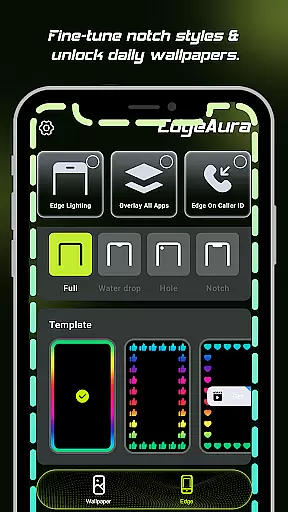
EdgeAura is a personalization app that enhances your device's visual appeal with stunning edge glow effects and dynamic live wallpapers. The app allows users to customize their phone screens with a vibrant aura of light that elegantly outlines the edges, making each device uniquely eye-catching.
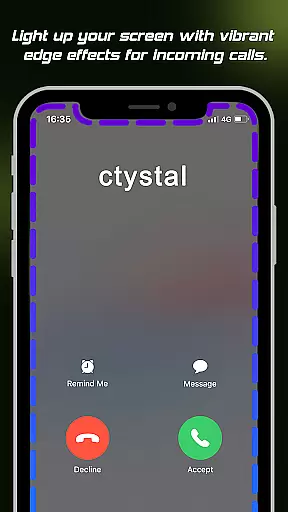
The app offers features such as Dynamic Edge Glow, which lets you adjust the color, width, and intensity of the glow to match your style. Additionally, its Floating Overlay Effect ensures the glow works seamlessly over other applications without disrupting normal usage. With Incoming Call Alerts, your screen edges light up during calls, adding a modern touch to notifications.
Perfect for those looking to personalize their smartphones with visually striking effects, EdgeAura brings both aesthetic value and functional alerts to your everyday mobile experience.
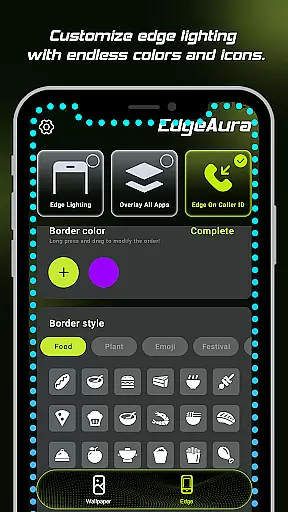
EdgeAura stands out with its innovative features designed to transform your smartphone into a visually immersive device. The Dynamic Edge Glow feature provides a smooth, colorful outline around your screen, fully customizable in terms of color, width, and intensity, allowing for a personalized visual effect.
In addition to the glowing edges, the app includes a Floating Overlay Effect that ensures the glow remains present across all applications, offering an uninterrupted visual experience. This feature is particularly useful as it doesn't interfere with your regular phone activities. Moreover, the Incoming Call Alert adds functionality by lighting up the screen edges during incoming calls, ensuring you never miss a notification.
With an extensive collection of high-quality live wallpapers, EdgeAura allows users to refresh both home and lock screens instantly. These animated wallpapers are regularly updated, providing endless options to keep your device looking fresh and vibrant.
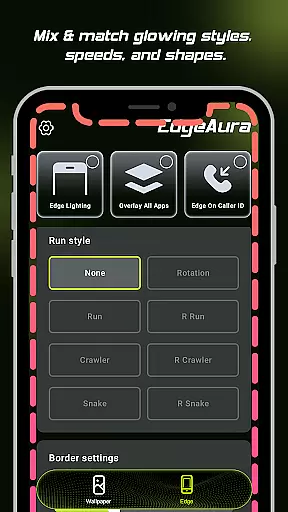
EdgeAura offers an extensive range of customization options that allow users to tailor their device's visual experience according to their preferences. The app provides dynamic edge glow effects with adjustable color, width, and intensity settings.
This level of personalization ensures that each user can create a unique look that complements their individual style and chosen wallpapers. By fine-tuning these elements, users are able to enjoy a smooth, colorful glow framing their screen that is truly their own.
The ability to customize not only enhances the aesthetic appeal but also contributes to a more engaging and immersive experience. Users can match the ambiance of their deviceu2019s display with their personal mood or environment, making every interaction visually pleasing.
Theme compatibility in EdgeAura ensures that its stunning visual effects work seamlessly across various themes and applications on your device. The floating overlay effect is designed to integrate smoothly with other apps without disrupting normal phone use.
Whether you're using a light theme or dark mode, EdgeAurau2019s elegant glow adapts accordingly, maintaining visual consistency throughout your digital experience. This adaptability guarantees that no matter which application you're using, the vibrant aura remains uninterrupted and visually striking.
By ensuring broad theme compatibility, EdgeAura allows for continuous enjoyment of both its live wallpapers and edge glow features. This means users benefit from an aesthetically cohesive interface regardless of how they choose to personalize their devices.
Visually Stunning Effects
Fully Customizable Settings
Non-Intrusive Overlay
Unique Call Notifications
Vibrant Live Wallpapers
Requires Accessibility Permission
Potential Battery Drain
Limited to Android Devices
May Not Appeal to Minimalists
Some Features May Feel Gimmicky

Stunningly Different look with Line Icons and Neon Colors
 4.60
4.60
3D, live, and moving wallpapers & themes in 4K and HD for your device.
4.50
Bring adorable pets to life on your screen. Playful, interactive and full of fun
4.60
Add cute Shimeji pets to screen, interact with them and relax with cute motions
4.60
Ultimate widget creator. Design custom widgets for a truly unique home screen!
3.90
Try creating your own keyboard with "Keyboard theme for android" app now!
4.50
One 8 icons glass color version
4.80
A minimalist productivity launcher. One-hand-friendly. Zero ads.
4.70
Customize phone with anime themes, 3D icons, aesthetic widgets & wallpapers
4.80
Personalize your phone with stunning HD and 4K wallpapers!
4.70
A retro cartoon style watch face and a punch right in the face of the copyright
4.60
Unique Android Launcher
4.60
Customizable screen pets that play, climb, and keep you company.
4.50
Fingerprint Lock Screen & Live Animations with 4K Wallpapers as Live Wallpaper
4.40
Art & Emoji Keyboard with Cool Fonts, Cute Themes and Custom Designs.
4.40
Your home screen, just the way you like it.
4.30
Wear Os Watch Face - Seasonal - Animated Snow Effect - 9 Animals
4.20
Your go to Weather App & Home Screen. Get your weather at a swipe of a finger!
3.80
Modern Glass Icon Pack with glossy icons, clean minimal theme & aesthetic style
4.2


User Reviews