
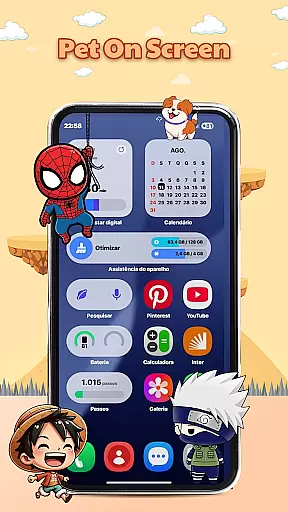
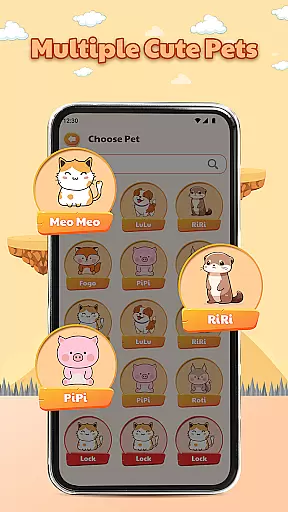
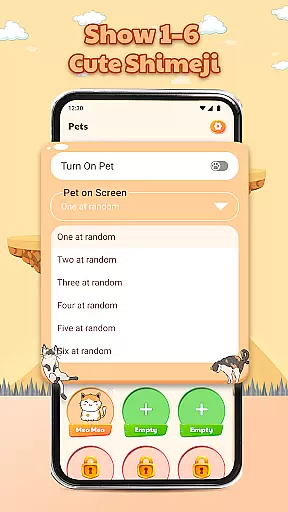
Pet On Screen - Shimeji Kawaii is a delightful personalization app that brings your phone to life with adorable animated characters. These cute, anime-style pets walk, climb, and play on your screen, creating an interactive and lively experience.
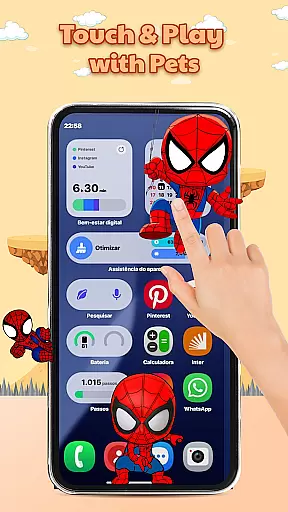
With a wide selection of charming characters to choose from, you can customize your device's appearance to match your unique style. The app offers playful interactions, allowing you to tap and hold the characters to see their funny reactions. Whether you're looking for a fun companion or a way to reduce stress, Pet On Screen - Shimeji Kawaii provides a joyful experience every time you use your phone.
The app features live mini characters that move naturally across your screen, making your device feel more dynamic and engaging. You can choose from a variety of cute pet styles, including anime, cartoon, and chibi designs, each offering its own personality and charm.
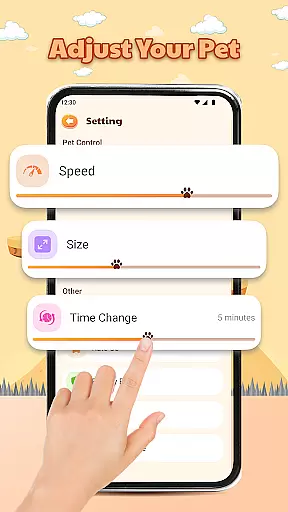
Pet On Screen - Shimeji Kawaii also includes advanced customization options. You can easily adjust character size, movement speed, and other settings to fit your preferences. These features ensure that your virtual pets not only look adorable but also behave in a way that suits your lifestyle.
Customization is at the heart of Pet On Screen - Shimeji Kawaii, allowing users to tailor their experience with a range of adjustable settings. The app offers an extensive selection of cute characters in various styles such as anime and chibi, ensuring that there's something for everyone's taste.
Beyond choosing from different pet types, users can also modify specific attributes of their virtual companions. This includes altering the size of the characters, adjusting their movement speed, and setting time changes to match personal preferences or screen dimensions.
The ability to customize extends to interactions as well; by tapping and holding the characters, users are greeted with charming reactions that add another layer of engagement. These playful elements contribute significantly to making each useru2019s device truly unique.
Ultimately, this high degree of customization empowers users to create a personalized environment on their phones that not only looks adorable but also feels alive with personality. It transforms routine device usage into an enjoyable experience filled with delightful surprises.
Pet On Screen - Shimeji Kawaii excels in theme compatibility, seamlessly integrating its lively characters across various device themes and backgrounds. Regardless of whether you prefer light or dark modes, these animated pets adapt effortlessly, maintaining visual harmony without disrupting your chosen aesthetic.
This adaptability ensures that no matter what type of wallpaper or system theme you have selected, the cute companions will always appear vibrant and clear. Such versatility enhances the overall user experience by preserving both functionality and attractiveness.
Moreover, because it supports diverse display settings, users do not need to compromise between having dynamic desktop pets and enjoying their preferred interface style. Instead, they get the best of both worldsu2014a customized look paired with entertaining digital friends.
In essence, Pet On Screen - Shimeji Kawaii demonstrates exceptional attention to detail when it comes to ensuring broad theme compatibility. By doing so, it guarantees that every interaction remains visually pleasing while reinforcing the appu2019s mission to bring joy through delightful animations.
Cute animated characters
Wide selection of pets
Interactive and playful
Customizable settings
Stress-relieving experience
May drain battery faster
Limited free options
Can be distracting
Not suitable for all ages
Some features require payment

A Colorful and Minimal icon pack in an Outline Style - Over 13,600 icons!
 4.70
4.70
Ultra realistic gold analog watch face with lots of customization options.
4.50
Fingerprint Lock Screen & Live Animations with 4K Wallpapers as Live Wallpaper
4.40
More than 3000+ themes and 9000+ wallpapers for everybody!
4.10 3.50
3.50
One 8 icons glass color version
4.80
300+ Stunning and well-designed widgets inspired by NOTHING.
4.70
Fast SMS & group chat - use GIFs and emojis from your home screen launcher.
4.50
Custom ringtones songs, music ringtones for Android phones
4.60
Gun Chase - Let the chase begin.
4.80
Ninja Turtles Cowabunga SE watch face for Wear OS
4.50
A light in the dark, a unique style and an andless cutomization!
4.30
Wear Os Watch Face - Seasonal - Animated Snow Effect - 9 Animals
4.20
Unleash Your Creativity and Connect with Loved Ones with Lockscreen Drawing!
4.20
Run multiple accounts of the same app on a single device
4.10
Crystal-clear, square icon provides a sleek and sophisticated visual upgrade
4.00
Customize glowing edges, wallpapers, and caller screen with EdgeAura.
3.50
Struggling to find apps? Use this app to locate and open any app on your phone!
2.20
Capture moments that pass like a storm, second by second.
4.3


User Reviews