
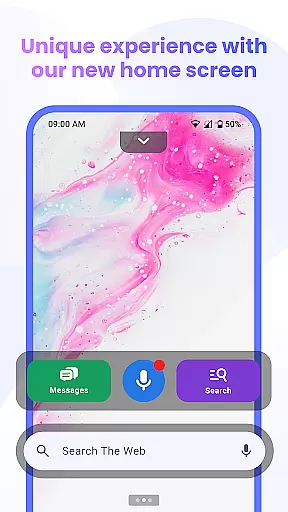

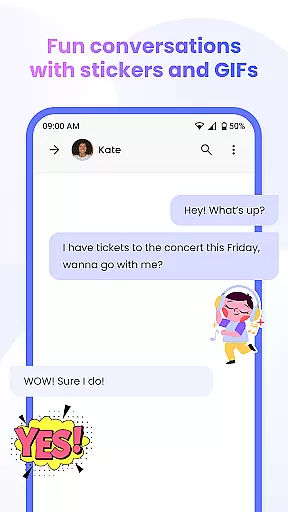

Messenger Chat Home is a unique personalization app that transforms your Android home screen into an efficient messaging hub. This innovative SMS launcher allows users to send and receive text messages, access group chats, and utilize creative communication tools like stickers and GIFs directly from their home screen.
The app combines the simplicity of traditional texting with modern launcher capabilities, creating a streamlined communication experience. Users can enjoy features like voice-to-text functionality, smart widgets for quick message previews, and an ad-light interface that maintains focus on conversations. Whether you're managing individual chats or group discussions, Messenger Chat Home keeps all communication organized and readily accessible.
For individuals seeking to optimize their messaging workflow while maintaining a personalized touch, this app offers both practicality and creativity in one solution.
Messenger Chat Home stands out with its comprehensive feature set tailored for efficient communication. The app's home screen integration enables instant access to SMS and MMS messages without needing to open separate applications. Its smart widget functionality allows users to preview unread texts and reply quickly, enhancing productivity.
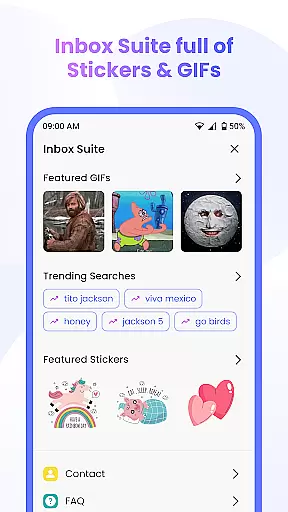
Creativity is at the core of this app's design. With thousands of free stickers, GIFs, and emojis available, users can add personality to every conversation. The inclusion of voice-to-text capabilities provides hands-free operation, while media sharing options support photos and videos for richer interactions. Additionally, the app's lightweight architecture ensures minimal battery consumption and storage usage.
Privacy-conscious users will appreciate the app's commitment to data protection. Unlike many messaging platforms, Messenger Chat Home avoids unnecessary data collection, ensuring conversations remain private and secure. These thoughtful features make it an ideal choice for those seeking a balance between functionality and privacy.
Customization is at the heart of Messenger Chat Home, allowing users to tailor their messaging experience to fit their personal style. With a wide array of customization options, users can modify their home screen interface and chat settings to reflect their unique preferences.
The app offers an extensive selection of free stickers, GIFs, and emojis that bring personality to every conversation. This vast library of expressive tools enables users to communicate in a more engaging and fun way, ensuring that every message stands out.
Messenger Chat Home's customization extends beyond aesthetics; it includes functional elements such as voice-to-text dictation, smart widgets for quick access to messages, and personalized chat themes. These features collectively enhance user interaction and streamline communication processes.
By integrating these diverse customization options, Messenger Chat Home not only makes texting more enjoyable but also increases efficiency and personal connection in digital conversations.
Theme compatibility in Messenger Chat Home ensures that users can enjoy a consistent and visually pleasing experience across different devices and operating systems. The app supports various themes, which adapt seamlessly to the user's device settings, providing a harmonious look and feel.
Users have the flexibility to choose from multiple theme options, including light, dark, and system default modes. This adaptability reduces eye strain and optimizes readability in various lighting conditions, enhancing overall usability.
Beyond visual appeal, theme compatibility contributes to the app's performance optimization. By aligning with the deviceu2019s native theme settings, Messenger Chat Home minimizes resource consumption and maintains smooth operation even on older devices.
This thoughtful approach to theme integration underscores Messenger Chat Home's commitment to delivering a personalized yet cohesive user experience, making it a versatile choice for those seeking both form and function in their messaging app.
User-friendly interface
Customizable chat options
Fast message access
Lightweight performance
Privacy-focused design
Limited cross-platform support
Few advanced customization
No end-to-end encryption
Occasional widget glitches
Basic theme options

Personalize your phone with stunning HD and 4K wallpapers!
 4.70
4.70
100+ Stylish Fonts, Emojis, Symbols keyboard for Instagram & TikTok!
4.80
Unique Fonts, typefaces and stylish text. Fonts for Instagram, Whatsapp & others
4.20 4.50
4.50 4.50
4.50
Your go to Weather App & Home Screen. Get your weather at a swipe of a finger!
3.80
350+ widgets with a premium glass-style finish, perfect for home & lock screens.
4.70
Create stunning widgets with Widget 2026: Aesthetic Widgets for Android!
4.60
Transform your phone with stylish zipper lock themes and 4D live wallpaper
4.10
Enjoy a variety of amazing live wallpapers and colorful EDGE lighting borders!
4.80
Glass style colourful icons with a One UI look and feel
4.60
Customize your home screen with stunning themes, blur, widgets & icons.
4.60
Transform your phone with Launcher iOS 26 - Smooth & elegant iOS experience
4.50
Art & Emoji Keyboard with Cool Fonts, Cute Themes and Custom Designs.
4.40
Launcher OS™ Pro without ads help make your phone simple and pretty
4.30
Wear Os Watch Face - Seasonal - Animated Snow Effect - 9 Animals
4.20
Adult video chat, dating, making friends, random matching
4.20
Create unique, fun emojis with Funny Emoji Maker! Unlimited creativity!
4.00
Adorable pets roam and play right on your phone screen!
3.30


User Reviews