
AutoRemote is a powerful productivity tool that allows users to remotely control their devices, including phones, PCs, and web services. With its seamless integration with Tasker and standalone apps, this application enables you to send push notifications and execute commands across platforms from anywhere in the world. Whether you want to manage your Android device from a PC or control your Linux system remotely, AutoRemote provides an unprecedented level of flexibility and control.
The app supports bi-directional messaging between devices, allowing for complex automation scenarios. For instance, you can request your phone's location and have it displayed on a map on your tablet or PC. Additionally, AutoRemote offers advanced matching options and a flexible command system, making it possible to customize workflows exactly to your needs. Its compatibility with services like IFTTT, Zapier, and Chrome extends its utility even further, creating endless possibilities for remote management and automation.
AutoRemote stands out with its extensive feature set tailored for power users seeking advanced control over their digital environment. The app facilitates device-to-device and PC-to-device messaging, enabling users to operate one device from another seamlessly. It also integrates with Tasker, allowing for sophisticated automation setups where specific triggers lead to predefined actions, such as sending a spoken shopping list at a set time.
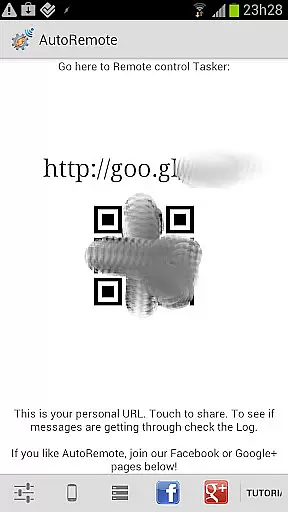
One of the key features of AutoRemote is its ability to work with URLs, which means you can initiate commands from virtually any platform capable of making HTTP requests. This includes web browsers, desktop applications, and even other web services. Furthermore, AutoRemote's advanced matching options and flexible command system let users create highly customized workflows. From finding a misplaced phone by triggering an audible alert to sharing content directly between Android devices via the Share menu, AutoRemote empowers users to automate their lives in innovative ways.
At the heart of AutoRemote lies its robust core task management system, designed to streamline how you interact with your devices. This feature allows users to create, manage, and automate tasks across multiple platforms including Android, PC, and web services.
The application leverages Tasker integration to enable complex workflows. For instance, users can set up profiles in Tasker that react to specific AutoRemote messages, executing predefined actions like sending notifications or triggering device functions.
This level of control provides significant benefits to users. Whether it's remotely locating a lost phone or automating daily routines, the task management capabilities ensure efficiency and convenience.
By supporting bi-directional messaging between devices, AutoRemote empowers users to control their entire digital ecosystem from anywhere, making it an indispensable tool for productivity enthusiasts.
AutoRemote excels in providing reliable cross-device synchronization, ensuring seamless communication between all your connected devices. This functionality is crucial for maintaining consistency across different platforms and locations.
The system employs push notifications as its primary synchronization method. When a message is sent through AutoRemote, it instantly reaches the target device, regardless of whether it's a phone, tablet, or computer. The real-time nature of these notifications guarantees immediate response and action.
Users benefit greatly from this reliable synchronization. They can share information, trigger actions, and maintain up-to-date status across their devices without worrying about delays or missed communications.
Furthermore, the integration with Android's Share menu and various web services ensures that content sharing and task execution remain smooth and efficient, regardless of the source or destination platform.
User-friendly interface
Highly customizable
Cross-platform support
IFTTT integration
Advanced automation
Steep learning curve
Requires Tasker
Limited iOS support
Occasional bugs
Premium features cost

Seamlessly integrate data and reports to build your presentation to impress
 4.80
4.80
Mega cloud explorer plugin for Solid Explorer
3.80
8 custom complications. Custom Time Fonts. Beautiful color schemes. A++ Design.
5.00
Absolutely the best CNC machinist speed and feed calculator around. fswizard.com
4.60
CalenGoo is a very flexible and feature-rich calendar app
4.40
App lock - lock apps with fingerprint, password, pin or pattern, protect privacy
4.70
Docker, Kubernetes management over Portainer Mobile
4.40
This small app MUST BE INSTALLED after purchase, else license won't work
4.40
Access your phone's notifications, calls, apps, photos & texts on your PC
3.90
Protect and view your important info on your phone and tablet with eWallet®
4.80
Use powerful, industry-leading AI tools to generate visual charts from any data
4.80
Quickly and easily keep track of your work shifts
4.70
To do list widget with a notebook organizer, checklist, simple shopping list
4.60
Pwnagotchi companion app
4.20
Create and edit presentations with Google Slides, part of Google Workspace.
4.00
Ultimate Virtual AI Character for immersive Roleplay Chat. Perfect Companion
3.90
All in one sketching tool. Technical and General drawing. Online Maps support.
3.70
Smart PDF reader & editor to view, organize and manage PDF documents easily.
3.70
A comprehensive suite of tools designed specifically for Lactation Consultants
4.2


User Reviews