
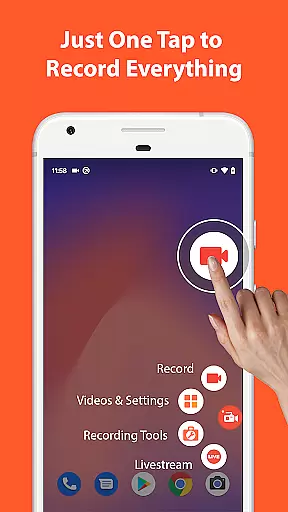

AZ Screen Recorder is a versatile screen recording application designed for Android users who need to capture high-quality screen videos with audio. The app offers multiple functionalities including screen recording, video editing, live streaming, and screenshot capturing. With its user-friendly interface and advanced features, it caters to various needs such as creating gameplay videos, recording video calls, or capturing live streams.
One of the standout features of AZ Screen Recorder is its ability to record screen activity with both internal audio and microphone input, making it ideal for tutorials, gameplays, and video calls. Additionally, the app provides a built-in video editor that allows users to trim, merge, add music, subtitles, and even compress videos to save storage space. Its multi-purpose design ensures that whether you're a content creator, gamer, or professional, this app can meet your screen recording needs effectively.
AZ Screen Recorder stands out with its comprehensive set of features tailored for different recording needs. The screen recording function supports high-definition video formats from HD to 4K, depending on device compatibility, and includes options like pause/resume, facecam, and drawing on the screen during recording. Users can also transfer recorded videos to computers via WiFi, enhancing convenience.
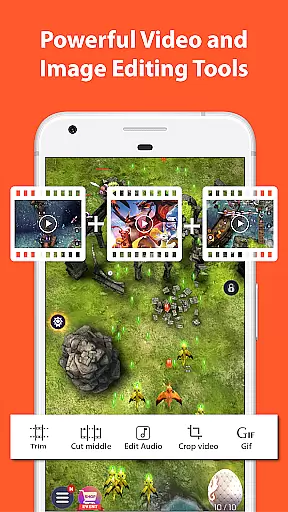
The integrated video editor is another highlight, offering tools to trim, merge, crop, rotate, and compress videos. It also allows adding background music and subtitles, providing a complete post-production suite within the app. Furthermore, the live streaming feature enables users to broadcast their screens directly to platforms like YouTube and Facebook, with customizable stream resolutions and optional facecam display. These robust features make AZ Screen Recorder a powerful tool for both casual and professional use.
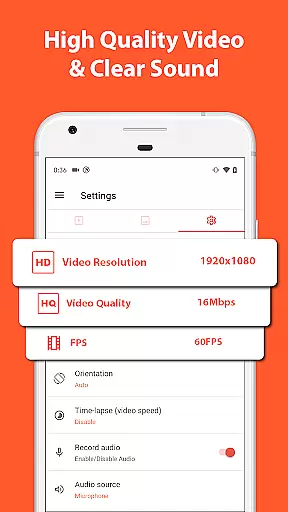
Video format compatibility is crucial for any video recording and editing application, ensuring that users can work with a wide range of video formats without the need for additional conversion software. AZ Screen Recorder stands out in this aspect by supporting various resolutions from HD, FullHD, 2K to 4K, although 4K recording is only available for select users and devices.
This screen recorder app also supports different frame rates including 24fps, 30fps, and 60fps, providing flexibility for users who have specific needs for their video projects. Whether you're recording gameplay or capturing video calls, the ability to choose your preferred resolution and frame rate ensures that the final output meets your quality standards.
In addition to its impressive recording capabilities, AZ Screen Recorder offers robust video editing features. Users can trim videos, remove unwanted sections, merge multiple clips, add background music, insert subtitles, extract frames, crop, rotate, and compress videos to save space. These comprehensive tools ensure that regardless of the original video format, users can edit and enhance their recordings to achieve professional results.
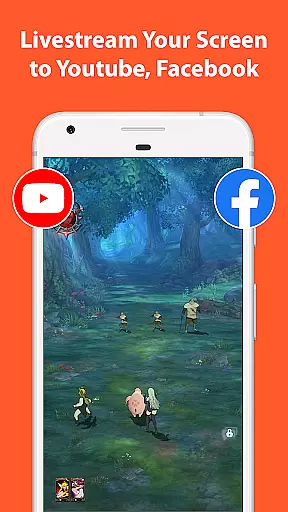
The app's versatility extends beyond just video recording and editing. It includes functionality for live streaming to platforms like YouTube and Facebook, with options to broadcast the phone screen along with audio and optionally show your face during the stream. This multi-purpose approach makes AZ Screen Recorder an invaluable tool for content creators, gamers, and professionals who require reliable and high-quality video solutions on their Android devices.
AI-powered editing features are revolutionizing the way users interact with video editing software, making it easier and more efficient to produce high-quality content. AZ Screen Recorder incorporates advanced AI technologies to enhance its video editing capabilities, allowing users to perform complex tasks with minimal effort. For instance, the app uses AI to optimize video compression, ensuring that files retain their quality while occupying less storage space.
Another notable AI feature is the automatic detection and stitching of images, which simplifies the process of combining multiple screenshots into a single cohesive image. This function is particularly useful for creating tutorials or documenting processes that span several screens. Additionally, the app's AI-driven tools enable users to blur specific areas of an image, add text, emojis, or draw directly on screenshots, enhancing the overall editing experience.
AZ Screen Recorder also leverages AI to improve its live streaming functionalities. By analyzing real-time data, the app can adjust video stream resolutions dynamically, ensuring smooth and uninterrupted broadcasts. This adaptability is essential for maintaining viewer engagement, especially when streaming content to platforms with varying bandwidth requirements.
Furthermore, the integration of AI-powered features extends to the app's ability to record both internal and external audio sources. This dual audio recording capability allows users to capture crisp sound from their device's microphone and internal audio simultaneously, resulting in richer and more immersive recordings. Overall, these AI enhancements make AZ Screen Recorder a powerful tool for anyone looking to create and share compelling video content effortlessly.
User-friendly interface
High-quality video output
No watermark on videos
Comprehensive video editing tools
Supports live streaming
Advanced features require purchase
Some features limited to newer Android versions
Occasional performance issues
Interface may feel cluttered
Ads in free version

Kodi media center, a free and open source cross-platform entertainment hub
 3.60
3.60
Video Trimmer, Video to MP3 Converter. Extract music from video, Easy & Fast.
4.80
This app was created to edit the metadata of music files.
4.20
1)AirPlay/DLNA Mirroring/Streaming, up to 4 connections; 2)Samba/NAS/DMS Player.
4.00
IPTV Loader, loads your own Playlist. DOES NOT CONTAIN ANY LIST OR CHANNELS
4.60
Connect EasyCap or UVC devices for recording and broadcast video/audio stream
3.60
Powerful video player with advanced hardware acceleration and subtitle supports
4.20
convenient, safe and fast at Video Downloader & Player
4.60
Make videos you’re proud to share with Edits, a video editor for creators.
4.70
Fast & easy HD video downloader for all formats, support 4K playback & download.
4.60
Auto video maker with music & exclusive filters. Video editing made simple.
4.50
Fast video downloader & private browser. Save HD clips to watch offline.
4.40
KMPlayer Plus (Divx Codec) officially support Divx codec.
4.30
Video Downloader is an utility that can save videos and music from web sites
4.20
VLC for Android is the best open source video and music player, fast and easy!
4.10
Save photos and videos from social apps in one tap.
3.60
This app is an emulator of some specific IPTV boxes
3.50
Browser for Sony TV to stream web videos, online movies and live tv
3.20
Play and download HD videos from all sources — fast, simple, and all-in-one.
4.3


User Reviews