
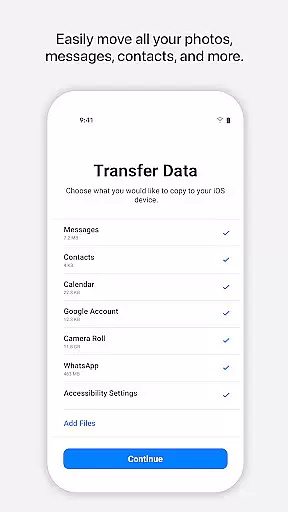
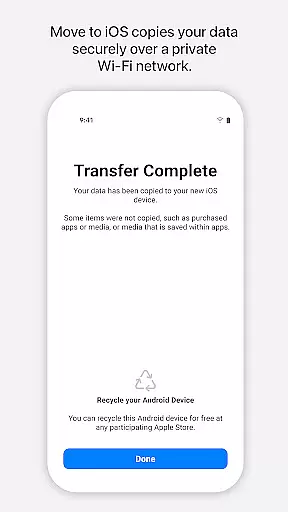
Move to iOS is a powerful migration tool designed to simplify the transition from Android to iPhone or iPad. This application enables users to transfer a wide range of content seamlessly and securely, including contacts, message history, photos, videos, mail accounts, calendars, and even WhatsApp data. By creating a private Wi-Fi network between devices, Move to iOS ensures that all data migration occurs without the need for third-party storage solutions.
The app's standout feature is its ability to migrate not just basic data but also complex content like voice memos and call logs. Whether you're switching for personal or professional reasons, this tool provides an effortless way to retain your digital life while upgrading to iOS. Its intuitive design and robust functionality make it an essential utility for anyone transitioning to Apple's ecosystem.
Move to iOS offers several notable features that enhance the migration experience. First, it eliminates the hassle of manual backups by automatically transferring data directly between devices. The app supports a comprehensive list of content types, such as apps, camera media, and mail accounts, ensuring no critical information is left behind. Additionally, its secure Wi-Fi connection safeguards user data during the transfer process.
Another key feature is the optional permissions system, which allows users to customize what they wish to migrate. For instance, you can choose to move SMS messages, photos, contacts, and more based on your preferences. This flexibility ensures that only the desired content is transferred, providing both convenience and control. With its seamless integration into the setup process of new iOS devices, Move to iOS delivers a polished and reliable migration solution.
Move to iOS offers a seamless and secure way to transfer content from an Android device to an iPhone or iPad. The app's core functionality lies in its ability to migrate a wide range of data types, including contacts, message history, photos, videos, mail accounts, calendars, and even WhatsApp content.
The effectiveness of Move to iOS is evident in its straightforward process. By creating a private Wi-Fi network between devices, the app facilitates a direct and secure transfer without the need for third-party storage solutions. This ensures that personal information remains protected throughout the migration process.
Users benefit from the app's comprehensive approach to data migration. With just a few steps, all essential content can be transferred automatically, saving time and effort. The app handles various data formats and ensures they are placed correctly on the new iOS device.
This level of accuracy and effectiveness provides peace of mind for users switching platforms. Knowing that their valuable data is transferred securely and completely allows users to focus on exploring the features of their new iOS device without worrying about data loss or privacy concerns.
The Move to iOS app excels in providing a user-friendly interface that simplifies the complex process of data migration. Its intuitive design guides users through each step, from establishing a connection between devices to entering the security code that initiates the transfer.
With clear instructions and minimal required interactions, the app removes the technical barriers often associated with platform switching. Users don't need technical expertise to complete the migration successfully, making the transition accessible to people of all skill levels.
The app's interface also provides reassurance during the transfer process. By keeping users informed about the status of their migration and any optional permissions they might choose to grant, it creates a transparent and trustworthy experience.
This combination of simplicity and intuitiveness makes Move to iOS an invaluable tool for anyone looking to switch to an iPhone or iPad. The app's thoughtful design ensures that even those who are less tech-savvy can complete their device migration with confidence and ease.
User-friendly interface
Secure data transfer
Comprehensive content support
Private Wi-Fi network
Optional permission settings
Limited to Android-iOS
Requires stable Wi-Fi
Long transfers for large data
No cloud backup option
Device proximity needed

 4.50
4.50
Small and simple app to Verify Root Access and BusyBox Install!
4.70
Smart and comfortable browsing experience.
3.80
MS-DOS in your pocket. Play old DOS games anywhere you are ;)
4.10
Bedrock Together: Join any bedrock server on Xbox/PS
4.80
WiFi Signal Strength Meter help you detect WiFi Signal Strength in real time.
4.80
Automate everything from settings to photos, SMS to speech. ADC2 prize winner.
4.10
Clean up large files and similar photos, fast and easy to use
4.40
Enhance your Beats
3.70
Best leveling tool for your Android device. Hang paintings like a pro.
4.90
Monitor car performance in real time and troubleshoot malfunctions.
4.80
HD Camera captures every special moment.
4.60
HD Video player and downloader for all formats, fast & smooth 4K video playback.
4.60
The Ultimate Bluetooth Keyboard & Mouse. Securely control your PC, Mac, and more
4.50
Quickly check the frequency of the Earth
4.30
Carry a FTP server in your pocket and avoid USB cables for file transfer
4.20
Quickly & easily calculate the spacing of handrail balusters
4.20
View detailed information about your Nissan Leaf the dealer never shows you.
4.10
1-Click close all background apps on Android TV
3.90


User Reviews