
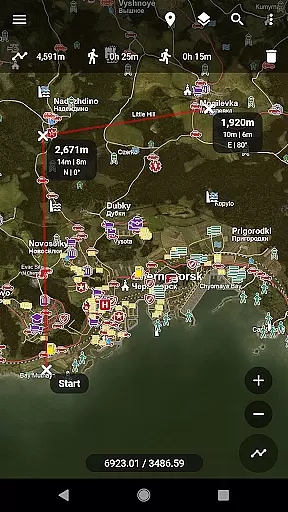
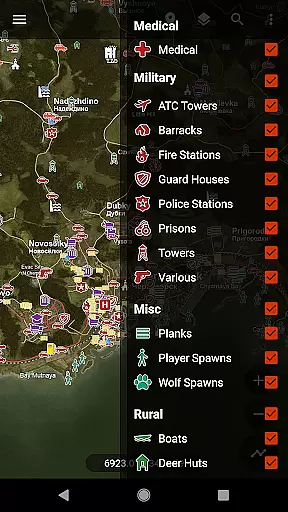
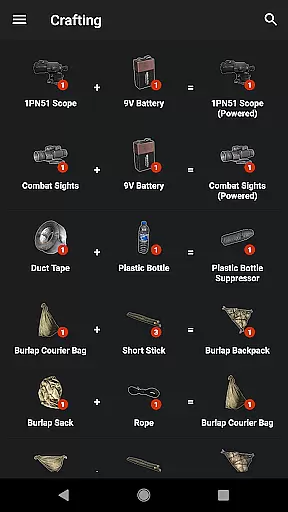
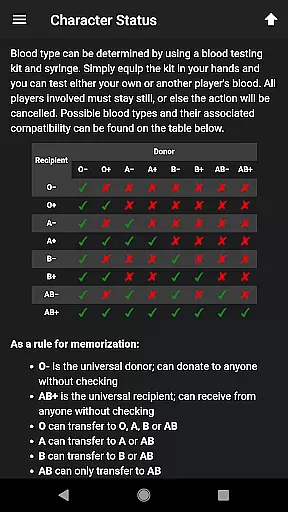
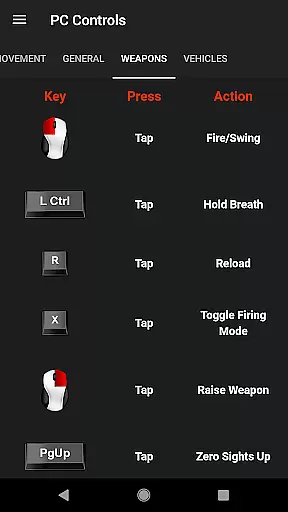
Central for DayZ is a specialized tool designed to enhance the gameplay experience for DayZ enthusiasts. This Pro Unlocker provides access to detailed loot and building locations across various categories, including Coast, Crash Sites, Industrial, Landmarks, Medical, Military, Misc, Rural, Urban, Vehicles, and Water Sources. Each category contains specific points of interest that help players strategize their moves more effectively.
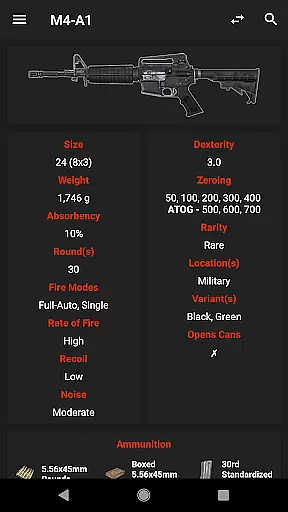
In addition to location data, the app offers a Side-by-Side Compare feature, allowing users to evaluate items and determine which ones are worth taking. This functionality is particularly useful for optimizing inventory management and planning in-game strategies. The app's comprehensive database is powered by contributions from DayZWiki, the community, and Dan Clarke, ensuring reliable and up-to-date information for gamers.
Whether you're a seasoned player or new to DayZ, Central for DayZ serves as an invaluable resource for improving your gameplay. By providing detailed insights into strategic locations and item comparisons, this tool helps users make informed decisions, ultimately enhancing their overall gaming experience.
Central for DayZ stands out with its extensive range of features tailored for DayZ players. One of the key highlights is the detailed categorization of loot and building locations. These categories include Coast, featuring Boat Houses and Shipwrecks; Crash Sites with Helicopters and Police Cars; Industrial areas like Construction Sites and Fuel Stations; and many others such as Medical, Military, and Urban locations. This meticulous organization allows users to quickly find and utilize critical in-game resources.
Another notable feature is the Side-by-Side Compare functionality. This tool enables players to compare items directly within the app, helping them decide which items are most beneficial to pick up during their gameplay sessions. Such a feature not only streamlines decision-making but also enhances strategic planning and resource management.
The app benefits greatly from community contributions, notably from DayZWiki and designer Dan Clarke. These collaborations ensure that the content remains accurate and relevant. Additionally, users can reach out via email for support, suggestions, or reporting issues, making Central for DayZ a dynamic and responsive tool for the gaming community.
Central for DayZ offers a comprehensive set of tools that are essential for players looking to enhance their gameplay experience. The app's core functions revolve around providing detailed locations for loot and building sites, which is crucial for strategic planning and survival in the game.
The application meticulously categorizes points of interest including medical facilities, military bases, urban buildings, and natural water sources. This level of detail ensures that players can effectively plan their routes and resource management, making each decision count in their quest for survival.
By integrating user-generated content and contributions from the community, Central for DayZ maintains an up-to-date and accurate representation of the ever-evolving game world. This collaborative approach guarantees that users have access to the latest information, enhancing both the accuracy and effectiveness of their in-game strategies.
Ultimately, the app empowers players with precise and actionable data, allowing them to navigate the complexities of DayZ with confidence. Whether it's avoiding high-risk areas or discovering hidden resources, Central for DayZ equips gamers with the knowledge they need to thrive.
Achieving a balance between functionality and ease of use, Central for DayZ boasts an interface that is both simple and intuitive. Players can easily navigate through various categories of points of interest without feeling overwhelmed by unnecessary complexity.
The app employs a straightforward layout where each type of location is clearly labeled and organized into distinct sections such as coast, crash sites, industrial areas, and more. This logical arrangement allows users to quickly find what they're looking for without any steep learning curve.
Additionally, features like side-by-side item comparison exemplify how thoughtful design enhances user interaction. With just a few taps, players can compare items to make informed decisions about which ones to take on their expeditions, streamlining the decision-making process significantly.
Overall, Central for DayZu2019s commitment to maintaining an accessible yet powerful interface ensures that both new and experienced players can utilize its full potential without hassle. By prioritizing clarity and ease of navigation, the app delivers a seamless user experience that complements the challenging nature of DayZ itself.
Comprehensive location data
User-friendly interface
Side-by-side item comparison
Community-driven updates
Regularly updated content
Separate app download required
No offline functionality
Limited to DayZ game
Premium version needed
Dependent on third-party content

Unit and currency converter with easy and simple UI.
 4.80
4.80
Remote for Roku, Fire TV, Samsung TV, LG TV, Android TV, Chromecast and VIZIO TV
4.20
Optimize your WiFi network, turn your phone into Wifi Analyzer
4.70
App to pay for FUTO Keyboard
4.60
A simple app to back up and restore SMS & MMS messages and call logs.
4.10
NFC Tools can read and write NFC tags.
4.70
Remote Play with FSR upscaling, low latency & full controller support
4.80
Introducing Smart Printer, your ultimate destination for printing solutions!
4.00
Creation, Learning, Entertainment & More — The All-in-One AI Search Engine
4.70
Small and simple app to Verify Root Access and BusyBox Install!
4.70
Play your X-Box games remotely in 1080p with any controller and zero latency
4.60 4.50
4.50
Universal TV remote control all TVs, Roku, LG, Samsung, Fire, Vizio, Sony, TCL.
4.40
Pro Emulator is an easy to use game console emulator for a range of consoles.
4.40
Just one-tap to easy translate in any language after calls within seconds.
4.20
VESC Tool can monitor and configure VESC-compatible devices over BLE and Wifi
4.20
Unleash gamepad precision for ultimate mobile gaming dominance.
3.90
Fun lie-detection pranks for friends and parties.
3.80
Download any file easily and quickly with Downloader
4.5


User Reviews