
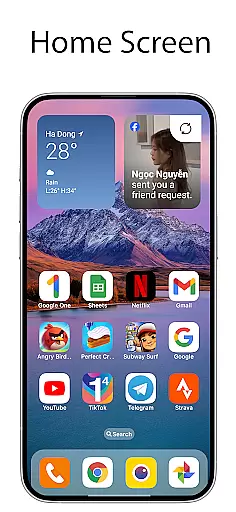
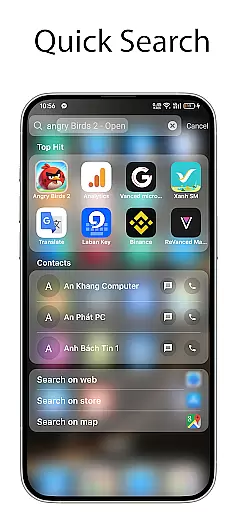
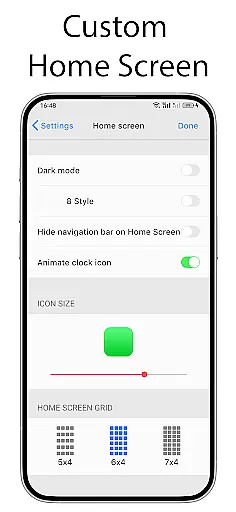
OS Launcher 18 - Phone 16 Max offers a unique personalization experience for Android users seeking a blend of simplicity and luxury in their device's interface. This launcher app transforms the visual appearance of your Android, providing a customized environment that includes redesigned app icons, exclusive wallpapers, and other specific features.
The app allows users to emulate the Simple interface while preserving the robust functionality of the Android operating system. With its user-friendly approach, OS Launcher 18 caters to those who wish to enjoy an aesthetically pleasing and highly functional smartphone experience without compromising on versatility or performance.
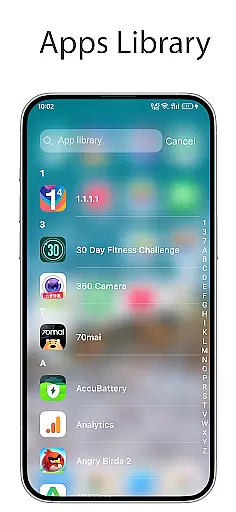
OS Launcher 18 - Phone 16 Max is packed with features designed to enhance your device's usability and personalization. The Apps Library helps organize your apps into categories, streamlining navigation, while the Lock App feature ensures privacy by preventing unauthorized access to your locked apps.
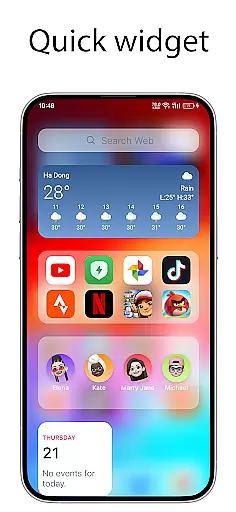
Users can benefit from the Today View, which displays weather information, favorite contacts, and calendar events at a glance. The Weather function provides detailed forecasts, including temperature, wind, and humidity. Additionally, the Widgets and Customizable Icon options allow further personalization, letting you modify icons and names as well as add cool widgets to your home screen.
OS Launcher 18 - Phone 16 Max offers a wide array of customization options that allow users to personalize their Android devices extensively. This app provides features such as customizable app icons, wallpapers, and the ability to modify both the icon and name of applications.
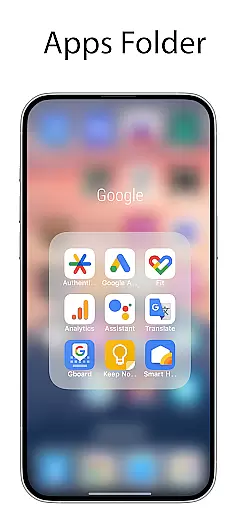
Users can organize their apps into categories through the Apps Library, create folders by dragging and dropping apps, and even hide apps from the home screen. These options ensure that each user's device can be tailored to their specific preferences and needs.
In addition to visual customizations, the launcher also includes functional personalizations like the Today View, which displays weather information, favorite contacts, and calendar events. Such features enhance both the aesthetics and usability of the device.
The ability to customize extends to widgets as well, with many cool widgets available to add to the home screen. This level of customization empowers users to create a personalized and efficient mobile experience that mirrors their unique style and workflow.
Theme compatibility is a crucial aspect of OS Launcher 18 - Phone 16 Max, ensuring that users can enjoy a cohesive and visually appealing interface. The app supports various themes that align with different design aesthetics, allowing for seamless integration with the Simple interface.
By offering a range of themes, the app ensures that users can switch between different looks without losing functionality or encountering display issues. This flexibility is vital for users who wish to refresh their device's appearance regularly.
Moreover, the launcher maintains theme compatibility while providing advanced features like unread notification dots and weather forecasts. This balance ensures that additional functionalities do not disrupt the visual harmony of the chosen theme.
Overall, OS Launcher 18 - Phone 16 Max delivers a robust theming experience that caters to diverse user preferences, enhancing both the visual appeal and operational consistency of Android devices.
User-friendly interface
Highly customizable
Comprehensive weather info
Efficient app organization
Enhanced privacy controls
May require frequent updates
Potential compatibility issues
Privacy concerns over permissions
Limited default theme options
Occasional ads in free version

A Colorful and Minimal icon pack in an Outline Style - Over 13,600 icons!
 4.70
4.70
Bring adorable pets to life on your screen. Playful, interactive and full of fun
4.60
More than 3000+ themes and 9000+ wallpapers for everybody!
4.10
Customizable screen pets that play, climb, and keep you company.
4.50 4.50
4.50
⭐ OneUI inspired Fluffy Icon Pack – Soft. Stylish. Standout. ⭐
4.1
Adaptive Dot Style IconPack with Light & Dark Theme.
3.70
Color phone with cool effects for call screen, flash alert & ringtones music
4.50
Custom edge gestures for volume control, brightness, apps, and shortcuts.
4.3
Dark icon pack based on One 8
4.80
Nothing Icon pack with more than 3750+ highly crafted icons.
4.70
350+ widgets with a premium glass-style finish, perfect for home & lock screens.
4.70
300+ Beautifully crafted widgets inspired by OneUI.
4.60 4.50
4.50
Vibrant Adaptive Icons with Material You and Enhanced Monet Colors.
4.50
App Icon Changer & Shortcut Creator. Customize your icons without any watermarks
4.30
Customizable flower power digital watch face for Wear OS watches.
4.00
HappyLighting is a Bluetooth lamp control software.
3.40
Prank your friends with realistic broken screen and cracked HD effects!
4.3


User Reviews