
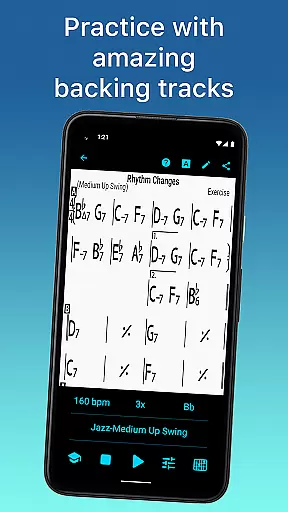
iReal Pro is a comprehensive music practice tool designed to help musicians of all skill levels improve their craft. The app functions as both a virtual band and a chord chart repository, providing realistic accompaniment and reference materials for practice sessions. With its extensive features, iReal Pro has been recognized as one of Time Magazine's 50 Best Inventions of 2010.
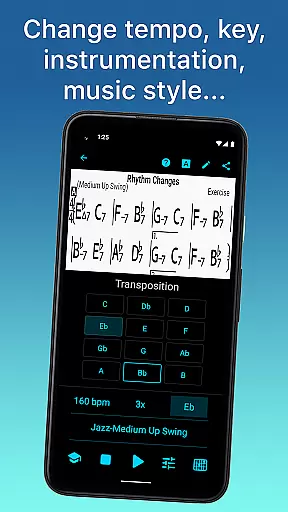
Users can simulate playing with a band by choosing from 51 included accompaniment styles, ranging from Swing to Latin, and customize sounds with options like piano, guitar, and bass. Additionally, the app allows musicians to create, edit, and collect chord charts, making it an essential companion for practice or performance. Whether you're a student or a teacher, iReal Pro offers tools that cater to various musical needs, including transposition, recording, and sharing capabilities.
iReal Pro stands out with its versatile features tailored for musicians. The app provides a virtual band experience with 51 accompaniment styles, which can be personalized with different instrument sounds such as piano, Fender Rhodes, and electric guitars. This feature enables users to practice in a realistic band setting, enhancing their performance skills.
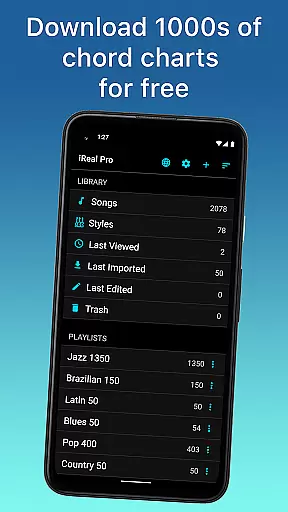
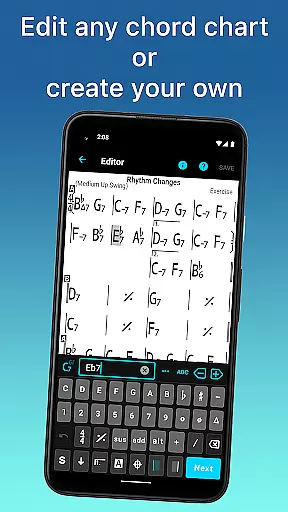
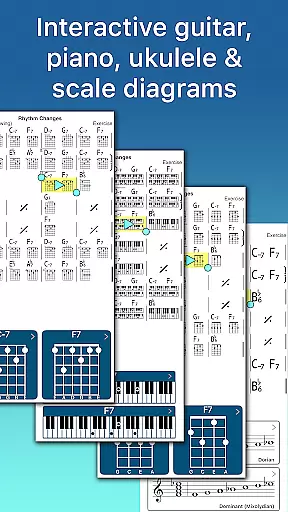
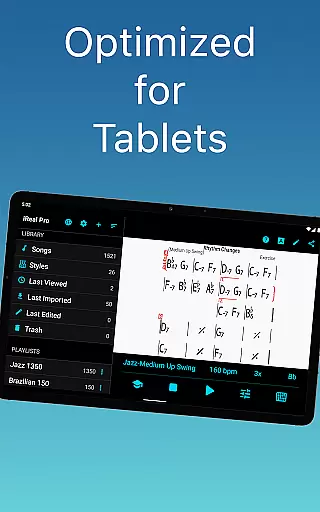
Another key aspect is the ability to manage chord charts effectively. Users can download thousands of songs from forums, edit them using the built-in editor, and even create new ones. The app supports multiple editable playlists and includes chord diagrams for guitar, ukulele, and piano, aiding in learning and improvisation. Advanced practice settings like automatic tempo increase and key transposition further refine the practice experience.
Sharing and exporting options ensure that your music is accessible wherever needed. You can share charts via email, export them as PDFs or MusicXML files, and export audio recordings in WAV, AAC, and MIDI formats. These features make iReal Pro not just a practice tool but also a complete music management solution.
When it comes to music applications, the size and authenticity of the music library are crucial factors. iReal Pro boasts an extensive music library that includes thousands of songs available for download directly within the app. This vast collection ensures that musicians of all levels have access to a wide range of musical pieces to practice and perform.
The app's dedication to copyright authenticity is evident in its approach to content. All the music available in iReal Pro is properly licensed, giving users peace of mind that they are accessing legitimate content. This commitment not only supports the original artists but also enhances the credibility of the learning experience provided by the app.
Moreover, iReal Pro allows users to create and edit their own chord charts, which can be saved and added to personal playlists. This feature enriches the useru2019s music library with custom content tailored to individual preferences and needs, further expanding the depth and utility of the app's music database.
By providing a platform where both quantity and quality are prioritized, iReal Pro establishes itself as a reliable tool for musicians who require a comprehensive and authentic music library to support their practice and performance routines.
Audio quality is paramount when evaluating music applications, and iReal Pro excels in offering diverse audio quality options. The app provides realistic accompaniments through a variety of sounds including piano, Fender Rhodes, acoustic and electric guitars, basses, drums, and more. These high-quality audio outputs simulate a real band environment, enhancing the practice sessions of musicians significantly.
iReal Pro goes beyond basic sound provision by allowing users to personalize each accompaniment style. With over 51 different styles ranging from Swing to Latin, users can fine-tune the audio settings to match their preferred tone and style. This customization capability ensures that every practice session can be as close to a real performance as possible.
In addition to playback features, iReal Pro supports exporting audio in multiple formats such as WAV, AAC, and MIDI. This flexibility in audio export options enables musicians to use their recordings for various purposes, whether it's for personal review or professional sharing.
Overall, the emphasis on superior audio quality options makes iReal Pro an indispensable tool for musicians aiming to refine their skills with the most realistic and flexible audio accompaniments available in a mobile application.
User-friendly interface
Extensive sound customization
Versatile accompaniment styles
Comprehensive chord chart editor
Advanced practice settings
Some features require in-app purchases
Interface may overwhelm beginners
Occasional syncing issues
Limited free song downloads
Export options could be more intuitive

Simply convert wav to mp3. Clear. Reliable. Safe.
 4.1
4.1
Tune in to the greatest hits on UK Radio | The home of Capital, Smooth & Heart.
4.90
Simple & Intuitive Metronome
4.70
USB audio recording and playback finally possible on Android 3.1 or higher!
3.90
Voice recorder - Audio recorder. Best recorder for recording
4.90
No wifi music app. Mp3 offline. Tuner radio, young radio music. Music downloader
4.20
Help you quickly get started with Shokz headphones
4.40
Offline Music Player&MP3 Player with themes, equalizer, lyrics, music play mode
4.60
Sing, record, and create music together — enhanced by smart voice tools.
4.00
Play your hearts out on TouchTunes jukeboxes & connect with fellow music lovers.
4.80
Unleash your creativity! Turn simple prompts into full fledged songs.
4.70
Learn the notes on the guitar fretboard fast with this easy and fun app
4.60
Reverse your voice & songs instantly! Fun singing challenge with cool effects.
4.60
Fun & Easy Voice Changer – Record, Edit & Add Hilarious Effects!
4.50
A synth that really lets you shape your sounds!
4.50
Enjoy singing any song, no matter how high or low it is
4.30
Smart piano keyboard, Classical to Pop, Real-time multiplayer connection!
4.20
The only true audiophile music player with Hi-Fi audio rendering and DSP engine
3.90
Music Streaming suite for Ampache, Nextcloud Music and compatible backends.
4.0


User Reviews