
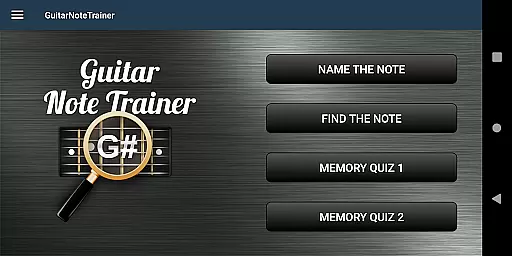

Guitar Fretboard Note Trainer is an innovative app designed to help guitarists master the essential skill of learning notes on the fretboard. With its engaging and progressive game-based approach, users can practice anywhere at their own pace.
The app features four distinct training modes that target different aspects of note recognition. From basic note identification to challenging memory quizzes, it offers a comprehensive learning experience. Beginners can use simplified settings while advanced players can tackle more complex challenges.
This app is particularly useful for intermediate guitarists looking to improve their music theory knowledge and fretboard familiarity, which are crucial for composing, improvising, and communicating with other musicians.
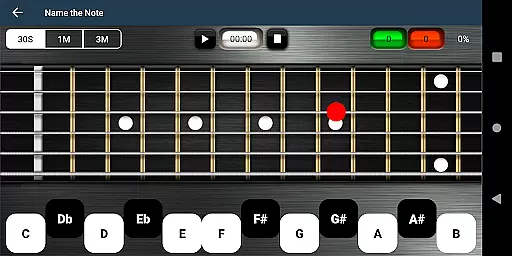
The app's standout feature is its diverse training modes. Name The Note challenges users to identify displayed notes, while Find A Note tests their ability to locate specific notes across all six strings. These interactive exercises make learning engaging and effective.
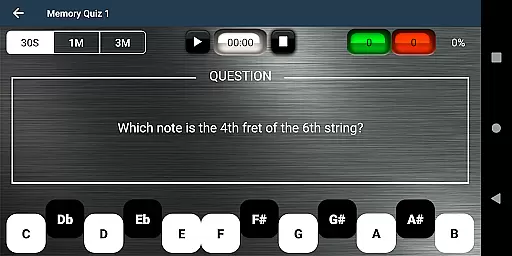
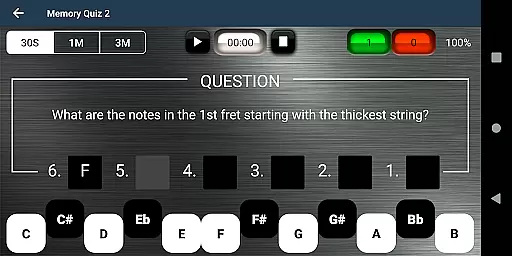
For memory training, the app offers two specialized quizzes. Memory Quiz 1 requires recalling note positions, and Memory Quiz 2 pushes users to name all notes across an entire fret - a significant challenge for even experienced players. The optional audio feedback feature enhances learning by connecting visual and auditory information.
Additional thoughtful features include adjustable difficulty levels for beginners, a helpful cheat function for reference, and a clean user interface that keeps the focus on learning without unnecessary distractions.
When it comes to music learning applications, the size and authenticity of the music library are crucial. The Justin Guitar Fretboard Note Trainer offers a comprehensive selection of notes and training modes that cater to guitarists at different skill levels. With four distinct training modes, users can progressively enhance their knowledge of the guitar fretboard.
The app provides various interactive games such as 'Name The Note', 'Find A Note', and two types of 'Memory Quiz'. These games ensure that users engage with copyrighted content that is legitimate and designed to aid in musical education. Furthermore, the optional audio feature enriches the learning experience by allowing users to hear the notes they select, reinforcing auditory learning.
For beginners, simplified options help ease the complexity of the guitar's fretboard, making the initial learning curve less daunting. This tiered approach to difficulty, paired with genuine musical content, ensures that learners have access to a vast array of notes without compromising on the quality or legality of the material.
Audio quality is paramount when discerning the subtle nuances of musical notes. The Justin Guitar Fretboard Note Trainer app includes an essential audio option that allows users to listen to the notes they interact with on the fretboard. This auditory feedback is critical for developing a musician's ear and ensuring accurate note recognition.
By engaging with high-quality audio outputs, learners can better understand the tonal differences between notes, which is vital for both composing and performing music. The app's ability to provide clear and precise sound samples aids in ingraining proper pitch and tone identificationu2014a fundamental skill for any advancing guitarist.
Moreover, the inclusion of this feature demonstrates the app's commitment to delivering a holistic learning experience. Users can be confident that the audio quality options available in the Justin Guitar Fretboard Note Trainer will support their growth as musicians by offering dependable and true-to-life sound reproduction.
User-friendly interface
Progressive learning system
Audio note feedback
Customizable difficulty
Offline functionality
Limited advanced theory
No left-handed mode
Basic visual design
Few customization options
Occasional performance lag

Remove ads permanently from Music Visualizer
 4.3
4.3
Visualize the guitar fretboard, master scales & play through changes like a pro!
4.50
The ultimate media player for Android devices
3.90
24,000 free audio books and no ads!
4.90
Smart piano keyboard, Classical to Pop, Real-time multiplayer connection!
4.20
The official Sonos app
4.10
The Minimalistic Premium Music Player. Handmade with passion for music
2.20
Turn your Android phone into a professional audio analyser with up to 120 bands.
4.00
Master Salsa Rhythm quickly and with a lot of fun!
4.30
Music, News & Sports Radio Tuner App. Tune in Live FM & AM Radio Stations.
4.80
Walkout Song DJ is the most intuitive app to manage your sports music.
4.70
Full featured mp3 and audio player with Chromecast and Android Auto support.
4.40
Equalizer, Bass Booster and Volume Booster (Eq & Bass) improve sound quality
4.30
Bass Booster Pro takes auto-equalizing to the next level!
4.30
The original SP-1200 experience on your iPad
4.20
Versatile MP3 recorder with auto-backup to Dropbox and Google Drive
4.10
Slow music down without changing pitch.
3.70
The iconic iOS metronome app is now on Android.
3.70
Control your MIDI USB or Bluetooth devices in app and avoid some trampling
3.30


User Reviews