


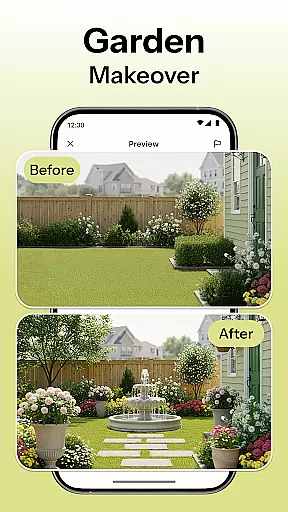
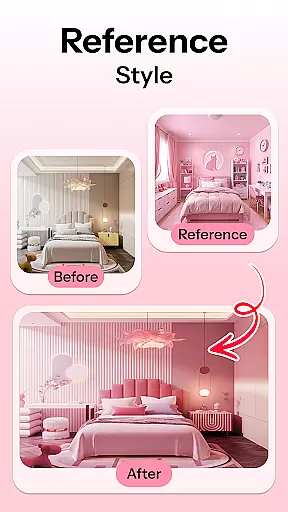
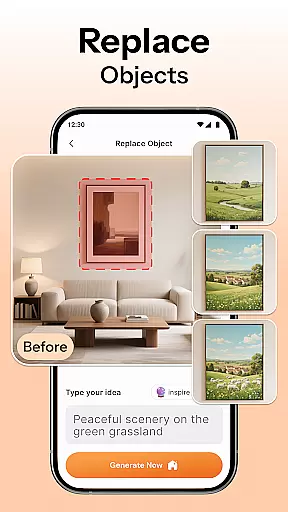
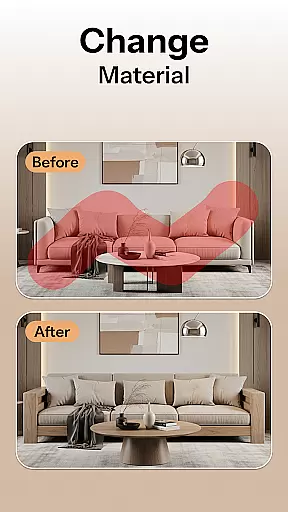
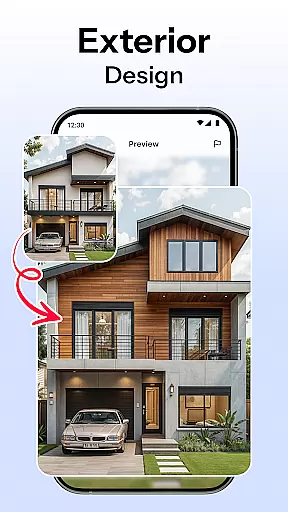

HomeMagic is an innovative AI-powered interior design application that transforms the way users approach home decoration. The app's core functionality lies in its ability to instantly generate professional-grade room designs based on user-provided photos and selected styles. Whether you're redesigning a single room or planning a complete home makeover, HomeMagic provides realistic visualizations across various design aesthetics including Modern, Retro, and Bohemian.
Beyond basic design generation, the application offers advanced features such as smart furniture layout planning, wall color experimentation, and detailed before-and-after comparisons. These capabilities make it particularly valuable for homeowners undertaking renovations, renters seeking affordable refresh options, and professional interior designers looking for quick concept visualizations. The app's strength lies in its ability to save users significant time and resources by providing accurate design previews before any physical changes are made.
HomeMagic distinguishes itself through several key features that enhance the interior design process. The AI Interior Design Generator serves as the foundation, allowing users to upload space photographs and receive multiple style variations within seconds. This feature supports an extensive range of design themes from Tropical to Cyberpunk, catering to diverse aesthetic preferences.
The application's Room Makeover Preview and Smart Furniture Layout Planner work in tandem to optimize space utilization while maintaining aesthetic appeal. Users can experiment with different furniture arrangements, lighting placements, and decorative elements without any physical commitment. Additionally, the Home Decor Ideas & Style Filters enable precise customization of wall colors, flooring materials, and furniture combinations, ensuring every design element aligns with personal taste.
One of HomeMagic's most practical features is the Before & After Comparison tool, which allows users to evaluate design effectiveness through direct visual contrast. Combined with the ability to save and organize multiple design iterations in high-quality formats, these features create a comprehensive design solution that serves both casual decorators and professional designers alike.
HomeMagic offers a comprehensive suite of creative tools that cater to all your interior design needs. With features like the AI Interior Design Generator, Smart Furniture Layout Planner, and Home Decor Ideas & Style Filters, users have everything they need to transform any room instantly.
The app allows experimentation with various design styles including Modern, Retro, Tropical, Bohemian, Vintage, and Cyberpunk. This versatility ensures that whether you're planning a cozy bedroom or a modern living room, HomeMagic has the tools to bring your vision to life.
Users can optimize their space with AI-suggested layouts for furniture, lighting, and wall art, making it an invaluable resource for homeowners, renters, and professional interior designers alike.
Flexibility is at the core of HomeMagic's design philosophy. The app supports a variety of formats and canvas sizes, allowing users to visualize their designs in high detail and quality. Whether you are redesigning a small bedroom or an expansive office, HomeMagic adapts to your specific requirements.
With options to experiment with wall colors, flooring textures, and trendy furniture sets, users can find the perfect combination that suits their taste. The Before & After Comparison feature further enhances this flexibility by letting users see the current space alongside the AI-designed version.
This adaptability extends to exporting designs in high quality, making it easy to share your favorite designs with friends or professional interior designers. HomeMagic ensures that your creative process is not just flexible but also seamless and enjoyable.
User-friendly interface
Wide style variety
Quick rendering speed
High-quality visuals
Comprehensive tools
Premium feature costs
Occasional inaccuracies
Device compatibility
Learning curve
File export limits

Download now for a stylish and functional timepiece
 4.1
4.1
Transform photos into amazing monochrome dither art with professional algorithms
4.5
Create sweet, cool and unique couple avatars easily, in just a few steps!
3.40
Create trending AI photos & videos with powerful effects and 3D styles.
3.20
AI Face Swap, Video Effects Editor, Realtime Morph, Funny Video FX,AI Filters
3.70
Unleash your drawing and painting potential
4.50
Turn your drawings into flipbook-style animations with simple creative tools
4.60
Draw, make movies & animate cartoons easily with our 2D animation maker app
4.40
How to draw anime step by step for beginner easily by AR drawing sketch & paint.
3.60
Create stunning art with AI.
4.80
Your AI soulmate — meaningful chats, and unique emotional moments
4.70
Castle is social media for creating and playing games!
4.60
Digital illustration drawing & painting pad app to paint Anime and Manga art
4.50
Create and Design Custom Logos in Seconds with AI-Powered Tools!
4.40
Bring One UI 8.5 Icons to life -elegant dark icons with a modern, premium touch.
4.30
Your homescreen as an elegant glass with customized blur, lighting, and visuals.
3.70
Create cute cat emojis & PFPs! Fun, custom avatars for cat lovers.
3.70
Art of Combination Wear OS Watch faces (for Wear OS 5+ devices)
3.00
Art of Combination Wear OS Watch faces
4.5


User Reviews