
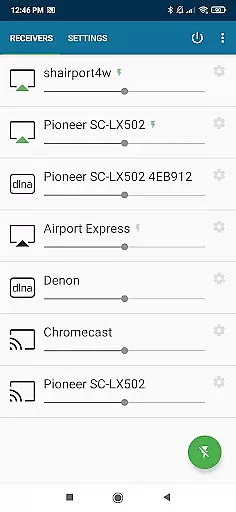
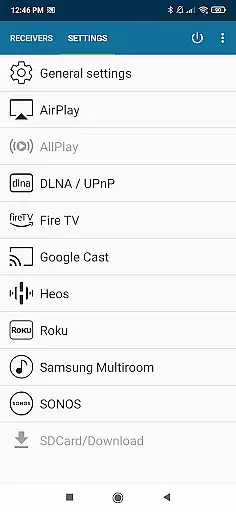
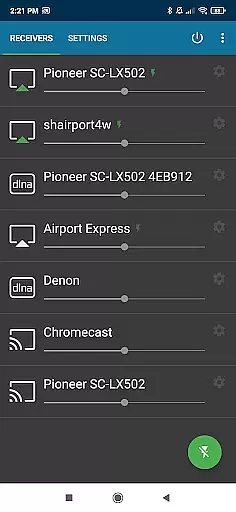
AirMusic is a versatile audio streaming application that allows users to stream audio from virtually any app to a wide range of receivers with just one click. Compatible with popular streaming services like YouTube Music, Deezer, Amazon Music, Apple Music, and Spotify, it supports devices including SONOS, Apple TV, Chromecast, Fire TV, Smart TVs, AV-receivers, Homepod, Samsung Multiroom, Denon HEOS, Roku, Raspberry Pi, and Airport Express.
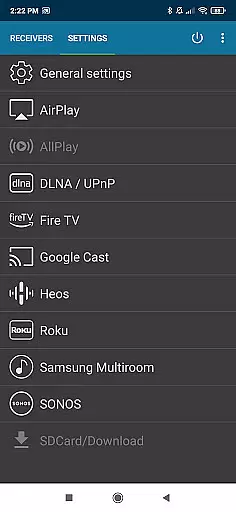
The app integrates seamlessly with the latest streaming technologies such as Apple AirPlay, SONOS, Google Cast, DLNA, Amazon Fire TV, Samsung Multiroom, Denon HEOS, and Roku. Whether you're looking to enjoy music on your Apple TV, Homepod, or any AirPlay-enabled receiver, AirMusic ensures an effortless streaming experience across all compatible devices in your home.
With its powerful features and broad compatibility, AirMusic enhances your entertainment options by allowing you to stream any audio from your Android device to multiple receivers. This makes it an ideal solution for enjoying music everywhere in your home, providing both convenience and high-quality audio streaming.
AirMusic stands out with its robust feature set designed to provide seamless audio streaming. One of its key features is the ability to run in the background, enabling users to stream audio with just one click. This ease of use is complemented by its capability to send information and artwork to AirPlay or Google Cast-enabled receivers, enhancing the overall user experience.
In addition to supporting major streaming technologies, AirMusic also offers integration with automation apps like Tasker and MacroDroid. This allows users to create custom widgets or automate their music streaming, adding a layer of personalization and control. Such features ensure that users can tailor their streaming experience according to their preferences.
AirMusic's commitment to user satisfaction is evident in its provision of personal assistance for any issues encountered. Users can contact support via email at support@airmusic.app, ensuring that help is readily available. Despite some limitations with certain apps and Android versions, AirMusic remains a powerful tool for streaming audio across various devices, making it an essential app for audiophiles and casual listeners alike.
AirMusic offers an extensive streaming solution that supports a wide range of music services including YouTube Music, Deezer, Amazon Music, Apple Music, and Spotify. This vast compatibility ensures users have access to an impressive music library size.
With its ability to stream audio from almost any app, AirMusic guarantees that users can enjoy content from various platforms without worrying about copyright restrictions. The app supports the latest streaming technologies, ensuring that all streamed music is authentic and legally accessible.
The integration with multiple streaming services not only enhances the variety of available music but also assures users of the legitimacy of the content they are accessing. This feature is crucial for those who prioritize legal and authorized music consumption.
By supporting services like SONOS, Apple TV, Chromecast, and others, AirMusic provides a seamless experience where users can enjoy their favorite tunes across different devices, reinforcing the authenticity and breadth of its music library.
AirMusic stands out in its support for high-quality audio streaming across a multitude of devices, ensuring an optimal listening experience. By leveraging advanced streaming technologies, it delivers superior sound quality that audiophiles will appreciate.
The app's compatibility with high-fidelity systems such as Bang & Olufsen, Bowers & Wilkins, and premium receivers like Yamaha and Bose means that users can expect top-notch audio quality options. These partnerships ensure that sound is not just heard but felt, maintaining the integrity of the original recordings.
Moreover, AirMusic's support for formats and technologies like DLNA and AirPlay means that audio is transmitted with minimal loss, preserving the richness and depth of the music. Listeners can indulge in a soundscape that mirrors studio-quality output right in their homes.
Whether enjoying music through a sophisticated home theater system or a simple setup, AirMusic caters to diverse audio preferences, making certain that each note is delivered with precision and clarity, thus elevating the overall auditory experience.
User-friendly interface
Wide device compatibility
Seamless streaming technology
Background operation
Personalized support
Limited app compatibility
Android version restrictions
Additional steps for some services
Premium features require payment
Occasional connectivity issues

DJ Music Mixer - DJ Remix: remix songs, make beat music & record mix of DJ.
 4.40
4.40
Most Advanced AI Song Generator and Music Creator. Rap, Pop, Rock, Gospel & more
4.70
More downloads than any other metronome. Includes drum machine & tempo trainer.
4.80
Turn your Android phone into a professional audio analyser with up to 120 bands.
4.00
Responsive piano with great sounds, graphics, and songs
4.80
Reverse your voice & songs instantly! Fun singing challenge with cool effects.
4.60
Travel To The Music Universe
3.40
Uninterrupted Tunes, Unmatched Vibes
3.90
Get alarms that fit your lifestyle and wake up to the sounds you love.
4.80
Taal player that lets you sing any Indian & Western song with Tabla & Tanpura
4.60
Visualize the guitar fretboard, master scales & play through changes like a pro!
4.50
Let your Android device with the sound effects you want
4.50
Formerly known as Spotistats! View your top tracks, artists, albums and more!
4.40
Bass Booster Pro takes auto-equalizing to the next level!
4.30
Powerful 10-Band equalizer pro with sound booster improves Android audio quality
4.30
The original SP-1200 experience on your iPad
4.20
PowerAudio is a powerful offline music player.
4.20
The official Sonos app
4.10
Learn to play the piano using falling notes!
3.80


User Reviews