
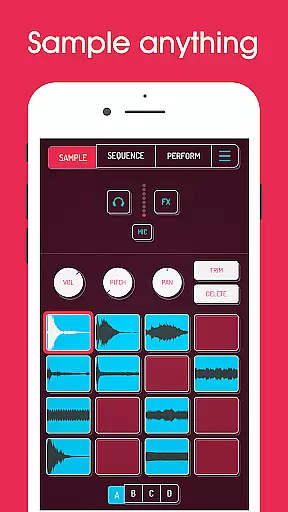
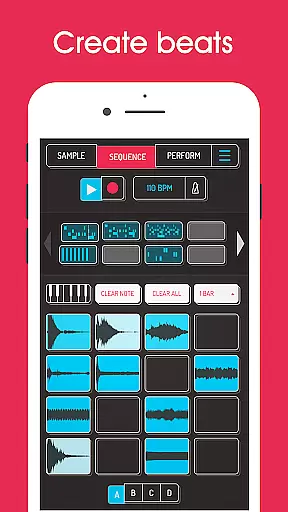
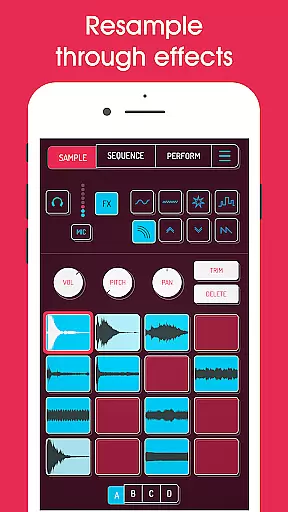
Koala Sampler is a pocket-sized music production tool that allows users to record sounds through their phone's microphone or import custom samples. Designed for both amateur beatmakers and professional musicians, this app provides an intuitive interface for creating tracks quickly and efficiently. With features like AI-powered sample separation, 16 built-in effects, and a high-resolution sequencer, Koala Sampler makes music creation seamless and fun.
The app supports up to 64 different samples, each with adjustable attack, release, and tone settings. It also includes advanced functionalities such as resampling, MIDI control, and exporting tracks in professional WAV format. Whether you're transforming your voice with unique effects or crafting intricate beats, Koala Sampler keeps the creative process flowing without overwhelming users with unnecessary complexities.
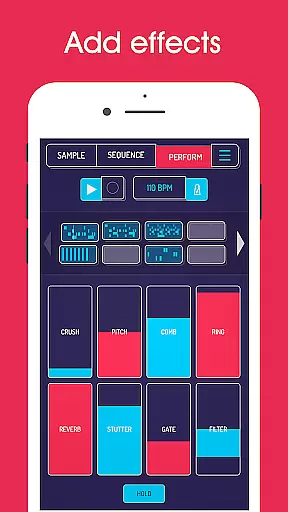
Koala Sampler stands out with its comprehensive set of features tailored for music producers. The app offers 16 built-in microphone effects, including reverb, fuzz, and synthesizer options, allowing users to modify sounds instantly. Additionally, it provides 16 DJ mix effects like bit-crusher, pitch-shift, and tempo delay, giving creators endless possibilities for sound manipulation.
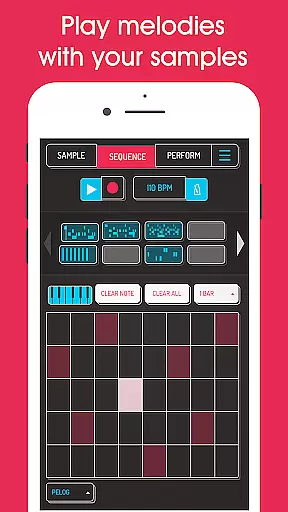
One of the key highlights is the AI-powered sample separation feature, which divides audio into individual instruments such as drums, bass, and vocals. This functionality, combined with the piano roll editor and auto-chop tools available via in-app purchase, ensures precision in music editing. The app also supports MIDI controllers, enabling users to play samples on external keyboards while maintaining full creative control over their projects.
Koala Sampler offers an extensive music library that allows users to record up to 64 different samples using their phone's mic. This vast capability ensures a rich diversity of sounds, which is crucial for creative freedom in music production.
In addition to recording, the app supports importing your own samples, thus providing complete control over the audio content you work with. The ability to use AI to separate samples into individual instruments like drums, bass, vocals, and others further expands the library's utility and versatility.
Regarding copyright authenticity, Koala Sampler enables users to create original content by transforming voices or any other sound with 16 superb built-in effects. This feature not only enhances creativity but also helps maintain the integrity and originality of the music produced within the app.
The app provides professional-quality WAV file export options for loops or entire tracks, ensuring that the output meets industry standards. This high level of audio quality is essential for musicians who require pristine sound reproduction in their work.
Koala Sampler includes adjustable parameters on each sample such as attack, release, and tone, allowing precise control over the sound design process. These meticulous controls contribute significantly to achieving the desired audio quality in your compositions.
Furthermore, the inclusion of 16 DJ Mix FX and additional features through SAMURAI In-App Purchase, such as Pro-quality Timestretch and Piano roll editor, enhance the overall audio manipulation capabilities. Such tools are indispensable for refining audio quality and crafting polished musical pieces.
Intuitive user interface
Extensive sound effects library
AI-powered sample separation
Professional WAV export
MIDI compatibility
Some features require in-app purchase
Microphone input issues reported
Limited free version capabilities
No cloud backup option
Occasional performance lags

Equalizer, Bass Booster and Volume Booster (Eq & Bass) improve sound quality
 4.30
4.30
Over 100 million tracks available for high quality streaming and download
4.60
Offline and always ad-free - stream in the highest quality available.
4.10
Advanced 10-Band Audio Graphic Equalizer Sound Booster Pro
4.30
Learn to play the piano using falling notes!
3.80
No wifi music app. Mp3 offline. Tuner radio, young radio music. Music downloader
4.20
Ringtone Maker is free app create ringtone from music files or your recording.
4.40
Sing, record, and create music together — enhanced by smart voice tools.
4.00
Play your music offline without limits
4.80
Offline Music Player & MP3 Player.Powerful equalizer, Lyrics, Themes, Tag Editor
4.80
JBL PartyBox APP works with 110/310/710/120/320/520/Encore/Encore 2/Encore Ess 2
4.80
Taal player that lets you sing any Indian & Western song with Tabla & Tanpura
4.60
AI Music Maker: Generate And Compose AI Tunes & AI Songs & AI Music & AI Melody!
4.60
A complete sound package for the sound engineer or enthusiast
4.60
Master Salsa Rhythm quickly and with a lot of fun!
4.30
Time Trainer: accurate metronome w tools to help you develop your internal time!
4.20
A High-Precision Audio Spectrum Analysis App
4.20
Turn your Android phone into a professional audio analyser with up to 120 bands.
4.00
The Skullcandy App Experience
3.20


User Reviews