
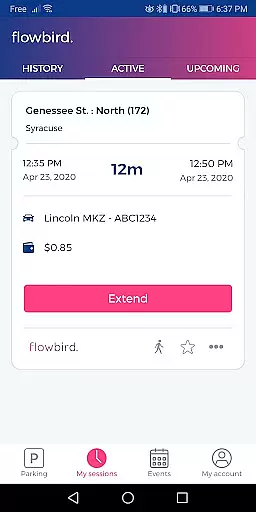
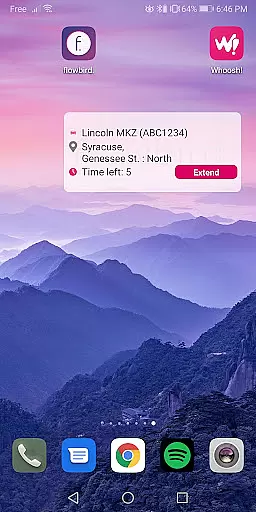
Flowbird Parking is a mobile application designed to simplify the parking experience for users. With this app, you can pay for parking directly from your mobile device, receive notifications when your parking time is about to expire, and extend your parking duration without needing to return to a physical meter. This functionality is particularly useful in urban areas where parking meters are prevalent and time constraints are critical.
The app also offers additional features such as a parking pressure display for certain locations, a 'find my car' function for those who tend to forget where they parked, and secure login options like fingerprint authentication. Registration is free, and once you've set up an account, you can use the service in any location that supports Flowbird Parking. However, availability varies by location, so it's important to check the list of eligible areas on their website.
Flowbird Parking stands out with its comprehensive feature set tailored to enhance user convenience. One of the key aspects is the ability to make mobile payments through either a smartphone or web interface, ensuring that users have flexible options for managing their parking fees. The parking pressure display is another innovative feature, providing real-time information on parking space availability in select areas, which can significantly reduce the time spent searching for a spot.
For users who frequently forget where they parked, the 'find my car' feature is invaluable. It uses location services to help you quickly locate your vehicle. Security is also a top priority, with measures such as fingerprint login adding an extra layer of protection to your account. Additionally, the app's payment process is certified against Payment Card Industry Data Security Standards, ensuring that your financial data remains safe and secure during transactions.
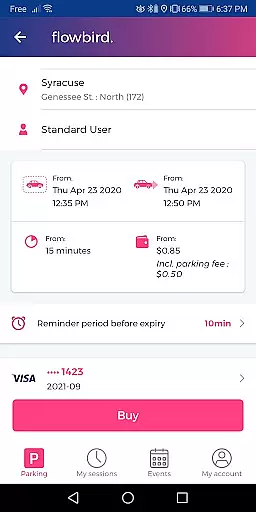
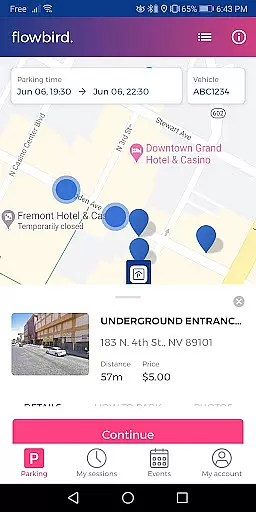
When it comes to managing parking sessions through the Flowbird Parking app, having access to detailed vehicle information is crucial. This feature allows users to register and manage multiple vehicles under a single account, ensuring that they can swiftly select the correct license plate number when initiating a parking session. The app securely stores essential details such as vehicle make, model, and color, which not only aids in streamlining the parking process but also enhances security measures.
The importance of this functionality lies in its ability to save time and reduce errors during the parking process. Users no longer need to manually enter their license plate numbers each time they park, minimizing the risk of incorrect entries that could lead to fines or towing. Additionally, by maintaining an organized list of vehicles within the app, users with multiple cars can switch between them effortlessly, making the experience seamless regardless of which vehicle they are driving.
Flowbird Parking takes user convenience seriously, and the detailed vehicle information feature is a testament to this commitment. By providing a comprehensive overview of each registered vehicle, the app ensures that users have all necessary information at their fingertips, allowing for quick selections and confirmations. This level of detail not only simplifies the parking process but also contributes to a more personalized and efficient user experience overall.
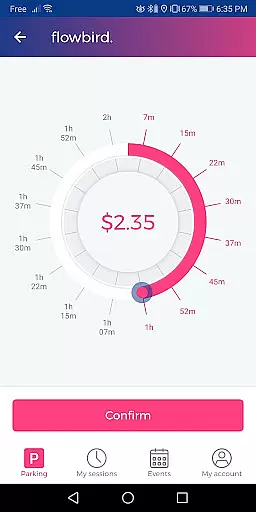
Price transparency is a cornerstone of the Flowbird Parking app's value proposition, ensuring that users are fully aware of the costs associated with parking before confirming their sessions. The app provides clear and concise pricing information based on the selected location and duration, empowering users to make informed decisions about their parking expenditures. This transparency extends beyond basic rates to include any additional fees or taxes, presenting a complete picture of what users can expect to pay.
In practice, the Flowbird Parking app displays dynamic pricing that may vary depending on factors such as location, time of day, and demand. Users can easily view these details during the session setup process, allowing them to adjust their parking duration or choose alternative locations if needed. This approach not only builds trust with users but also encourages responsible financial planning by eliminating unexpected charges.
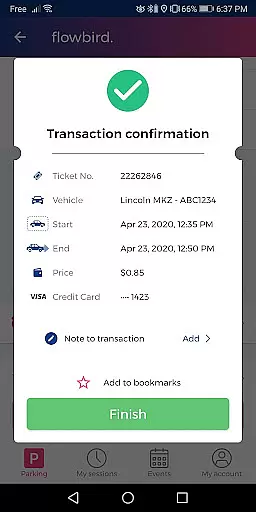
Moreover, the app's commitment to price transparency goes hand-in-hand with its secure payment processing. After reviewing the displayed costs, users can proceed with confidence knowing that their transactions are protected by industry-leading security standards. This combination of clear pricing information and robust data protection creates a reliable and trustworthy parking solution that prioritizes user satisfaction and peace of mind.
User-friendly interface
Secure payment options
Real-time parking info
Free registration
Convenient time extension
Limited location support
Requires internet connection
Parking rules vary
No offline functionality
Dependent on third-party services

OBD1 ECMs application. Data log or tune directly from your phone or tablet!
 4.60
4.60
Theme for Car Launcher
4.4
Wonder how much horsepower and torque your car/truck makes? Look no further.
3.40
Better fuel to help keep you on the road
3.20
By enthusiasts, for enthusiasts
4.00
Car Sounds Engine Sounds app welcomes Auto Lovers to feel Car Simulator Sound
4.20
View your car’s service records and find out when maintenance is due.
4.70
Your Path to Driving Licensing Success Begins Here! Develop your driving skills.
4.40
Earn and save with Fuel Rewards®
3.20
7-Day Returns on All Cars
4.80
Oil change service & coupons for car maintenance at Valvoline Instant Oil Change
4.70
Trip computer+car diagnostic tool with widest variety of features and dashboard!
4.70
Browse millions of cars, track vehicle listings or sell your car today
4.70
Instantly redesign your car with AI. From sporty to futuristic, try it all.
4.50
Digital Car Key/Launcher, Screen Mirror, Android Dashboard, Remote Wireless Link
4.40
AI Powered - Automotive Mechanic Assistant
4.30
Realtime Charts is a plugin for the Torque Pro App (OBD 2 & Car)
4.20
Ferrari inspired analog & digital watch face with quick access and premium style
4.2
DIY Vehicle Wheel Alignment
4.5


User Reviews