
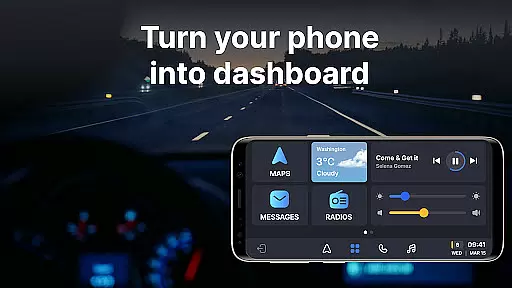
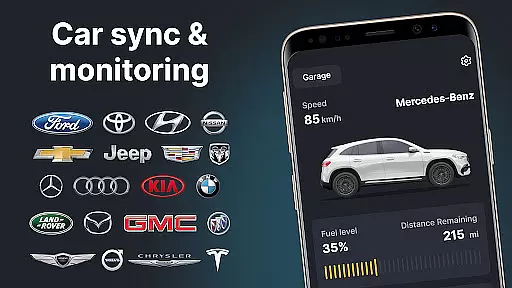
Auto Sync for Android/Car Play is a comprehensive vehicle management app that transforms your smartphone into an advanced car dashboard. The app provides real-time monitoring of crucial vehicle statistics such as fuel level, battery status, engine oil life, mileage, and tire pressure through seamless integration with Apple CarPlay and Android Auto systems. This ensures drivers can maintain safety standards while enjoying the convenience of digital car key functionalities and screen mirroring.
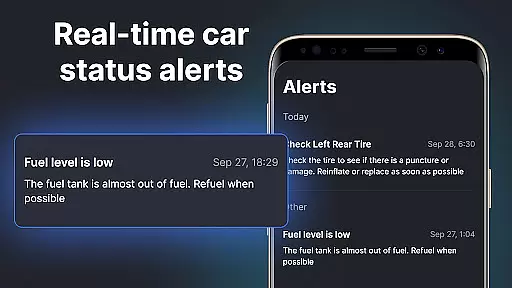
Beyond basic monitoring, the app features a wireless Driving Mode that optimizes the driving experience by enabling easy access to navigation maps, hands-free calling, and music controls. Its user-friendly interface delivers timely alerts and notifications about vehicle maintenance, low fuel levels, and potential issues, making it an essential tool for proactive vehicle care. With support for multiple vehicles across various brands, Auto Sync serves as a versatile digital garage solution.
The application's true value lies in its ability to sync with different car models, providing a unified platform for managing all your vehicles. Whether you drive a Tesla or a Toyota, the app offers brand-agnostic compatibility, ensuring every driver can benefit from its innovative features. By combining essential vehicle data with smart connectivity options, Auto Sync enhances both safety and convenience for modern drivers.
Auto Sync for Android/Car Play stands out with its comprehensive feature set designed specifically for vehicle management. The app's core functionality revolves around real-time vehicle monitoring, where it tracks essential parameters including fuel consumption, battery health, engine performance, and tire conditions. These metrics are presented through an intuitive car dashboard interface that integrates seamlessly with both Apple CarPlay and Android Auto systems.
One of the app's most innovative features is its wireless Driving Mode, which automatically adjusts your smartphone's interface for safe driving. This mode enables hands-free operation of navigation apps, phone calls, and entertainment systems while maintaining focus on the road. The built-in Digital Garage functionality allows users to manage multiple vehicles within a single platform, storing individual settings and preferences for each car.
Additional notable features include customizable alert systems for maintenance schedules and potential issues, digital car key capabilities for remote access, and advanced screen mirroring options that enhance the driving experience. The app also supports various vehicle brands, making it a universal solution for drivers who own multiple cars. These features collectively create a comprehensive vehicle management ecosystem that prioritizes both safety and convenience.
Auto Sync for Android/Car Play offers comprehensive access to your vehicle's vital statistics, ensuring you stay informed about its current status. The app provides real-time updates on crucial factors such as fuel level, battery life, engine oil condition, mileage, and tire pressure. These insights are presented on a convenient car dashboard interface.
The level of detail provided allows users to address potential issues promptly. With notifications for maintenance reminders and warnings for low fuel or tire pressure, drivers can maintain their vehicles proactively. This feature significantly contributes to vehicle safety and reliability, giving peace of mind during every journey.
Compatibility with multiple car brands makes this app versatile and widely applicable. Whether you drive a Tesla, BMW, or Toyota, Auto Sync delivers accurate and essential vehicle information. This ensures that all users, regardless of their car brand, can benefit from the detailed monitoring capabilities of the application.
While Auto Sync for Android/Car Play focuses primarily on vehicle information, it also excels in providing clear details regarding potential costs associated with car maintenance. The app alerts users to necessary maintenance actions, which helps in planning and budgeting for future expenses. These timely notifications prevent unexpected repair costs and ensure financial preparedness.
Users receive comprehensive reports on their vehicle's condition, highlighting areas that may require attention. This proactive approach enables car owners to understand possible upcoming expenses, such as oil changes or tire replacements. By staying informed, users can avoid costly emergency repairs and manage their automotive finances more effectively.
Additionally, by supporting a wide range of car brands, the app ensures that price transparency isn't limited to specific manufacturers. Regardless of whether you own a luxury vehicle or a standard sedan, Auto Sync provides the same level of clarity regarding maintenance needs and associated costs. This universal approach to cost visibility enhances the overall value proposition of the application.
User-friendly interface
Real-time monitoring
Multi-brand support
Wireless driving mode
Comprehensive alerts
Premium features locked
Occasional sync issues
Limited free version
High system requirements
Brand-specific limitations

On the CarShield app, you can view contracts, make payments, & request roadside.
 4.40
4.40
OBD2 car scanner and diagnostics: read Check Engine, DTC, economy....
4.30
Theme for Car Launcher
4.3
Buy and sell your boat
4.70
Autolist - The Largest Selection of Local Used Cars and Trucks
4.50
Boost profits and hit your goals faster with GigU's amazing tools for gigworkers
4.00
Secure mobile payments & fuel savings at Phillips 66®, Conoco® and 76® stations
4.40
Find Fast EV Chargers | Charge Your Vehicle at 1,100+ Fast Car Charging Stations
4.60
7-Day Returns on All Cars
4.80
Play what you want through Android Auto
4.90
Shop, finance, or sell today.
4.80
1M+ high-quality auto parts at your fingertips. Fitment guaranteed.
4.70
MySubaru: Download. Connect. Love.
4.70
Trip computer+car diagnostic tool with widest variety of features and dashboard!
4.70
OBD1 ECMs application. Data log or tune directly from your phone or tablet!
4.60
myAudi offers users services and Audi connect services for Audi drivers
4.10
Control maps, media and messaging, with the Google Assistant while you drive
4.10
PayByPhone: A quick and easy way to pay for parking.
3.80
Theme for Car Launcher
4.2


User Reviews