

PayByPhone is a leading mobile parking payment solution trusted by over 95 million drivers globally. The app simplifies the parking experience by allowing users to pay for parking directly from their smartphones. Available in 10 languages and used across more than 1,300 locations worldwide, it supports major regions including the UK, North America, France, Germany, and Switzerland.
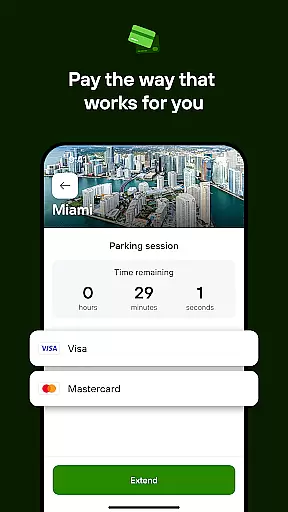
The app's core functionality enables users to enter or scan location codes, select parking durations, and pay using various payment methods such as credit/debit cards, Google Pay, Apple Pay, or PayPal. This seamless process ensures quick and secure transactions, making parking effortless so users can focus on their primary objectives.
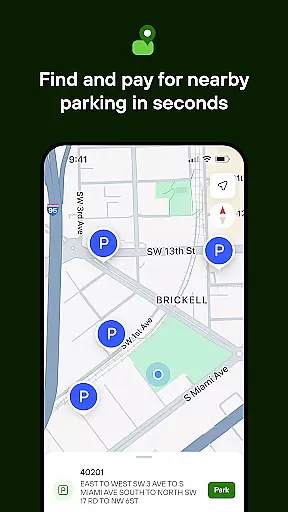
PayByPhone offers an array of features designed to enhance user convenience and streamline the parking experience. Users can start and extend parking sessions remotely, ensuring flexibility and control over their parking time. The Today View widget provides a quick overview of active parking sessions, while Maps and Nearby features help locate available parking spots efficiently.
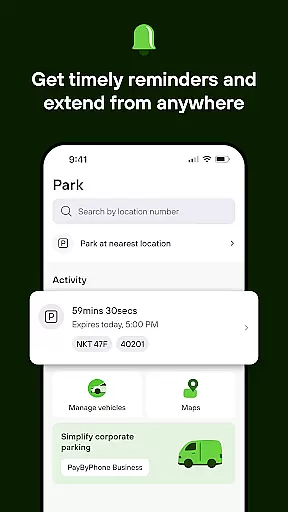
Additional functionalities include SMS or push notifications that alert users before their parking session expires, allowing them to extend time without hassle. Users can review their parking history, pin their parking location for easy vehicle retrieval, and receive emailed receipts for expense tracking purposes. These features collectively contribute to a smarter, more intuitive parking experience tailored to modern drivers' needs.
Detailed vehicle information is crucial for drivers who need to manage multiple aspects of their vehicles efficiently. The PayByPhone app provides essential details that help users keep track of their parking sessions and vehicle locations seamlessly.
Through the app, users can easily pin their parking location, ensuring they can find their vehicle without hassle after their activities. This feature eliminates the stress of forgetting where you parked, especially in large or unfamiliar parking areas.
In addition to location tracking, the app allows users to review their parking history and past sessions. This functionality not only helps in managing expenses but also provides insights into parking habits, enabling better planning and budgeting.
By offering these detailed insights, PayByPhone enhances the overall user experience, making vehicle management straightforward and efficient. Users can focus on their primary tasks while the app takes care of the intricacies of parking logistics.
Price transparency is a vital aspect of any service, ensuring users are fully aware of the costs involved before committing to a transaction. PayByPhone excels in providing clear and upfront pricing for all its parking services, enhancing trust and satisfaction among its users.
The app allows drivers to choose their preferred duration and pay using their chosen payment method, whether it's credit/debit cards, Google Pay, Apple Pay, or PayPal. This flexibility ensures that users are never caught off guard by hidden fees or charges.
Moreover, PayByPhone sends SMS or push notifications before a parking session expires, giving users ample time to extend their session if needed. This proactive approach prevents unexpected charges and allows users to manage their expenses effectively.
With transparent pricing and timely notifications, PayByPhone empowers drivers to make informed decisions, enhancing their overall parking experience while maintaining financial control.
User-friendly interface
Wide geographic coverage
Multiple payment options
Remote session management
Comprehensive parking tools
Limited offline functionality
Occasional service fees
Region-specific features
Notification delays
Dependent on network connectivity

OBD diagnostics, Live Data, DPF regeneration for BMW
 4.00
4.00
Realtime Charts is a plugin for the Torque Pro App (OBD 2 & Car)
4.20
OBDII - ELM327 Terminal tool for 96-00 Volvos
4.50
* This app needs an adapter cable and a certain OBD2 adapter to work *
4.20
Club Car Wash Mobile App—the fast lane to managing your wash membership.
3.30
Take state-specific DMV permit tests and ace the exam.
3.90
Quick and easy car diagnostics to get you the right fix.
4.70
Autotrader is your online solution for buying and selling new and used cars.
4.40
Browse millions of cars, track vehicle listings or sell your car today
4.70
Find Your Local Store or Shop Online for the Car, Truck, or SUV Parts You Need
4.70
Shop cars & see your financing
4.60
Find Fast EV Chargers | Charge Your Vehicle at 1,100+ Fast Car Charging Stations
4.60
Find, search, and browse 40,000+ used cars, SUVs, and trucks.
4.50
Get price alerts, vehicle history details and more for cars near you!
4.50
Instant diesel savings. No credit checks or fees. Nationwide growing network.
4.40
Taximeter; the professional's choice
4.30
Your car is talking. Start listening.
4.30
Blink Charging Mobile app makes finding an EV charger an intuitive experience.
3.80
App Mirroring for Tesla Car's Browser
2.80


User Reviews