


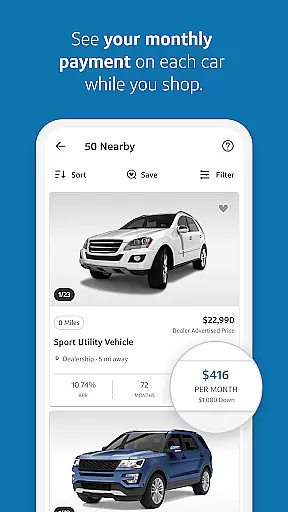

Capital One Auto Navigator is a comprehensive car shopping app designed to simplify the vehicle purchasing process. The app provides users with access to millions of new and used cars for sale across the nation, allowing them to search, compare, and save their favorite vehicles. With customizable search filters, users can refine their options by make, model, year, price, and more, ensuring they find a car that fits both their preferences and budget.
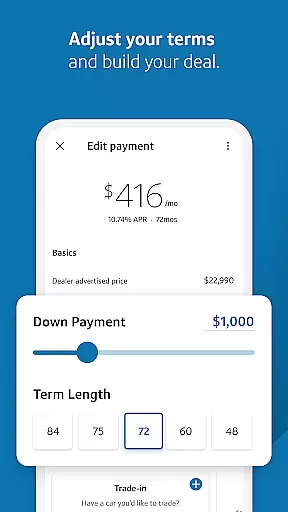
A standout feature of Auto Navigator is its financing tools. Users can pre-qualify for an auto loan within minutes without affecting their credit score. Once pre-qualified, they can view real monthly payments while browsing cars, enabling smarter financial decisions. Additionally, the app allows users to adjust down payments and loan terms to create personalized financing plans. By bringing pre-qualification details to the dealership, users can streamline the buying process and save time during negotiations.
Capital One Auto Navigator offers several key features that enhance the car-buying experience. First, its extensive inventory includes millions of vehicles, catering to diverse needs such as first-time buyers or families seeking spacious options. Each listing provides detailed information, including pricing, mileage, and fuel economy, helping users make informed decisions.
The app's advanced search functionality allows users to filter results based on specific criteria like body style, fuel efficiency, and dealer location. This ensures a tailored search experience that saves time and effort. Furthermore, users can directly contact dealers through the app to inquire about availability or schedule test drives. Another notable feature is the ability to compare multiple vehicles side-by-side, making it easier to evaluate options before committing to a purchase.
For those concerned about financing, Auto Navigator provides transparency and flexibility. Users can pre-qualify for loans quickly and view accurate payment estimates. They can also experiment with different financing scenarios by adjusting variables like down payment amounts and loan durations. These tools empower users to design a financing plan that aligns with their financial goals.
When it comes to purchasing a new or used car, having access to detailed vehicle information is crucial for making an informed decision. Capital One Auto Navigator provides comprehensive details on millions of cars for sale nationwide. Each vehicle listing includes essential specifications such as make, model, year, mileage, fuel economy, and more.
The app's intuitive filtering system allows users to narrow down their search based on specific criteria that matter most to them. Whether you prioritize fuel efficiency, body style, or price range, the app ensures you can find vehicles that meet your exact requirements. This level of detail empowers buyers to compare different options effectively and choose a car that aligns with both their preferences and budget constraints.
Moreover, Capital One Auto Navigator enhances the car-buying experience by enabling direct communication with dealers through the app. Users can call dealerships directly to inquire about vehicle availability and ask additional questions regarding the car's condition or history. This seamless interaction ensures that buyers have all the necessary information at their fingertips before visiting the dealership.
One of the standout features of Capital One Auto Navigator is its commitment to price transparency throughout the car-buying process. The app offers users the ability to pre-qualify for an auto loan quickly without impacting their credit score. Once pre-qualified, users gain access to their real interest rate and monthly payment amounts while browsing cars, eliminating any guesswork about financial feasibility.
This transparent approach extends beyond just loan terms; it also encompasses clear pricing details for each vehicle listed within the app. By displaying accurate prices alongside comprehensive vehicle descriptions, Capital One Auto Navigator ensures there are no hidden costs or surprises during negotiations with dealerships. Buyers can confidently assess whether a particular car fits within their budgetary limits.
Additionally, the app allows users to adjust various financing parameters such as down payment amounts and term lengths. This flexibility enables buyers to customize their deals according to personal financial situations and preferences. By comparing side-by-side monthly payments under different scenarios, users can identify the best possible option that suits their needs while maintaining complete visibility into how these choices affect overall affordability.
User-friendly interface
Extensive vehicle database
Quick loan pre-qualification
Transparent payment estimates
Customizable search filters
Limited to Capital One customers
Dealer communication varies
Requires personal financial data
No virtual test drive option
Occasional app performance issues

Theme for Car Launcher
 4.3
4.3
App Mirroring for Tesla Car's Browser
2.80
Autolist - The Largest Selection of Local Used Cars and Trucks
4.50
Digital Car Key/Launcher, Screen Mirror, Android Dashboard, Remote Wireless Link
4.40
The ExtraMile App allows you to pay for fuel from the comfort of your car!
4.70
Lexus app currently supports 2010 or newer vehicles (2018 or newer for Hawaii).
4.80
1M+ high-quality auto parts at your fingertips. Fitment guaranteed.
4.70
Find Fast EV Chargers | Charge Your Vehicle at 1,100+ Fast Car Charging Stations
4.60
O'Reilly Pro will streamline your parts lookup and ordering process!
3.20
Car Values, Research and More
4.80
Trip computer+car diagnostic tool with widest variety of features and dashboard!
4.70
Quick and easy car diagnostics to get you the right fix.
4.70
Easy connect & control your cars from afar. Remote Lock & unlock car and carplay
4.60
A full featured, real-time transit locator system
4.30
Get your personalized financing options and shop for used cars today!
4.20
OBD diagnostics, Live Data, DPF regeneration for BMW
4.00
Available in select states.
4.00
Wonder how much horsepower and torque your car/truck makes? Look no further.
3.40
DIY Vehicle Wheel Alignment
4.5


User Reviews