
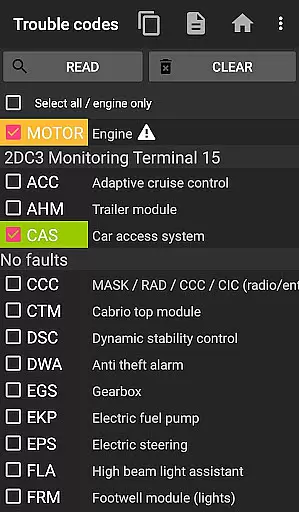
bimmer-tool is a comprehensive diagnostic application designed specifically for BMW vehicles. This app allows users to read and clear fault codes, request DPF regeneration, and access real-time engine data. Compatible with a range of BMW models, bimmer-tool supports various OBD adapters, ensuring broad usability across different vehicle ages and types.
For older models predating 2008, the app recommends using a K+DCan USB cable for optimal functionality. It also provides detailed guidance on connecting different adapters, making it accessible even for less tech-savvy users. Whether maintaining your vehicle or troubleshooting issues, bimmer-tool delivers essential tools directly to your smartphone.
The true value of bimmer-tool lies in its ability to empower BMW owners with professional-grade diagnostic capabilities. From monitoring engine parameters to managing service intervals, this application transforms your mobile device into a powerful automotive diagnostic tool, saving both time and money while ensuring optimal vehicle performance.
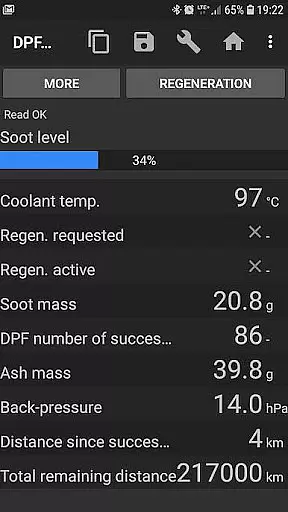
bimmer-tool stands out with its extensive feature set tailored for BMW enthusiasts and professionals. The application's core functionality includes reading and clearing diagnostic trouble codes (DTCs), enabling users to identify and resolve vehicle issues without visiting a dealership. Its DPF management capabilities are particularly noteworthy, allowing users to monitor regeneration status, initiate regeneration processes, and reset adaptation values after filter replacement.
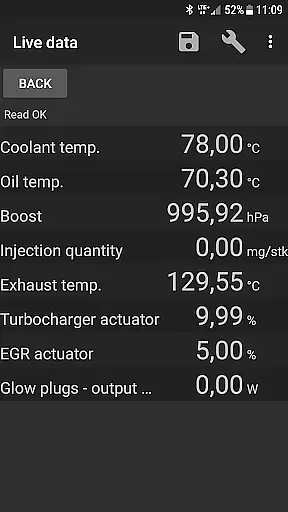
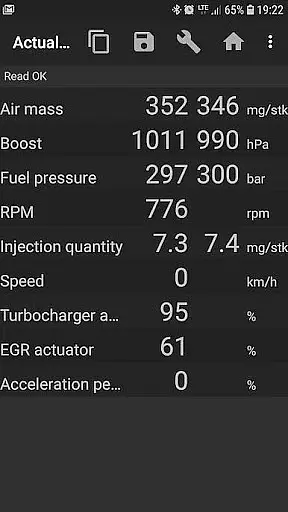
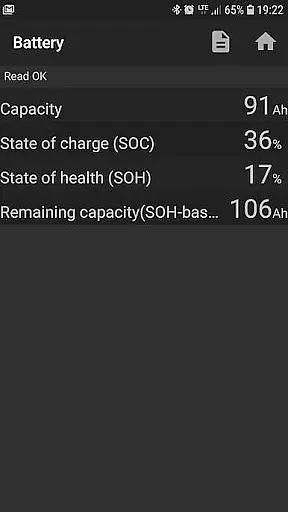
One of the app's most valuable features is its live data monitoring capability. Users can access real-time information about crucial engine parameters such as air mass, intake manifold pressure, and fuel pressure. The application also supports data logging to CSV files, enabling detailed analysis and record-keeping. Additional functions include battery replacement registration and resetting blocked lamp circuits in E-series vehicles.
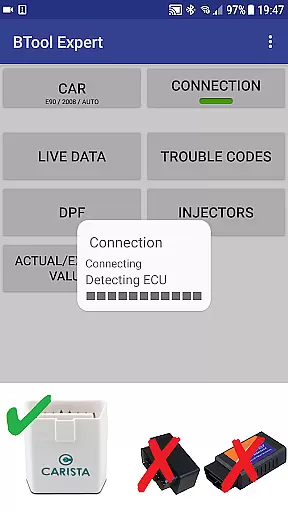
The application's versatility extends to its compatibility with multiple connection types. Whether using a K+DCan USB cable, ENET adapter for newer F/G series models, or Bluetooth/WiFi ELM327 adapters, bimmer-tool provides flexible connection options. The app's comprehensive support system, including detailed quick-start instructions and troubleshooting guidance, ensures users can maximize the benefits of these features regardless of their technical expertise.
bimmer-tool provides comprehensive access to detailed vehicle information, which is crucial for BMW owners who want to understand their car's performance and health. The app allows users to read engine live data, including parameters such as air mass, intake manifold pressure, and fuel pressure. This real-time insight into the vehicle's operations enables proactive maintenance and troubleshooting.
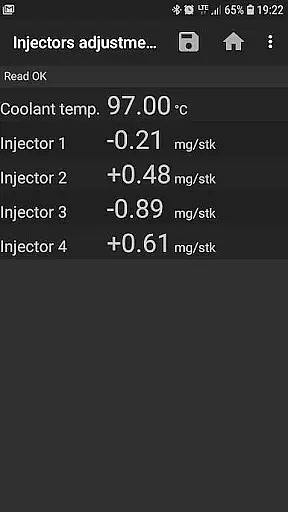
Additionally, bimmer-tool supports reading injectors adjustments and exhaust fumes pressure, offering a deeper understanding of the engine's condition. These features are particularly beneficial when diagnosing issues or assessing the need for repairs. By providing actual and expected values for various metrics, the app empowers users to make informed decisions regarding their vehicle's upkeep.
The ability to log data to a CSV file further enhances the utility of this application. Users can analyze trends over time, compare performance before and after servicing, or share the data with mechanics for expert advice. This functionality transforms the way vehicle diagnostics are handled, making it more accessible and user-driven.
While bimmer-tool itself does not directly deal with monetary transactions, it promotes price transparency by detailing the costs associated with vehicle maintenance. Through its compatibility with various OBD adapters, users can choose the most cost-effective solution for their diagnostic needs. The app recommends specific adapters like Vgate vLinker and UniCarScan, each with clear pricing available on their respective websites.
Moreover, bimmer-tool offers a lite version, allowing potential users to test the app's compatibility with their BMW and OBD adapter before committing to any purchases. This approach ensures that customers are fully aware of what they need and how much it will cost, preventing unexpected expenses. It also highlights the importance of having a reliable OBD adapter, which could be seen as an investment in maintaining the vehicle.
By clearly outlining the limitations and requirements for different car models, the app helps users avoid unnecessary expenditures. For example, it specifies that for cars below model year 2008, a K+DCan USB cable connection is recommended, ensuring users do not spend on incompatible accessories. This level of transparency builds trust and enhances the overall value proposition of bimmer-tool.
User-friendly interface
Comprehensive diagnostic tools
Wide adapter compatibility
Detailed live data monitoring
Professional-grade features
Limited older model support
Requires compatible adapter
Some features model-specific
Occasional connection issues
Professional use may require experience

Attention! This is the theme for the Car Launcher app
 4.3
4.3
CVT diagnostics with ELM327 for Nissan-based vehicles
4.40
Better fuel to help keep you on the road
3.20
Buy and sell your boat
4.70
By enthusiasts, for enthusiasts
4.00
Secure mobile payments & fuel savings at Phillips 66®, Conoco® and 76® stations
4.40
Find Fast EV Chargers | Charge Your Vehicle at 1,100+ Fast Car Charging Stations
4.60
O'Reilly Pro will streamline your parts lookup and ordering process!
3.20
Marathon ARCO Rewards members earn rewards & apply the rewards for fuel savings!
4.80
Shop, finance, or sell today.
4.80
Your go-to app for car, truck & SUV parts, DIY tools, and expert repair help.
4.70
Find Your Local Store or Shop Online for the Car, Truck, or SUV Parts You Need
4.70
OBDII - ELM327 Terminal tool for 96-00 Volvos
4.50
Your Path to Driving Licensing Success Begins Here! Develop your driving skills.
4.40
Autotrader is your online solution for buying and selling new and used cars.
4.40
OBD2 car scanner and diagnostics: read Check Engine, DTC, economy....
4.30
BlueDriver® is a Premium Diagnostic OBD2 Scan Tool. www.BlueDriver.com
3.90
Discover new and used cars in Syria easily! Browse ads and connect with sellers.
3.70
Ferrari inspired analog & digital watch face with quick access and premium style
4.5


User Reviews