

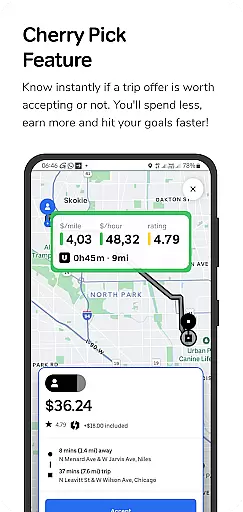
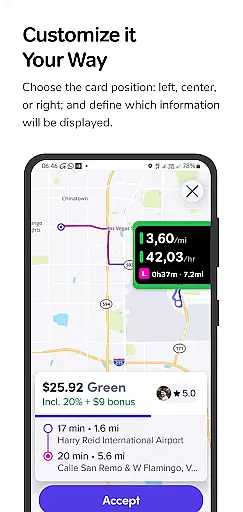
GigU is the ultimate smart assistant for rideshare drivers in the US, designed to optimize earnings on platforms like Uber and Lyft. The app's standout feature is Cherry Pick, which instantly evaluates trip offers, helping drivers make informed decisions that maximize income while minimizing time and effort.
Key functionalities include live smart indicators showing earnings metrics, a color-coded grading system for trip valuation, and quick map shortcuts for location safety checks. With additional features like trip history tracking and voice notifications, GigU ensures drivers stay informed without constant screen monitoring.
Ideal for rideshare drivers seeking better efficiency, GigU transforms how trip decisions are made, leading to smarter work strategies and faster goal achievement.
GigU stands out with its comprehensive suite of features tailored for rideshare drivers. The Cherry Pick functionality uses advanced algorithms to assess trip profitability, providing instant recommendations based on customizable parameters set by the user.
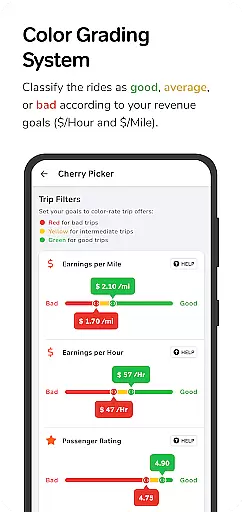
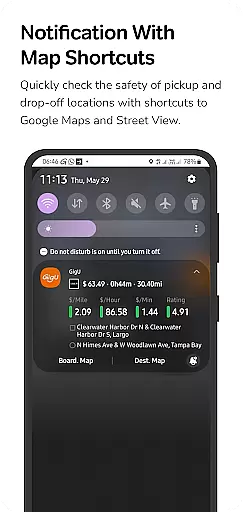
The app employs a colored grading system that visually categorizes trips according to potential earnings, making decision-making faster and easier. Live smart indicators display crucial metrics such as earnings per mile or hour, while integrated map shortcuts allow quick safety assessments of pickup and drop-off locations.
Additional notable features include a complete trip history log, hands-free voice notifications, and secure accessibility services that ensure privacy compliance. These tools collectively empower drivers to optimize their work routines and achieve better financial outcomes.
In the ridesharing industry, having access to detailed vehicle and trip information is crucial for drivers seeking to maximize their earnings. GigU revolutionizes this aspect by providing live smart indicators that display essential metrics such as earnings per mile, hour, and minute.
The app employs a unique colored grading system that rates trips based on user-defined settings. This feature ensures that drivers can quickly assess the profitability of a ride with color-coded simplicity, allowing for swift decision-making.
Additionally, GigU offers a quick maps shortcut notification, enabling drivers to verify the safety of pickup and drop-off locations using Google Maps and Street View. This not only enhances security but also aids in planning the most efficient routes.
By delivering comprehensive insights into each trip offer, GigU empowers drivers to optimize their vehicle's usage and overall performance, leading to increased earnings and achieving personal goals faster.
Price transparency is a significant factor for rideshare drivers when evaluating potential earnings from each trip. GigU addresses this need by instantly analyzing trip offers and presenting clear information on how much a driver can expect to earn.
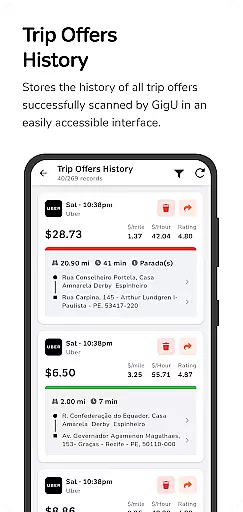
With features like Trip Offers History, drivers can review all scanned ride offers, gaining a transparent view of possible earnings over time. This historical data helps users understand patterns and make informed decisions about which trips to accept.
Voice notifications further enhance price transparency by audibly informing drivers if a ride is worth accepting without needing to look at the phone. This hands-free approach ensures maximum convenience and safety while driving.
GigU's commitment to not request passwords from Uber, Lyft, or other platforms reinforces trust and transparency. By prioritizing security and privacy, GigU provides a reliable tool that supports drivers in making profitable choices effortlessly.
User-friendly interface
Instant trip evaluations
Customizable settings
Privacy-focused design
Comprehensive earning insights
Limited to rideshare platforms
Requires manual setup
Premium features may cost extra
Dependent on third-party APIs
Occasional notification delays

Theme for Car Launcher
 4.3
4.3
OBD diagnostics, Live Data, DPF regeneration for BMW
4.00
Theme for Car Launcher
4.1
Get more out of your AAWireless adapter with this companion app | aawireless.io
4.80
Automotive Electrical Wiring Diagrams
4.40
Instantly redesign your car with AI. From sporty to futuristic, try it all.
4.50
Find, search, and browse 40,000+ used cars, SUVs, and trucks.
4.50
Find Your Local Store or Shop Online for the Car, Truck, or SUV Parts You Need
4.70
Quick and easy car diagnostics to get you the right fix.
4.70
Play what you want through Android Auto
4.90
OBD1 ECMs application. Data log or tune directly from your phone or tablet!
4.60
Shop cars & see your financing
4.60
OBDII - ELM327 Terminal tool for 96-00 Volvos
4.50
Instant diesel savings. No credit checks or fees. Nationwide growing network.
4.40
AI Powered - Automotive Mechanic Assistant
4.30
Mobile Phone Parking - So easy to park
3.70
Wonder how much horsepower and torque your car/truck makes? Look no further.
3.40
Read and delete OBD codes with any ELM327 OBD scanner. Coding functions included
3.40
The Smarter Way Forward
3.30


User Reviews