
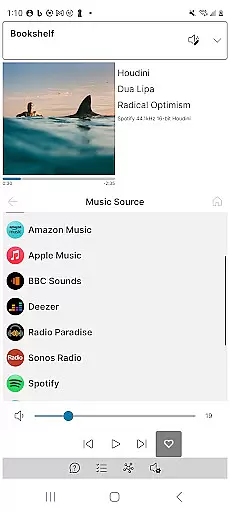
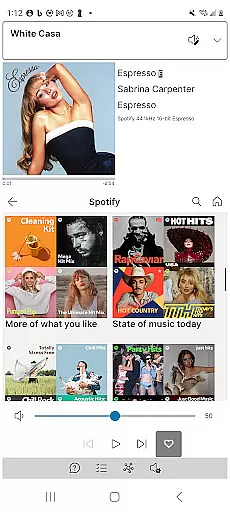
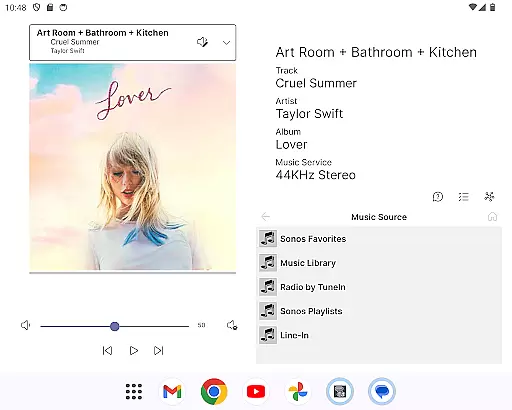
Phonos Ultimate is a powerful and reliable app designed specifically for controlling your whole-home Sonos music system. With an intuitive interface, it offers all the essential features you need to manage your Sonos devices seamlessly. The app supports over a hundred music services, local libraries, line-in, and custom station URLs, ensuring comprehensive control over your music experience.
In addition to standard playback controls like play, pause, next, previous, shuffle, repeat, like, and unlike, Phonos Ultimate provides unique functionalities such as viewing streaming data including sample rate and bit depth. It also allows users to edit groups easily, view and clear queues, add or delete tracks from playlists, and adjust EQ settings. Whether you're managing individual devices or entire rooms, this app ensures optimal performance and reliability without relying on the Sonos cloud API.
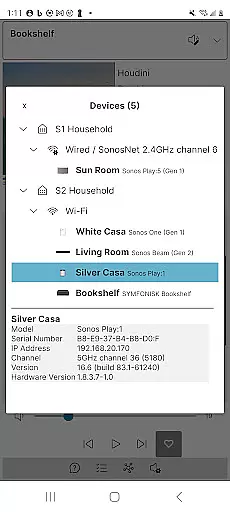
Phonos Ultimate stands out with its extensive feature set tailored for Sonos users. One of its key highlights is the Unique Devices View, which shows exactly how your Sonos devices are connected, providing insights into your system's architecture. This feature is particularly useful for troubleshooting connectivity issues or optimizing device placement.
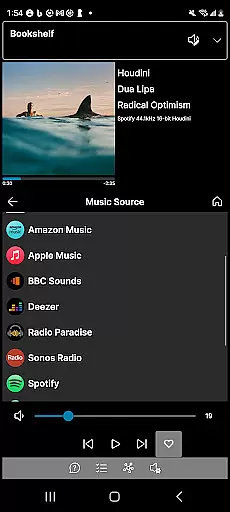
The app supports both S1 and S2 Sonos systems and can handle multiple systems simultaneously. It includes advanced options like adding direct streaming URLs as custom radio stations and alpha-jumping on large lists in the Local Library. Additionally, Phonos Ultimate offers portrait, landscape, and dark mode support, enhancing user comfort during extended use. With no ads and no automatic system updates, users enjoy uninterrupted access to their music while maintaining full control over their Sonos environment.
Phonos Ultimate offers an extensive music library that supports over a hundred music services, similar to what Sonos provides. This vast selection ensures users have access to a wide range of music genres and artists.
In addition to streaming services, the app allows for the integration of local libraries, line-in connections, and custom station URLs. This feature not only broadens the music sources but also guarantees that all content is legally accessible, respecting copyright laws.
The ability to save queues as Sonos Playlists and directly play or shuffle them adds another layer of convenience. Users can manage their music preferences efficiently without worrying about copyright infringement.
Furthermore, Phonos Ultimate's support for adding direct streaming URLs as custom radio stations enhances the diversity of its music offerings while maintaining legal standards. This positions the app as a reliable tool for accessing a rich and authentic music library.
One of the standout features of Phonos Ultimate is its ability to display track streaming data, including sample rate and bit depth, for systems running on S2. This transparency allows audiophiles to make informed decisions about their listening experience.
The app does not rely on the Sonos cloud API, which translates into faster and more reliable audio performance. By prioritizing speed and reliability, Phonos Ultimate ensures uninterrupted music playback with optimal sound quality.
Users can also edit EQ settings within the app, tailoring the audio output to their personal preferences. Whether it's adjusting bass levels or fine-tuning treble, these customization options contribute significantly to enhancing overall audio fidelity.
Moreover, by supporting both S1 and S2 systems simultaneously, along with every Sonos device except Ace headphones, Phonos Ultimate delivers consistent high-quality audio across different setups. This compatibility underscores the appu2019s commitment to providing superior sound experiences.
User-friendly interface
Comprehensive music control
Unique Devices View
No reliance on Sonos cloud API
Supports multiple systems
Cannot set up new Sonos systems
Lacks official Sonos endorsement
Does not support Ace headphones
Requires official app for configuration changes
Limited to existing Sonos setups

SqueezePlayer turns your Android phone or tablet into a SqueezeBox on its own!
 4.60
4.60
Pay Once, no monthly payment
4.60
Walkout Song DJ is the most intuitive app to manage your sports music.
4.70
Enhance the sound quality of your devices, listen to what you want
4.50
A High-Precision Audio Spectrum Analysis App
4.20
Music Streaming suite for Ampache, Nextcloud Music and compatible backends.
4.0
USB audio recording and playback finally possible on Android 3.1 or higher!
3.90
Smart piano keyboard, Classical to Pop, Real-time multiplayer connection!
4.20
MilkDrop for Android TV
3.00
Recording studio w/ 10k beats, pro vocal FX and a network of 20M rappers & fans!
4.60
Offline Music Player&MP3 Player with themes, equalizer, lyrics, music play mode
4.60
Visualize the guitar fretboard, master scales & play through changes like a pro!
4.50
Guzheng Master supports many playing techniques as an acoustic Guzheng
4.50
Manage your Sonos system directly from your home-screen!
4.40
Equalizer, Bass Booster and Volume Booster (Eq & Bass) improve sound quality
4.30
Offline and always ad-free - stream in the highest quality available.
4.10
Turn your Android phone into a professional audio analyser with up to 120 bands.
4.00
Learn to play the piano using falling notes!
3.80
The Cubase remote control app
3.60


User Reviews