
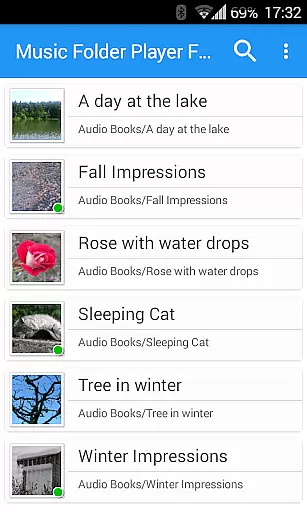
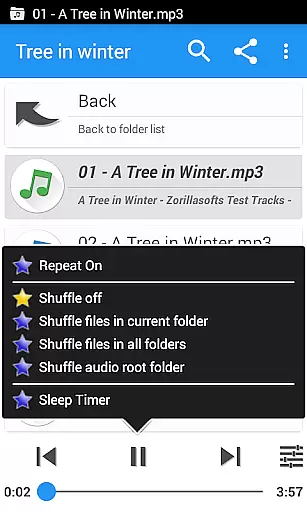
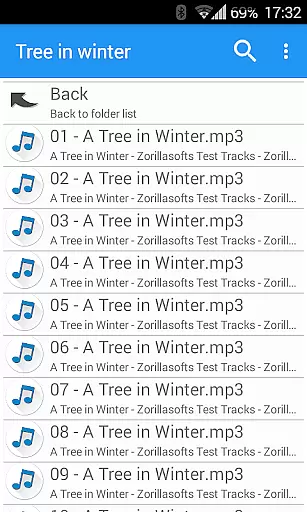
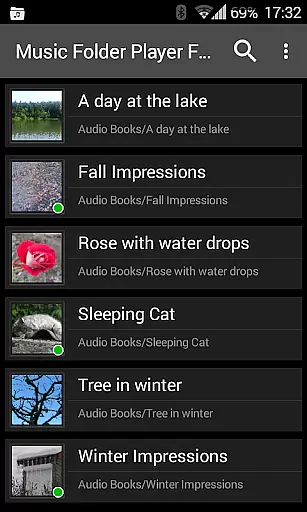
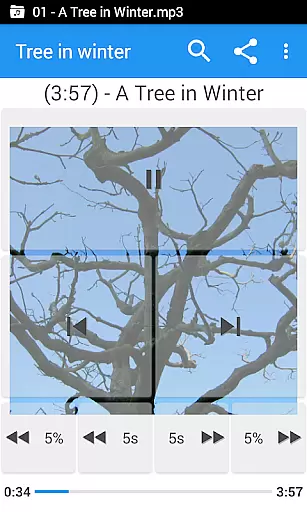
Music Folder Player Full is a specialized audio player designed for users who prefer organizing their music files in folders rather than traditional categories like artist or album. The app offers a unique folder-based playback experience, making it ideal for those with custom file organization systems.
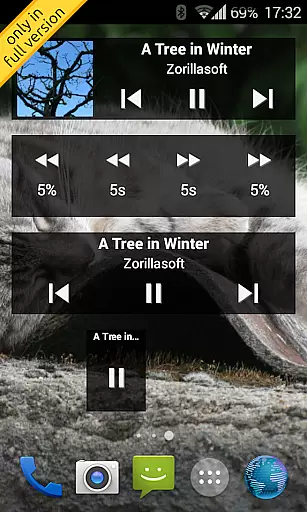
This full version features advanced functionalities including homescreen widgets, resume playback where you left off in each folder, and multiple display options for different collection sizes. Users can enjoy additional benefits such as virtual folders for favorite songs, customizable seek buttons perfect for podcasts, and an equalizer with various presets. It also includes innovative audio effects and playback controls that cater to audiobook and podcast enthusiasts.
With its user-friendly interface and practical features like speed control with pitch correction, pre-amplification, and 432 Hz playback mode, this app provides exceptional value for Android users seeking a more organized and feature-rich music listening experience.
Music Folder Player Full stands out with its comprehensive feature set tailored for audio enthusiasts. The app embraces Material Design principles while offering three distinct homescreen widget options exclusively in the full version. Its folder hierarchy display mimics a file manager, providing intuitive navigation for large music collections.
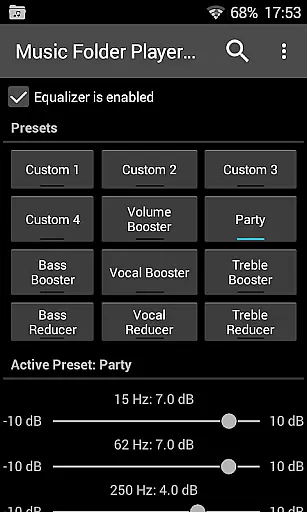
The player's standout capabilities include storing playback positions for each folder, four configurable seek buttons for precise navigation through long audio files, and an advanced equalizer system with both customizable and predefined settings. Users can experiment with virtual room/reverb effects and adjust playback speed with pitch correction - features particularly beneficial for consuming spoken-word content.
Additional professional-grade features include pre-amplification for low-level recordings, 432 Hz alternative tuning playback, and gesture-based volume control. Practical functions like undo protection, shuffle/repeat options, file management capabilities, and Last.fm scrobbling integration make this app a complete solution for managing and enjoying personal audio collections.
Music Folder Player Full offers a unique approach to managing and playing your music library. With the ability to organize audio tracks in folders, users can easily navigate through their collection regardless of its size.
The application supports both small and large music libraries by providing two distinct viewing modes. For smaller collections, it presents folders in a 'flat' list format, simplifying access. In contrast, larger libraries benefit from a hierarchical folder view akin to a file manager, ensuring that users can efficiently locate their desired tracks.
While the app does not directly address copyright authenticity, its organizational features empower users to maintain a well-structured library. This allows for better management of legally acquired music files, indirectly supporting copyright compliance.
Additionally, the full version enhances the experience with homescreen widgets and an array of advanced features, making it a versatile choice for discerning audiophiles who value both functionality and legal integrity in their music management tool.
One of the standout features of Music Folder Player Full is its robust set of audio quality options designed to enhance the listening experience. The built-in equalizer offers four customizable settings alongside eight predefined options, such as Bass Booster and Vocal Booster, catering to diverse musical preferences.
For users seeking even more control over their sound, the app includes virtual room and reverb effects available on Android 2.3 and newer. These effects add depth and ambiance to the audio playback, creating a richer soundscape that elevates the overall enjoyment of music or podcasts.
Advanced functionalities like speed control with pitch correction (on Android 4.2+) allow listeners to adjust playback speeds without affecting the pitchu2014ideal for those engaging with audio books or podcasts. Additionally, a pre-amplifier feature boosts the volume of low-level recordings, ensuring consistent audio levels across different tracks.
With these comprehensive audio quality options, Music Folder Player Full empowers users to tailor their listening sessions precisely to their liking, delivering a high-fidelity experience that meets the demands of even the most discerning audiophiles.
User-friendly folder organization
Advanced equalizer settings
Speed control with pitch correction
Comprehensive widget support
Professional audio features
No free version limitations
Complex for casual users
Feature overload possible
Requires folder management
Premium price point

Voice recorder - Audio recorder. Best recorder for recording
 4.90
4.90
Help you quickly get started with Shokz headphones
4.40
A complete sound package for the sound engineer or enthusiast
4.60
Turn your Android phone into a professional audio analyser with up to 120 bands.
4.00
Learn the notes on the guitar fretboard fast with this easy and fun app
4.60
The iconic iOS metronome app is now on Android.
3.70
Turn Every Moment into Music
3.60
Get alarms that fit your lifestyle and wake up to the sounds you love.
4.80
Play your music offline without limits
4.80
24,000 free audio books and no ads!
4.90
More downloads than any other metronome. Includes drum machine & tempo trainer.
4.80
Performance-Synthesizer & Multi-Track-Sequencer, polyphonic + multi timbral!
4.70
Listen to live FM radio stations, sports, music and news on global radios online
4.70
Walkout Song DJ is the most intuitive app to manage your sports music.
4.70
Recording studio w/ 10k beats, pro vocal FX and a network of 20M rappers & fans!
4.60
Let your Android device with the sound effects you want
4.50
The ultimate media player for Android devices
3.90
MilkDrop for Android TV
3.00
The Minimalistic Premium Music Player. Handmade with passion for music
2.20


User Reviews