
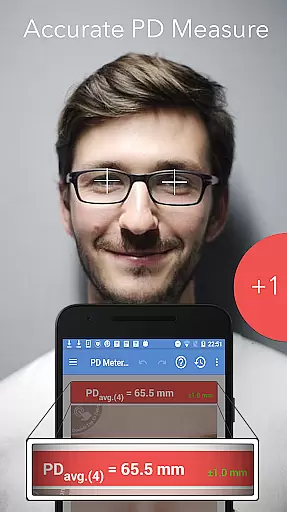
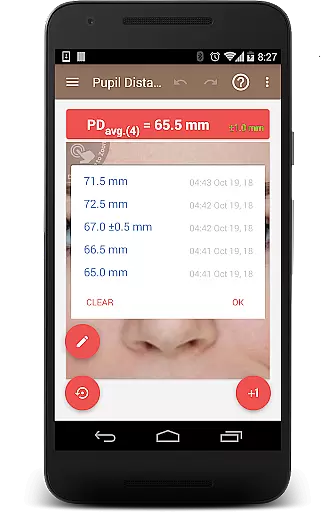
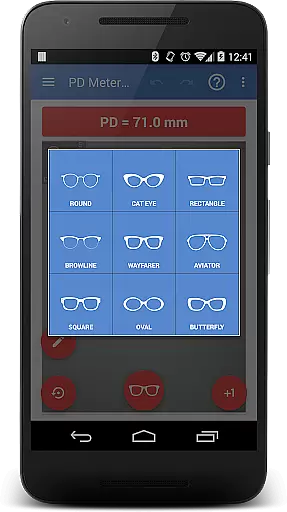
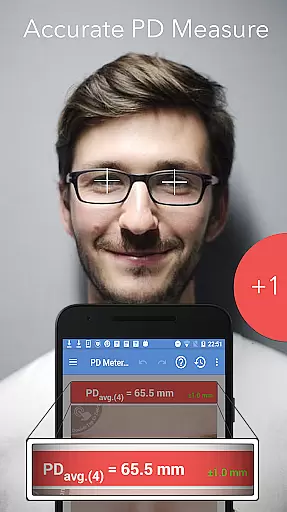
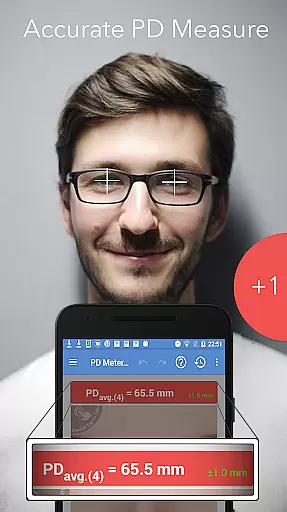
Pupil Distance PD Meter Pro is a specialized mobile application designed for accurate pupillary distance (PD) measurement using your smartphone's camera. This Health & Fitness tool allows users to conveniently measure their interpupillary distance (IPD) before purchasing eyeglasses, sunglasses, or VR headsets. The app stands out by offering a bonus feature of trying on basic eyeglass frames virtually, enhancing the online shopping experience.
With its user-friendly interface and reliable measurement capabilities, this app ensures precise PD readings that are crucial for proper eyewear fitting. Whether you're an optometrist or simply someone looking to buy eyewear online, Pupil Distance PD Meter Pro provides a practical solution that eliminates the need for in-person measurements.
The standout feature of Pupil Distance PD Meter Pro is its advanced camera integration that enables accurate PD measurement. Unlike other apps in the market, it avoids deceptive practices such as buying fake reviews, ensuring all feedback is genuine and from real users. This commitment to authenticity builds trust with its user base.
In addition to PD measurement, the app offers a virtual try-on feature for basic eyeglass frames, allowing users to preview how different frames might look on them. The app also provides responsive customer support, addressing any issues promptly or offering refunds if necessary. These features collectively create a comprehensive and reliable tool for anyone needing precise pupillary distance measurements.
Personalized planning in health and fitness apps refers to the ability to tailor experiences and recommendations specifically to individual users. Pupil Distance PD Meter Pro excels in this area by offering customized solutions for measuring pupillary distance (PD) with precision.
The app utilizes advanced algorithms to ensure that each measurement is adapted to the unique characteristics of the user's eyes. This personalized approach guarantees accurate results, which are crucial when purchasing eyewear or VR headsets.
Users benefit from a seamless experience where their specific needs are met without unnecessary adjustments. The app's intelligent system learns from each interaction, enhancing the accuracy of future measurements.
This level of personalization not only improves user satisfaction but also ensures that individuals can confidently make purchases based on reliable PD data. By focusing on personalized planning, Pupil Distance PD Meter Pro sets itself apart as a leader in mobile health solutions.
Progress visualization is an essential feature in health and fitness applications, allowing users to track their advancements over time. Pupil Distance PD Meter Pro incorporates this functionality by providing clear and concise visual representations of PD measurements.
Through intuitive graphs and charts, users can easily monitor changes in their pupillary distance. This visual feedback helps in understanding trends and making informed decisions regarding eyewear or virtual reality equipment purchases.
The app's interface is designed to present data in a digestible format, ensuring that users can quickly grasp their progress without feeling overwhelmed. Visual cues highlight significant milestones, motivating continued use.
By emphasizing progress visualization, Pupil Distance PD Meter Pro empowers users to take control of their eye health journey. This transparent approach fosters trust and encourages regular engagement with the app's features.
Accurate PD measurement
User-friendly interface
Genuine user reviews
Virtual frame try-on
Responsive customer support
Limited frame styles
Requires good lighting
Occasional measurement errors
No iOS version available
Basic design options

Your Health Has Met Its App (℠)
 3.90
3.90
Sync your activities of the most popular sports tracking services
2.70
Effortlessly and naturally release anxiety by harnessing the power of your brain
4.60
When the night comes, we prepare your eyes for deep, sweet dreams
4.70
Show your support for the development of FitNotes - Gym Workout Log
4.90
The Official Blood Type Diet® App - know your categorized foods anytime.
4.50
Your AI pet BFF. Talk, play, and beat anxiety in this calming game.
4.60
Make sense of your health data.
3.80
Mood journal, habits, self-care tracker, self-love
4.90
App to stop smoking slowly or now with a motivational badges and helpful tips
4.80
Measure your Pupil Distance for Eyeglasses and VR headsets in 3 quick steps.
4.70
Step Counter, track steps when you walk or run
4.70
The simplest way to track your 21 Day Program containers, exercises, and water.
4.50
Your portable blood pressure tracker. Record, monitor, and analyze BP anytime.
4.30
Walk, track, and burn calories with step counter & GPS walking tracker
4.20
Your personal BP tracking companion, focus on helping you achieve wellness goal.
4.10
beat yesterday.
4.00
Track sleep cycle, relax with white noise, sleep sounds & smart alarm clock
3.80
The app helps you address digestive symptoms based on the Fast Tract Diet.
3.50


User Reviews