
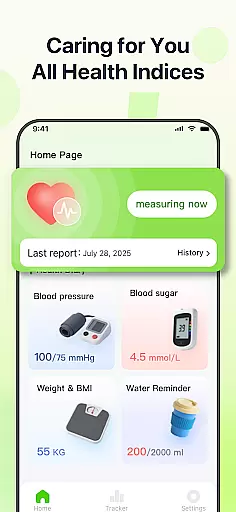
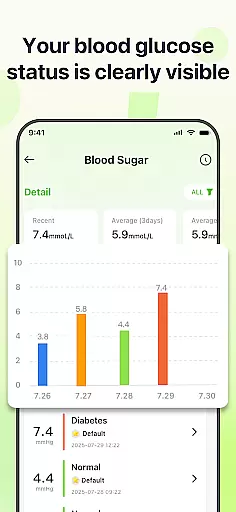
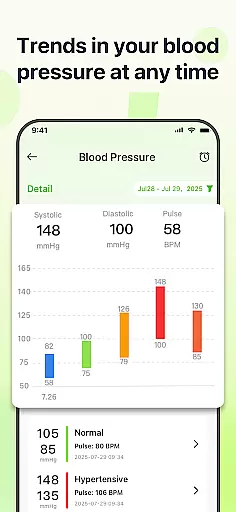
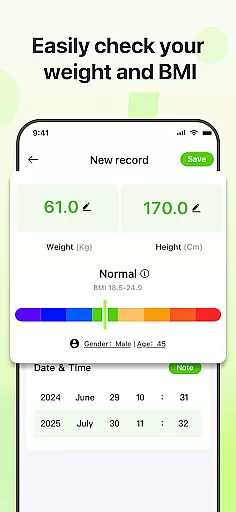
PulseSense is a comprehensive health tracking app designed to simplify wellness management. It allows users to effortlessly log key metrics such as blood pressure, glucose levels, and heart rate while providing intelligent reports tailored to individual needs. With sleek trend visualizations spanning days to years, the app helps uncover patterns and track progress over time.
Designed for individuals managing chronic conditions, pursuing fitness goals, or seeking a private health journal, PulseSense ensures complete data privacy. All records remain on-device with end-to-end encryption, offering a secure and dependable solution without requiring cloud storage or account creation.
PulseSense stands out with its effortless logging system, enabling users to input vital health metrics like blood pressure, glucose levels, and heart rate seamlessly. Its intelligent reporting feature generates personalized lifestyle recommendations based on logged data, empowering users to make informed decisions about their health.
The app's sleek trend visualizations provide intuitive insights into health patterns across days, weeks, months, and years. Users can attach personal notes and custom tags to entries, adding valuable context. Additionally, features like habit-building reminders and consolidated metric tracking eliminate the need for multiple tools, making PulseSense an all-in-one health companion.
Personalized planning in health applications refers to the app's ability to create tailored health strategies based on individual user data. PulseSense excels in this area by offering intelligent health reports and personalized lifestyle recommendations.
The app analyzes logged metrics such as blood pressure, glucose levels, and heart rate to generate insights that are specifically relevant to each user's unique health journey. This ensures that users receive advice that is not only accurate but also actionable.
By attaching personal notes and custom tags to health entries, users can provide additional context, which further refines the personalized planning feature. This level of customization empowers users to make informed decisions about their health.
Ultimately, PulseSense's personalized planning transforms raw health data into a strategic wellness plan, helping users manage chronic conditions and achieve fitness milestones with greater confidence and clarity.
Progress visualization is a critical component of any health and fitness app, allowing users to see trends and patterns in their health metrics over time. PulseSense offers sleek trend visuals that span days, weeks, months, and years.
These visualizations are not just aesthetically pleasing but also highly functional. They enable users to uncover patterns and track progress, reinforcing healthy habits through clear and intuitive graphs.
With the ability to set reminders, users can maintain consistency in their health tracking efforts. This ongoing engagement helps users stay committed to their wellness goals and make necessary adjustments along the way.
By consolidating all health metrics in one app, PulseSense provides a comprehensive view of a user's health journey, making it easier than ever to stay informed and motivated. The result is a powerful tool for anyone seeking to take control of their health with actionable insights.
User-friendly interface
Advanced trend analysis
Personalized health insights
Strong data privacy
Comprehensive metric tracking
No direct measurement tools
Limited social features
Premium-only exports
Device-specific encryption
Manual data entry required

Home workouts for fitness & fast bodybuilding at home - no equipment needed.
 4.90
4.90
HRV4Training helps you optimize goals and improve performance. No sensors needed
3.30
Binaural Beats - Fully Customizable Waves - Pure Sound - No Loops
4.50
Mind on steroids - relaxation, productivity, meditation and sleep!
4.60
The Official Blood Type Diet® App - know your categorized foods anytime.
4.50
Measure your Pupil Distance for Eyeglasses and VR headsets in 3 quick steps.
4.70
Grow with self-tests and personal routine.
4.30
Memory, mind & logic exercises. Puzzle games, IQ & brain test for kids & adults
4.50
Raccoon AI Calorie Counter. Intermittent Fasting & Timer. Macro, Carb, Protein
4.50
Walk. Earn: Get rewarded for every step! Walk, move, and earn real rewards.
4.70
Step Counter, track steps when you walk or run
4.70
Pilates, Calisthenics, Yoga
4.50
Personal step counter for you, private and accurate
4.50
Eat smarter with Eato, your personal calorie counter and nutrition tracker!
4.40
Blood Pressure Log, HRV & Heartbeat Tracker. Pulse Checker.
4.40
Fast Body building & Weight Loss. Home Workouts with Daily Coach, No Equipment.
4.30
Create powerful subliminal audio with custom affirmations and background music.
4.00
Measure real-time wrist & ambient temperature with your Galaxy Watch (Wear OS)
3.20
Your plan in your pocket 24/7
3.00


User Reviews